If you’ve ever sent tokens to the correct address but on the wrong blockchain, you know that gut-drop moment when it feels like your funds have vanished. With Blockradar Asset Recovery, getting your tokens back is possible and simpler than you might think.
With Blockradar Asset Recovery, you can:
- Recover native tokens on all supported blockchains
- Recover custom tokens (ERC-20 and other compatible assets) on supported networks
- Recover tokens on unsupported or custom networks by providing your own RPC endpoint
- Recover tokens on Layer 2 networks (Arbitrum, Optimism, Base, and other EVM-compatible rollups)
Prerequisites
Before starting a recovery, have the following information ready:
| Field | Description |
|---|
| Recovery Blockchain | The blockchain where the lost tokens currently reside (e.g. Ethereum, BNB Chain, Polygon) |
| Token Contract Address | Required only for custom (non-native) tokens |
| Recover From Address | The Blockradar address that accidentally received the tokens |
| Recover To Address | The address where recovered assets should be sent |
Recovering via the Dashboard
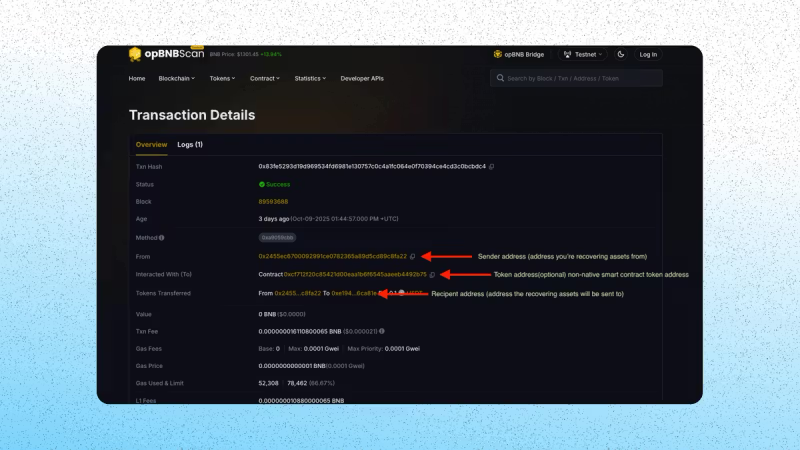
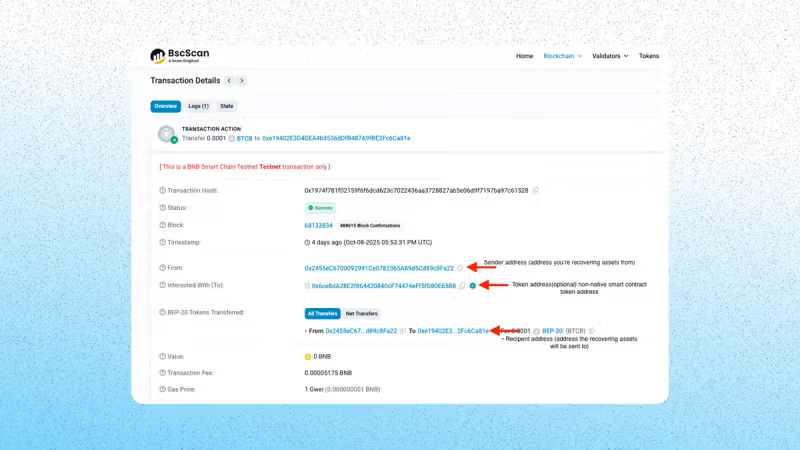
If you’re missing any recovery details, look up your transaction hash on the relevant blockchain explorer and note:
- The blockchain network used
- The receiving address (your Blockradar address)
- The token contract address (for custom tokens)
- The amount transferred
Step 2: Fill in Recovery Details
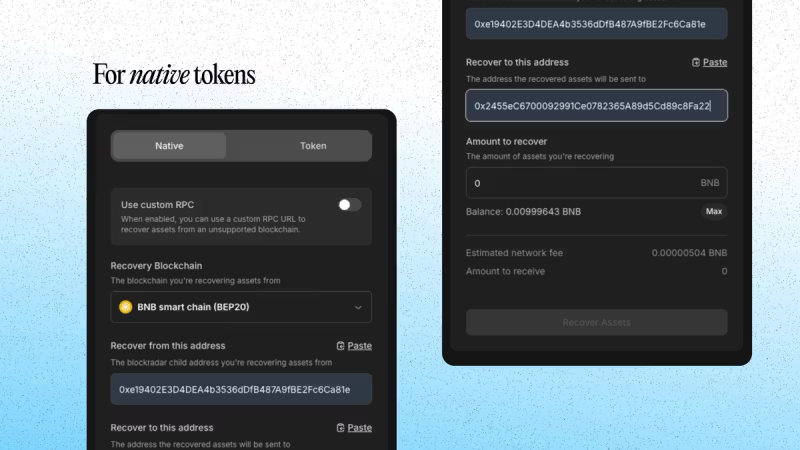
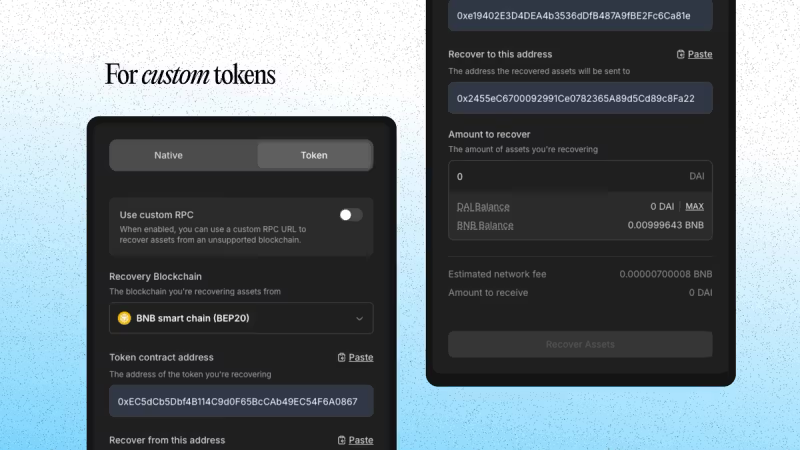
On your Blockradar dashboard, navigate to Asset Recovery and fill in the required fields.
For native tokens:
For custom tokens:
Ensure your wallet has enough native token balance to cover gas fees for the recovery transaction.
Step 3: Submit Recovery
- Click Recover Assets
- Enter the OTP from your authenticator app
- Confirm the action
Once completed, verify the recovery by checking the destination address in your dashboard or searching the transaction hash on the block explorer for the selected chain.
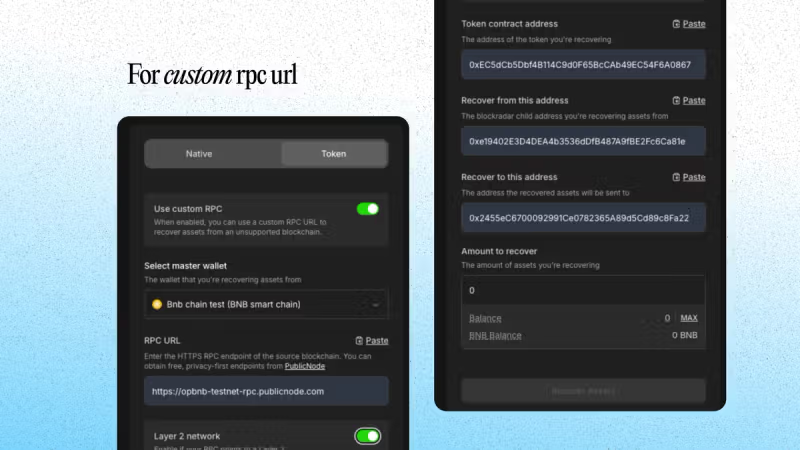
Recovering via a Custom RPC or Layer 2 Chain
If your lost assets exist on a blockchain not officially supported by Blockradar, you can recover them using a custom RPC URL.
Additional prerequisites:
| Field | Description |
|---|
| RPC Endpoint | A valid HTTPS RPC URL for the blockchain you’re recovering from. Free RPC endpoints are available from PublicNode. |
| Layer 2 Network | Enable this toggle if the RPC URL points to an L2 chain (Arbitrum, Optimism, Base, etc.) |
Steps:
- Enable Use Custom RPC
- Select the Master Wallet associated with your recovery address
- Paste your RPC URL
- Toggle Layer 2 Network if applicable
- Fill in all other fields as described above
- Click Recover Assets, verify OTP, and confirm
Recovering via the API
You can also recover assets programmatically using the Asset Recovery API — ideal for building custom flows or integrating recovery into backend systems.
Required Parameters
| Parameter | Description |
|---|
walletId | Your Blockradar master wallet ID |
blockchainId | The unique ID of the blockchain the transaction was performed on |
senderAddress | The Blockradar address holding the lost token |
recipientAddress | The address to send the recovered token to |
amount | Amount of the token to recover |
tokenAddress | Smart contract address of the token (custom tokens only) |
rpcUrl | RPC endpoint for unsupported networks (optional) |
isL2 | Whether the RPC points to a Layer 2 chain (optional) |
Step 1: Estimate the Network Fee
Before initiating recovery, estimate the gas cost:
curl --request POST \
--url "https://api.blockradar.co/v1/wallets/{walletId}/salvage/network-fee" \
--header "Content-Type: application/json" \
--header "x-api-key: <api-key>" \
--data '{
"amount": "2.5",
"blockchainId": "<BLOCKCHAIN_ID>",
"senderAddress": "0xYourBlockradarAddress",
"recipientAddress": "0xRecipientAddress",
"tokenAddress": null
}'
Response:
{
"data": {
"balance": "0.1",
"fee": "0.000021"
},
"message": "Salvage network fee fetched successfully",
"statusCode": 200
}
For custom tokens, include "tokenAddress": "0xTokenContractAddress" in the request body.
Step 2: Execute the Recovery
After confirming the fee and available balance, initiate the recovery:
curl --request POST \
--url "https://api.blockradar.co/v1/wallets/{walletId}/salvage" \
--header "Content-Type: application/json" \
--header "x-api-key: <api-key>" \
--data '{
"amount": "2.5",
"blockchainId": "<BLOCKCHAIN_ID>",
"senderAddress": "0xYourBlockradarAddress",
"recipientAddress": "0xRecipientAddress",
"tokenAddress": null
}'
Step 3: Monitor Recovery Status
Listen for these webhook events to confirm the outcome:
| Event | Description |
|---|
salvage.success | Recovery completed successfully |
salvage.failed | Recovery failed |
Troubleshooting
If you run into issues, check the following:
- Wrong wallet ID — make sure you’re using the master wallet ID, not a child address ID
- Missing token contract address — required for all custom (non-native) tokens
- Insufficient gas — ensure your master wallet has enough native token to cover the recovery fee
- Custom RPC issues — verify the RPC URL is a valid HTTPS endpoint and that the L2 toggle matches the chain type
Security Notes
- Blockradar is non-custodial — you control keys and policies
- Every recovery is an on-chain transaction that requires gas on the source chain
- OTP is required for all recovery actions on the dashboard
API Reference
| Endpoint | Description |
|---|
| Estimate Network Fee | Calculate the gas cost before recovery |
| Execute Recovery | Initiate the asset recovery |