

- v2 · 推荐
- v1 · Legacy
简而言之
Blockradar 的法币提现 API 将受支持的稳定币转换为法币,并发放至银行账户、移动货币及其他本地渠道。v2 流程会发现某个通道可用的支付方式,返回一个描述每种方式所需内容的 schema,解析诸如收款人账户名等字段,然后报价并从 master wallet 或 child address 执行提现。
Blockradar 的法币提现 API 将受支持的稳定币转换为法币,并发放至银行账户、移动货币及其他本地渠道。v2 流程会发现某个通道可用的支付方式,返回一个描述每种方式所需内容的 schema,解析诸如收款人账户名等字段,然后报价并从 master wallet 或 child address 执行提现。
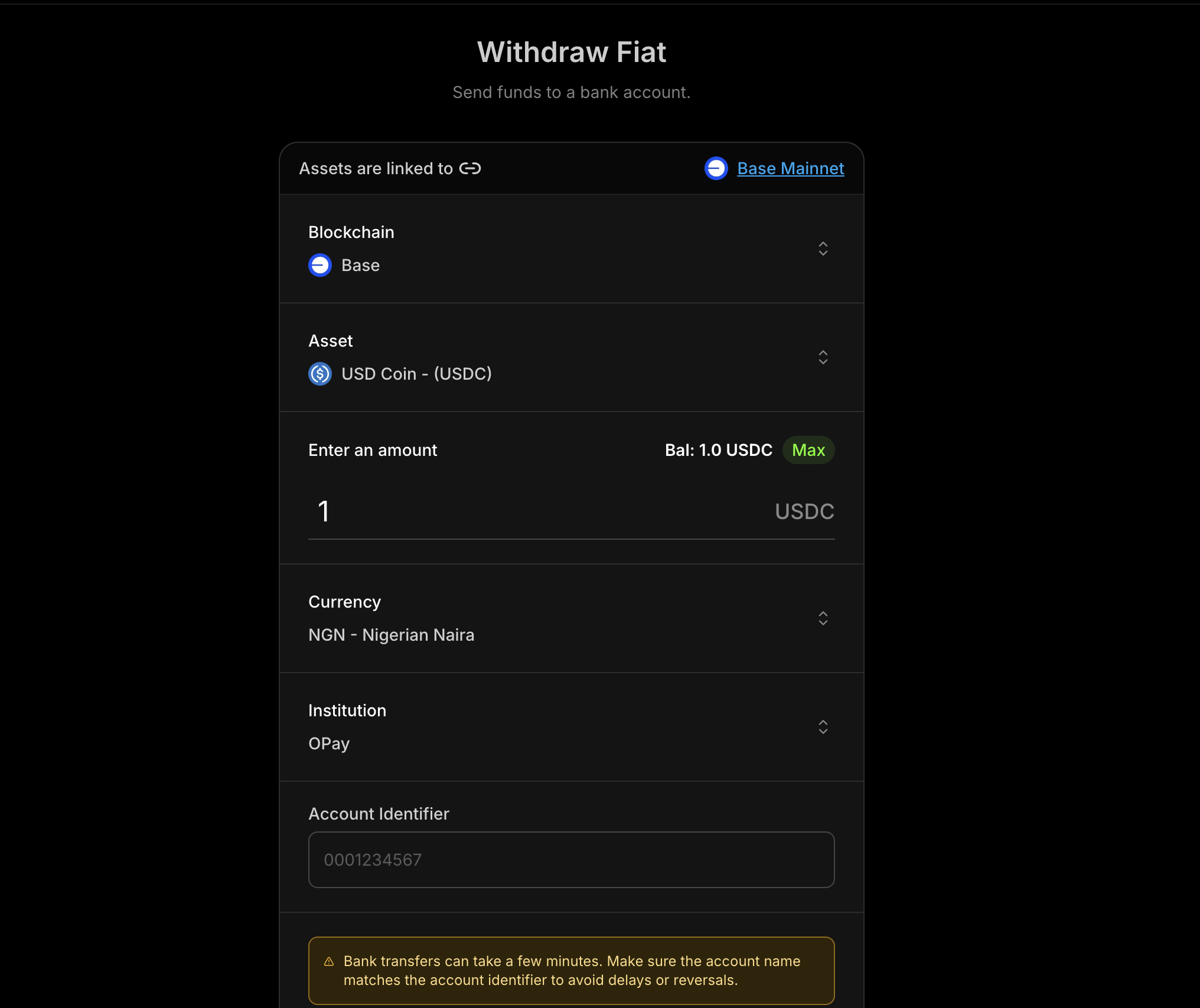
v2 支付方式会返回一个 JSON Schema,描述您的应用必须收集的收款人和支付
详情。请参阅 动态表单 来渲染、验证、解析并提交这些
字段。v1 流程可在 v1 · Legacy 标签页中查看,但不再推荐使用。
前提条件
在使用法币提现之前,请确保您具备以下条件:1
合规已批准
在控制台完成尽职调查流程:My Wallets → Settings → Compliance。合规要求和批准流程因地区而异,因此您只需完成您的产品所使用的本地渠道对应的项目。
2
API 密钥
从 Blockradar
控制台 获取您的 API 密钥。导航至 Developers 进行
生成。
3
已创建钱包
通过控制台创建钱包。您需要
walletId 来执行提现
操作。4
Asset ID
使用 Get Supported
Assets 获取受支持的法币资产。将
返回的
id 作为整个流程中的 assetId 使用。工作原理
v2 流程以通道为驱动:您选择一个资产、货币和金额,然后 发现支持该通道的支付方式,并精确收集 每种方式所需的内容。发现资产
获取支持提现的稳定币。
获取货币与汇率
列出受支持的发放货币并获取当前汇率。
列出支付方式
发现该资产、货币和金额可用的支付方式。
获取要求
检索描述该方式所需字段的 JSON Schema。
解析与报价
解析诸如账户名等字段,然后对费用和汇率进行报价。
执行
提交
paymentMethodData 以处理提现。受支持的法币
货币因通道和提供商而异。请始终通过 Get Supported Currencies 获取实时列表,而不要将其硬编码。下表展示了 USD、EUR 以及主要的拉美通道; 完整的法币与区块链对照表请参阅 受支持的法币 页面。| Fiat Currency | USDC Blockchains | USDT Blockchains | EURC Blockchains |
|---|---|---|---|
| USD | Base, Celo, Ethereum, Polygon, Solana, Tron | Base, Celo, Ethereum, Polygon, Solana, Tron | Solana |
| EUR | Base, Celo, Ethereum, Polygon, Solana, Tron | Base, Celo, Ethereum, Polygon, Solana, Tron | Solana |
| ARS | Ethereum, Base, Polygon, Solana | Tron | — |
| BRL | Ethereum, Base, Polygon | Ethereum, Polygon, Tron | — |
| COP | Ethereum, Polygon | Ethereum | — |
| MXN | Ethereum, Base, Polygon, Solana | Ethereum, Polygon, Tron | Ethereum, Base, Solana |
Master Wallet 与 Child Address
法币提现在两个层级提供:Master Wallet
从 master wallet 提现。适合资金管理操作。
Child Address
从特定的 child address 提现。适用于面向用户的流程。
Endpoints
| 操作 | 主钱包 | 子地址 |
|---|---|---|
| 获取受支持的资产 | GET /v2/wallets/{id}/withdraw/fiat/assets | — |
| 获取货币 | GET /v2/wallets/{id}/withdraw/fiat/currencies | — |
| 获取汇率 | GET /v2/wallets/{id}/withdraw/fiat/rates | — |
| 获取支付方式 | GET /v2/wallets/{id}/withdraw/fiat/payment-methods | — |
| 获取支付方式要求 | GET /v2/wallets/{id}/withdraw/fiat/payment-method-requirements | — |
| 解析支付方式 | POST /v2/wallets/{id}/withdraw/fiat/payment-method/resolve | — |
| 获取报价 | POST /v2/wallets/{id}/withdraw/fiat/quote | POST /v2/wallets/{walletId}/addresses/{addressId}/withdraw/fiat/quote |
| 执行 | POST /v2/wallets/{id}/withdraw/fiat/execute | POST /v2/wallets/{walletId}/addresses/{addressId}/withdraw/fiat/execute |
发现类端点(资产、货币、汇率、支付方式、要求、
解析)的作用域限定于 master wallet。一旦您拥有已验证的
paymentMethodData 对象,您就可以从 master
wallet 或 child address 进行报价和执行。典型流程
- 获取受支持的资产 以选择要提现的稳定币。
- 获取所选通道的货币和汇率,并保留返回的
sessionId。 - 使用该会话 列出支付方式。
- 获取 所选方式的 要求 以接收其 schema。
- 解析字段(例如账户名),然后 收集并验证
paymentMethodData。 - 使用同一会话 获取报价,以在执行前显示费用和汇率。
- 使用同一会话 执行 提现,并使用 webhooks 跟踪状态。
v2 汇率端点会启动一个提供商路由会话。在后续流程中,请以其
sessionId
为准:它会将钱包、钱包资产、货币、金额、金额方向、提供商和转换路由绑定 20 分钟。
请勿将某个会话与另一次汇率请求的路由值混用。如果 API 返回
FIAT_WITHDRAWAL_SESSION_EXPIRED 或
FIAT_WITHDRAWAL_SESSION_UNAVAILABLE,请重新请求汇率并重新开始流程。步骤 1:获取受支持的资产
获取可用于提现的稳定币,并将您想要的id 作为
assetId。curl --request GET \
--url 'https://api.blockradar.co/v2/wallets/{walletId}/withdraw/fiat/assets' \
--header 'x-api-key: <api-key>'
步骤 2:获取货币和汇率
列出受支持的发放货币,然后获取该资产、 货币和金额的当前汇率。| 参数 | In | 必填 | 说明 |
|---|---|---|---|
assetId | query | Yes | 要提现的稳定币资产 ID |
currency | query | Yes | ISO 4217 发放货币(例如 NGN) |
amount | query | Yes | 以字符串表示的十进制金额,以保留精度 |
amountSide | query | No | amount 指代哪一侧:source(默认)为稳定币金额,target 为收款人收到的法币金额 |
curl --request GET \
--url 'https://api.blockradar.co/v2/wallets/{walletId}/withdraw/fiat/rates?assetId=ae455f23-3824-4125-baab-d158315cbcbd¤cy=NGN&amount=100.00' \
--header 'x-api-key: <api-key>'
Rate Response
{
  "statusCode": 200,
  "message": "Exchange rates fetched successfully",
  "data": {
    "rate": "1550.00",
    "amount": "100.00",
    "unlocked": true,
    "sessionId": "13a36c1c-f4a6-4e49-a582-2ecded2559bc",
    "sessionExpiresAt": "2026-09-15T15:20:00.000Z"
  }
}
步骤 3:列出支付方式
发现绑定到该会话的通道可用的支付方式。传入步骤 2 返回的sessionId;可选择通过 country 或
paymentMethodCategory 进行缩小。| 参数 | In | 必填 | 说明 |
|---|---|---|---|
sessionId | query | Recommended | 汇率端点返回的会话 ID。如果省略,请改为发送 assetId、currency 和 amount |
country | query | No | ISO 3166-1 alpha-2 国家/地区代码 |
paymentMethodCategory | query | No | 高层级类别,例如 bank |
curl --request GET \
  --url 'https://api.blockradar.co/v2/wallets/{walletId}/withdraw/fiat/payment-methods?sessionId=13a36c1c-f4a6-4e49-a582-2ecded2559bc' \
  --header 'x-api-key: <api-key>'
Payment Methods Response
{
  "statusCode": 200,
  "message": "Payment methods fetched successfully",
  "data": {
    "paymentMethods": [
      {
        "id": "bank_transfer",
        "supportsPaymentMethodResolution": true,
        "type": "bank_transfer",
        "country": "NG",
        "fiatCurrency": "NGN",
        "paymentMethodCategory": "bank",
        "paymentMethodType": "bank_transfer",
        "processingSeconds": 60,
        "fee": "1500.00",
        "requirementsRef": "7d9b1a4fc73d369e57894c2e229a4e26a9f2382352ab2528562febd0a484a30b"
      }
    ],
    "requirements": {
      "7d9b1a4fc73d369e57894c2e229a4e26a9f2382352ab2528562febd0a484a30b": {
        "schema": {
          "$schema": "http://json-schema.org/draft-07/schema#",
          "type": "object",
          "properties": {
            "accountIdentifier": {
              "type": "string",
              "title": "Account identifier"
            }
          },
          "required": ["accountIdentifier"]
        },
        "metadata": null,
        "resolution": {
          "trigger": "submit",
          "method": "POST",
          "url": "/v2/wallets/{walletId}/withdraw/fiat/payment-method/resolve",
          "body": {
            "sessionId": "13a36c1c-f4a6-4e49-a582-2ecded2559bc",
            "paymentMethod": "bank_transfer"
          },
          "inputPath": "paymentMethodData"
        }
      }
    },
    "sessionId": "13a36c1c-f4a6-4e49-a582-2ecded2559bc",
    "sessionExpiresAt": "2026-09-15T15:20:00.000Z"
  }
}
requirementsRef 时,请在
data.requirements[requirementsRef] 中查找其 schema。多个方式可以引用同一
条目,因此 API 只会返回一次共享的 schema。没有
requirementsRef 的方式没有表单要求。supportsPaymentMethodResolution: true 表示该方式的 schema 可以包含一个
x-resolution 字段(例如账户名查询),您需要在报价前对其进行解析。请参阅 步骤 5。步骤 4:读取支付方式要求
从步骤 3 返回的共享requirements 注册表中读取所选方式的 JSON Schema。
使用 动态表单 来解释并完成它。此步骤无需再发起
API 请求。const selectedMethod = response.data.paymentMethods[0];
const requirements = selectedMethod.requirementsRef
? response.data.requirements[selectedMethod.requirementsRef]
: null;
const schema = requirements?.schema;
| 参数 | In | 必填 | 说明 |
|---|---|---|---|
sessionId | query | Recommended | 汇率端点返回的会话 ID。如果省略,请改为发送原始路由字段 |
paymentMethod | query | Yes | 步骤 3 中的支付方式 id |
country | query | No | ISO 3166-1 alpha-2 国家/地区代码 |
curl --request GET \
  --url 'https://api.blockradar.co/v2/wallets/{walletId}/withdraw/fiat/payment-method-requirements?sessionId=13a36c1c-f4a6-4e49-a582-2ecded2559bc&paymentMethod=bank_transfer' \
  --header 'x-api-key: <api-key>'
Requirements Response
{
  "statusCode": 200,
  "message": "Payment method requirements fetched successfully",
  "data": {
    "paymentMethodId": "bank_transfer",
    "schema": {
      "$schema": "http://json-schema.org/draft-07/schema#",
      "type": "object",
      "title": "Bank account details",
      "properties": {
        "institutionIdentifier": { "type": "string", "title": "Institution" },
        "accountIdentifier": { "type": "string", "title": "Account identifier" },
        "accountName": {
          "type": "string",
          "title": "Account name",
          "readOnly": true,
          "x-field-kind": "resolved",
          "x-resolution": {
            "method": "POST",
            "url": "/v2/wallets/{walletId}/withdraw/fiat/payment-method/resolve",
            "body": {
              "provider": "example-provider",
              "assetId": "ae455f23-3824-4125-baab-d158315cbcbd",
              "currency": "NGN",
              "amount": "100.00",
              "paymentMethod": "bank_transfer"
            },
            "inputPath": "paymentMethodData",
            "dependsOn": ["institutionIdentifier", "accountIdentifier"],
            "responsePath": "data.accountName"
          }
        }
      },
      "required": ["institutionIdentifier", "accountIdentifier"],
      "additionalProperties": false
    },
    "metadata": null,
    "resolution": {
      "trigger": "submit",
      "method": "POST",
      "url": "/v2/wallets/{walletId}/withdraw/fiat/payment-method/resolve",
      "body": {
        "sessionId": "13a36c1c-f4a6-4e49-a582-2ecded2559bc",
        "paymentMethod": "bank_transfer"
      },
      "inputPath": "paymentMethodData"
    },
    "sessionId": "13a36c1c-f4a6-4e49-a582-2ecded2559bc",
    "sessionExpiresAt": "2026-09-15T15:20:00.000Z"
  }
}
步骤 5:解析字段并构建 paymentMethodData
收集 data.schema 中的字段。当某个字段带有 x-resolution(如
上面的 accountName)时,一旦其 dependsOn 字段有效,就调用解析端点,
然后将结果存储到该字段。| 参数 | 类型 | 必填 | 说明 |
|---|---|---|---|
sessionId | string | Recommended | 汇率端点返回的会话 ID。如果省略,请改为发送原始路由字段 |
paymentMethod | string | Yes | 支付方式 id |
paymentMethodData | object | Yes | 解析所需的当前表单值 |
curl --request POST \
  --url 'https://api.blockradar.co/v2/wallets/{walletId}/withdraw/fiat/payment-method/resolve' \
  --header 'Content-Type: application/json' \
  --header 'x-api-key: <api-key>' \
  --data '{
    "sessionId": "13a36c1c-f4a6-4e49-a582-2ecded2559bc",
    "paymentMethod": "bank_transfer",
    "paymentMethodData": {
      "institutionIdentifier": "999",
      "accountIdentifier": "0123456789"
    }
  }'
Resolve Response
{
  "statusCode": 200,
  "message": "Payment method resolved successfully",
  "data": {
    "paymentMethod": "bank_transfer",
    "data": {
      "accountNumber": "0123456789",
      "accountName": "Ada Okafor",
      "bankCode": "999"
    },
    "metadata": { "institutionId": "bank_999" },
    "sessionId": "13a36c1c-f4a6-4e49-a582-2ecded2559bc",
    "sessionExpiresAt": "2026-09-15T15:20:00.000Z"
  }
}
paymentMethodData 如下所示:{
"institutionIdentifier": "999",
"accountIdentifier": "0123456789",
"accountName": "Ada Okafor"
}
步骤 6:获取报价
请始终在执行前获取报价,以便向用户显示汇率、费用和 预计到账时间。发送已验证的paymentMethodData。| 参数 | 类型 | 必填 | 说明 |
|---|---|---|---|
sessionId | string | Recommended | 汇率端点返回的会话 ID。如果省略,请改为发送原始路由字段 |
paymentMethod | string | Yes | 发现流程中的支付方式 id |
paymentMethodData | object | Yes | 已根据要求 schema 验证的值 |
isGaslessWithdraw | boolean | No | 在受支持的情况下 Blockradar 是否代付链上 gas |
curl --request POST \
  --url 'https://api.blockradar.co/v2/wallets/{walletId}/withdraw/fiat/quote' \
  --header 'Content-Type: application/json' \
  --header 'x-api-key: <api-key>' \
  --data '{
    "sessionId": "13a36c1c-f4a6-4e49-a582-2ecded2559bc",
    "paymentMethod": "bank_transfer",
    "paymentMethodData": {
      "institutionIdentifier": "999",
      "accountIdentifier": "0123456789",
      "accountName": "Ada Okafor"
    }
  }'
Quote Response
{
  "statusCode": 200,
  "message": "Successful",
  "data": {
    "debitAmount": "101.50",
    "minAmount": "10.00",
    "networkFee": "0.00006779052",
    "networkFeeInUSD": "0.14",
    "estimatedArrivalTime": 60,
    "transactionFee": "1.50",
    "nativeBalance": "0.000929309612767174",
    "nativeBalanceInUSD": "1.97",
    "sessionId": "13a36c1c-f4a6-4e49-a582-2ecded2559bc",
    "sessionExpiresAt": "2026-09-15T15:20:00.000Z"
  }
}
固定到账金额
请在创建会话的汇率请求中选择金额方向。默认情况下,amount 是您发送的
稳定币金额(amountSide: "source")。若要改为交付精确的法币金额,请在汇率
请求中设置 amountSide=target。生成的会话会在报价和执行中保留该选择。GET /v2/wallets/{walletId}/withdraw/fiat/rates?assetId={assetId}¤cy=NGN&amount=100.00&amountSide=source
GET /v2/wallets/{walletId}/withdraw/fiat/rates?assetId={assetId}¤cy=NGN&amount=155000&amountSide=target
amountSide: "target" 时,收款人将收到您指定的确切法币金额——上例中为
155,000 NGN——报价中的 debitAmount 显示将从您账户扣除的稳定币金额,由汇率
推导并按资产的小数精度向上取整,确保到账金额永远不会不足。amountSide 仅在
v2 端点可用。步骤 7:执行提现
用户接受报价后,使用相同的详情执行。添加可选的reference 用于幂等性和跟踪,并根据需要添加 metadata 和 note。| 参数 | 类型 | 必填 | 说明 |
|---|---|---|---|
sessionId | string | Recommended | 汇率端点返回的会话 ID。如果省略,请改为发送原始路由字段 |
paymentMethod | string | Yes | 发现流程中的支付方式 id |
paymentMethodData | object | Yes | 已根据要求 schema 验证的值 |
isGaslessWithdraw | boolean | No | 在受支持的情况下 Blockradar 是否代付链上 gas |
reference | string | No | 用于对账和安全重试的唯一客户端引用 |
metadata | object | No | 附加到交易的应用元数据 |
note | string | No | 此次提现的人类可读备注 |
curl --request POST \
  --url 'https://api.blockradar.co/v2/wallets/{walletId}/withdraw/fiat/execute' \
  --header 'Content-Type: application/json' \
  --header 'x-api-key: <api-key>' \
  --data '{
    "sessionId": "13a36c1c-f4a6-4e49-a582-2ecded2559bc",
    "paymentMethod": "bank_transfer",
    "paymentMethodData": {
      "institutionIdentifier": "999",
      "accountIdentifier": "0123456789",
      "accountName": "Ada Okafor"
    },
    "reference": "wd_20260719_001",
    "metadata": { "payoutId": "payout_123" },
    "note": "Vendor payout"
  }'
Execute Response
{
  "statusCode": 200,
  "message": "Successful",
  "data": {
    "id": "5b26b640-7a15-48aa-a465-82a4cb6e927b",
    "reference": "wd_20260719_001",
    "senderAddress": "0x947514e4B803e312C312da0F1B41fEDdbe15ae7a",
    "recipientAddress": "0123456789",
    "tokenAddress": "0xA0b86991c6218b36c1d19d4a2e9eb0ce3606eb48",
    "amount": "100.00",
    "amountPaid": "100.00",
    "amountUSD": "100.00",
    "rateUSD": "1.00",
    "fee": "1.50",
    "feeUSD": "1.50",
    "currency": "NGN",
    "toCurrency": "NGN",
    "hash": null,
    "confirmed": false,
    "status": "pending",
    "processingStatus": "pending",
    "processingProviderReference": null,
    "type": "offramp",
    "note": "Vendor payout",
    "createdAt": "2026-07-19T12:30:00.000Z",
    "updatedAt": "2026-07-19T12:30:00.000Z"
  }
}
从 Child Address 提现
要从特定的 child address 发放资金,请使用相同的请求体对 地址作用域端点进行报价和执行:POST /v2/wallets/{walletId}/addresses/{addressId}/withdraw/fiat/quote
POST /v2/wallets/{walletId}/addresses/{addressId}/withdraw/fiat/execute
Webhooks
通过以下 webhook 事件跟踪提现状态:| 事件 | 说明 |
|---|---|
offramp.processing | 提现正在处理中 |
offramp.success | 提现成功完成 |
offramp.failed | 提现失败 |
Webhook Payload 示例
{
  "event": "offramp.processing",
  "data": {
    "id": "d2b985da-7f7e-4494-a6bc-0e675d50eed3",
    "reference": "wd_20260719_001",
    "senderAddress": "0x947514e4B803e312C312da0F1B41fEDdbe15ae7a",
    "tokenAddress": "0xA0b86991c6218b36c1d19d4a2e9eb0ce3606eb48",
    "amount": "100.00",
    "amountPaid": "100.00",
    "amountUSD": "100.00",
    "rateUSD": "1.00",
    "fee": "1.50",
    "feeUSD": "1.50",
    "currency": "NGN",
    "toCurrency": "NGN",
    "status": "PROCESSING",
    "processingStatus": "SUCCESS",
    "type": "offramp",
    "network": "mainnet",
    "beneficiary": {
      "name": "Ada Okafor",
      "type": "FIAT",
      "institutionIdentifier": "999",
      "institutionAccountIdentifier": "0123456789",
      "currency": "NGN"
    }
  }
}
完整流程示例
一个完整的 v2 实现,展示了发现 → 要求 → 解析 → 报价 → 执行的流程:async function executeFiatWithdrawal({ walletId, currency, amount, formValues }) {
const apiKey = process.env.BLOCKRADAR_API_KEY;
const baseUrl = "https://api.blockradar.co/v2";
const headers = { "x-api-key": apiKey };
const jsonHeaders = { ...headers, "Content-Type": "application/json" };
// 1. Pick an asset to withdraw
const assets = await fetch(
`${baseUrl}/wallets/${walletId}/withdraw/fiat/assets`,
{ headers },
).then((r) => r.json());
const assetId = assets.data?.[0]?.id;
// 2. Fetch the rate for the corridor
const rates = await fetch(
`${baseUrl}/wallets/${walletId}/withdraw/fiat/rates?assetId=${assetId}¤cy=${currency}&amount=${amount}`,
{ headers },
).then((r) => r.json());
console.log("Rate:", rates.data?.rate);
const sessionId = rates.data?.sessionId;
// 3. List payment methods for the corridor
const methods = await fetch(
`${baseUrl}/wallets/${walletId}/withdraw/fiat/payment-methods?sessionId=${sessionId}`,
{ headers },
).then((r) => r.json());
const selectedMethod = methods.data?.paymentMethods?.[0];
const paymentMethod = selectedMethod?.id;
// 4. Resolve the selected method's shared requirements locally
const requirements = selectedMethod?.requirementsRef
? methods.data?.requirements?.[selectedMethod.requirementsRef]
: null;
const schema = requirements?.schema;
// 5. Collect fields from `schema`, then resolve fields carrying x-resolution.
// See the Dynamic Forms guide for how to interpret and validate the schema.
const resolved = await fetch(
`${baseUrl}/wallets/${walletId}/withdraw/fiat/payment-method/resolve`,
{
method: "POST",
headers: jsonHeaders,
body: JSON.stringify({ sessionId, paymentMethod, paymentMethodData: formValues }),
},
).then((r) => r.json());
const paymentMethodData = {
...formValues,
accountName: resolved.data?.data?.accountName,
};
// 6. Get a quote
const quote = await fetch(
`${baseUrl}/wallets/${walletId}/withdraw/fiat/quote`,
{
method: "POST",
headers: jsonHeaders,
body: JSON.stringify({ sessionId, paymentMethod, paymentMethodData }),
},
).then((r) => r.json());
console.log("Debit amount:", quote.data?.debitAmount);
console.log("Estimated arrival (s):", quote.data?.estimatedArrivalTime);
// 7. Execute (after user confirmation)
const execution = await fetch(
`${baseUrl}/wallets/${walletId}/withdraw/fiat/execute`,
{
method: "POST",
headers: jsonHeaders,
body: JSON.stringify({
sessionId,
paymentMethod,
paymentMethodData,
reference: "wd_20260719_001",
metadata: { payoutId: "payout_123" },
note: "Vendor payout",
}),
},
).then((r) => r.json());
console.log("Withdrawal initiated:", execution.data?.id, execution.data?.status);
// 8. Listen for the offramp.success webhook to confirm completion
return execution.data;
}
// Usage
executeFiatWithdrawal({
walletId: "wallet-uuid",
currency: "NGN",
amount: "100.00",
formValues: { institutionIdentifier: "999", accountIdentifier: "0123456789" },
});
错误响应
无效的支付方式数据
无效的支付方式数据
{
  "statusCode": 400,
  "message": "Invalid payment method data for accountIdentifier: accountIdentifier does not match the expected format"
}
不支持的货币
不支持的货币
{
  "message": "Currency not supported",
  "statusCode": 400
}
不支持的资产
不支持的资产
{
  "message": "Asset not supported",
  "statusCode": 404
}
功能未启用
功能未启用
{
  "message": "Fiat withdrawal feature is not enabled for this business, please contact support via the live chat or email support for more information"
}
余额不足
余额不足
{
  "message": "Insufficient token balance for withdrawal",
  "statusCode": 400
}
原生代币余额不足
原生代币余额不足
{
  "message": "Insufficient native balance for gas fees",
  "statusCode": 400
}
最佳实践
用户体验
- 报价前先解析:在显示报价之前,通过解析端点确认收款人账户名。
- 显示完整成本:展示汇率、交易费用、网络费用和
debitAmount。 - 呈现处理状态:使用 webhooks 实时更新用户。
正确性
- 每次尝试保持一个会话:将汇率端点返回的
sessionId依次传入支付方式、解析、报价和执行。 - 重新开始过期的会话:请重新请求汇率,而不要重试已过期或不可用的会话。
- 使用返回的 schema:仅收集当前要求 schema 中的字段。不要硬编码收款人字段——请参阅 动态表单。
- 保留字符串:将
amount和账户标识符作为字符串发送,以避免精度损失。 - 使用引用:使用唯一的
reference跟踪提现,以便安全重试。 - 通过 webhooks 确认:将
offramp.success视为最终事实来源。
性能
- 缓存资产和货币列表:定期刷新,而不是每次请求都获取。
- 每次尝试重新获取汇率:v2 汇率会为该次提现尝试创建一个 20 分钟的路由会话。
- 对瞬时错误进行重试:对 5xx 响应使用指数退避。
API 参考
v2(推荐)
| 端点 | 说明 |
|---|---|
| Get Supported Assets | 列出受支持的稳定币资产 |
| Get Supported Currencies | 列出受支持的发放货币 |
| Get Exchange Rates | 获取某个通道的汇率 |
| Get Payment Methods | 列出该通道可用的方式 |
| Get Payment Method Requirements | 获取某种方式的字段 schema |
| Resolve Payment Method | 解析诸如账户名等字段 |
| Master Wallet Quote | 从 master wallet 获取报价 |
| Master Wallet Execute | 从 master wallet 执行提现 |
| Child Address Quote | 从 child address 获取报价 |
| Child Address Execute | 从 child address 执行提现 |
支持
- 邮箱:[email protected]
- 实时聊天:在控制台上提供
简而言之
Blockradar 的法币提现 API 让您可以将受支持的稳定币转换为法币并将资金转账到银行账户。您可以查询受支持的资产、验证银行账户、获取报价并从 master wallet 和 child address 执行提现。
Blockradar 的法币提现 API 让您可以将受支持的稳定币转换为法币并将资金转账到银行账户。您可以查询受支持的资产、验证银行账户、获取报价并从 master wallet 和 child address 执行提现。
部分法币支付方式会返回一个 schema,描述您的应用必须收集的收款人或支付
详情。请参阅 动态表单 来渲染、验证并提交这些字段。
前提条件
在使用法币提现之前,请确保您具备以下条件:1
合规要求
在控制台完成尽职调查流程:My wallets > Settings > Compliance
2
API 密钥
从 Blockradar
控制台获取您的 API 密钥。导航至 Developers 进行
生成。
3
已创建钱包
通过控制台创建钱包。您需要
walletId 来执行提现
操作。4
Asset ID
使用 Get Supported
Assets 获取受支持的法币资产。
5
银行账户详情
收集有效的账户标识符和机构标识符(银行代码)。
工作原理
法币提现遵循一个简单的流程:发现资产
获取支持提现的资产。
获取法币
检索所有受支持的货币。
获取汇率
获取所选资产的当前汇率。
验证账户
在发起提现前验证机构账户详情。
获取报价
估算所请求金额的费用和汇率。
执行
提交提现以进行处理。
受支持的法币
| 货币 | 代码 |
|---|---|
| 肯尼亚先令 | KES |
| 尼日利亚奈拉 | NGN |
| 坦桑尼亚先令 | TZS |
| 乌干达先令 | UGX |
| 巴西雷亚尔 | BRL |
| 马拉维克瓦查 | MWK |
Master Wallet 与 Child Address
法币提现在两个层级提供:Master Wallet
从 master wallet 提现。适合资金管理操作。
Child Address
从特定的 child address 提现。适用于面向用户的流程。
Endpoints
| 操作 | 主钱包 | 子地址 |
|---|---|---|
| 获取受支持的资产 | GET /v1/wallets/{walletId}/withdraw/fiat/assets | — |
| 获取机构 | GET /v1/wallets/{walletId}/withdraw/fiat/institutions | — |
| 获取汇率 | GET /v1/wallets/{walletId}/withdraw/fiat/rates | — |
| 获取货币 | GET /v1/wallets/{walletId}/withdraw/fiat/currencies | — |
| 验证机构账户 | POST /v1/wallets/{walletId}/withdraw/fiat/institution-account-verification | — |
| 获取报价 | POST /v1/wallets/{walletId}/withdraw/fiat/quote | POST /v1/wallets/{walletId}/addresses/{addressId}/withdraw/fiat/quote |
| 执行 | POST /v1/wallets/{walletId}/withdraw/fiat/execute | POST /v1/wallets/{walletId}/addresses/{addressId}/withdraw/fiat/execute |
典型流程
- 获取受支持的资产以选择要提现的稳定币。
- 列出机构并选择银行/机构标识符。
- 验证账户以确认账户名称/详情。
- 获取报价以在执行前显示费用和汇率。
- 执行提现并在系统中跟踪状态。
步骤 1:获取报价
在执行提现之前,请始终先获取报价,以便向用户展示汇率和费用。请求参数
| 参数 | 类型 | 必填 | 描述 |
|---|---|---|---|
assetId | string | Yes | 要提现的稳定币资产 ID |
amount | string | Yes | 以资产单位表示的提现金额 |
currency | string | Yes | 目标法币(例如 NGN) |
accountIdentifier | string | Yes | 银行账号或标识符 |
institutionIdentifier | string | Yes | 银行/机构代码 |
报价示例
curl --request POST \
  --url https://api.blockradar.co/v1/wallets/{walletId}/withdraw/fiat/quote \
  --header 'Content-Type: application/json' \
  --header 'x-api-key: <api-key>' \
  --data '{
    "assetId": "asset-uuid-here",
    "amount": "1000",
    "currency": "NGN",
    "accountIdentifier": "0023103996",
    "institutionIdentifier": "SBICNGLA"
  }'
步骤 2:执行提现
接受报价后,使用相同的详细信息执行提现。请求参数
| 参数 | 类型 | 必填 | 描述 |
|---|---|---|---|
assetId | string | Yes | 要提现的稳定币资产 ID |
amount | string | Yes | 以资产单位表示的提现金额 |
currency | string | Yes | 目标法币(例如 NGN) |
accountIdentifier | string | Yes | 银行账号或标识符 |
institutionIdentifier | string | Yes | 银行/机构代码 |
reference | string | No | 用于幂等性/跟踪的客户端引用 |
metadata | object | No | 附加到交易的键值元数据 |
note | string | No | 此次提现的人类可读备注 |
执行示例
curl --request POST \
  --url https://api.blockradar.co/v1/wallets/{walletId}/withdraw/fiat/execute \
  --header 'Content-Type: application/json' \
  --header 'x-api-key: <api-key>' \
  --data '{
    "assetId": "asset-uuid-here",
    "amount": "1000",
    "currency": "NGN",
    "accountIdentifier": "8034007516",
    "institutionIdentifier": "OPAYNGPC",
    "reference": "WD-20260303-001",
    "metadata": {
      "source": "payroll",
      "initiatedBy": "treasury-bot"
    },
    "note": "March payroll payout"
  }'
执行响应
{
  "status": true,
  "message": "Successful",
  "data": {
    "id": "db53c3ef-5643-4f98-92cf-d02aef300f45",
    "reference": "WD-20260303-001",
    "senderAddress": "0x969838345E5cd5F755DfcADB57e72F5d23271e48",
    "recipientAddress": "0x30F6A8457F8E42371E204a9c103f2Bd42341dD0F",
    "tokenAddress": "0x46C85152bFe9f96829aA94755D9f915F9B10EF5F",
    "amount": "1000",
    "amountPaid": "1000",
    "amountUSD": "0.68",
    "rateUSD": "0.00068",
    "fee": "2",
    "currency": "NGN",
    "toAmount": "1000.00",
    "toCurrency": "NGN",
    "status": "PENDING",
    "processingStatus": "PENDING",
    "processingProviderReference": null,
    "processingReason": null,
    "type": "OFFRAMP",
    "createdChannel": "api",
    "network": "mainnet",
    "chainId": null,
    "note": "March payroll payout",
    "metadata": {
      "source": "payroll",
      "initiatedBy": "treasury-bot"
    },
    "beneficiary": {
      "id": "4dd8d16e-8550-4f51-84a1-60df9c608c5d",
      "name": "JOHN DOE",
      "type": "FIAT",
      "isActive": true,
      "institutionIdentifier": "OPAYNGPC",
      "institutionAccountIdentifier": "8034007516",
      "currency": "NGN"
    }
  }
}
Webhooks
通过以下 webhook 事件跟踪提现状态:| 事件 | 描述 |
|---|---|
offramp.processing | 提现正在处理中 |
offramp.success | 提现成功完成 |
offramp.failed | 提现失败 |
Webhook payload 示例
{
  "event": "offramp.processing",
  "data": {
    "id": "d2b985da-7f7e-4494-a6bc-0e675d50eed3",
    "reference": "EVF2g9X70Sj4hoX3ma8l",
    "senderAddress": "0x969838345E5cd5F755DfcADB57e72F5d23271e48",
    "tokenAddress": "0x833589fCD6eDb6E08f4c7C32D4f71b54bdA02913",
    "amount": "0.5",
    "amountPaid": "0.5",
    "amountUSD": "0.4998",
    "rateUSD": "0.9996",
    "fee": "0",
    "feeUSD": null,
    "currency": "USD",
    "toCurrency": "NGN",
    "status": "PROCESSING",
    "processingStatus": "SUCCESS",
    "processingProviderReference": "0x25003cb8356c92e3c296e7dd384ead681c5f57fb6182760fa4178750464ffd35",
    "processingReason": null,
    "type": "OFFRAMP",
    "createdChannel": "api",
    "network": "mainnet",
    "chainId": 8453,
    "metadata": null,
    "toAmount": "711.21",
    "rate": "1422.42",
    "beneficiary": {
      "id": "4dd8d16e-8550-4f51-84a1-60df9c608c5d",
      "name": "JOHN DOE",
      "type": "FIAT",
      "isActive": true,
      "reference": "d7dd5c7cf57acb5e2ff62eb23bceaca84d5dad6e62fec3d3836f20cfa1ea735c",
      "institutionIdentifier": "OPAYNGPC",
      "institutionAccountIdentifier": "8030303030",
      "currency": "NGN"
    }
  }
}
完整流程示例
以下是展示验证 → 报价 → 执行流程的完整实现:async function executeFiatWithdrawal({
walletId,
currency,
accountIdentifier,
}) {
const apiKey = process.env.BLOCKRADAR_API_KEY;
const baseUrl = "https://api.blockradar.co/v1";
const headers = { "x-api-key": apiKey };
// Step 1: Get supported assets
const assetsRes = await fetch(
`${baseUrl}/wallets/${walletId}/withdraw/fiat/assets`,
{ headers },
).then((r) => r.json());
// Pick the first asset (example)
const assetId = assetsRes.data?.[0]?.asset?.id;
// Step 2: Get supported currencies
const currenciesRes = await fetch(
`${baseUrl}/wallets/${walletId}/withdraw/fiat/currencies`,
{ headers },
).then((r) => r.json());
console.log("Supported currencies:", currenciesRes.data);
// Step 3: Get institutions for the currency
const institutionsRes = await fetch(
`${baseUrl}/wallets/${walletId}/withdraw/fiat/institutions?currency=${currency}`,
{ headers },
).then((r) => r.json());
// Pick the first institution (example)
const institutionIdentifier = institutionsRes.data?.[0]?.code;
// Step 4: Verify account
const verification = await fetch(
`${baseUrl}/wallets/${walletId}/withdraw/fiat/institution-account-verification`,
{
method: "POST",
headers: {
...headers,
"Content-Type": "application/json",
},
body: JSON.stringify({
accountIdentifier,
currency,
institutionIdentifier,
}),
},
).then((r) => r.json());
console.log("Account name:", verification.data?.accountName);
// Step 5: Get exchange rate (optional)
const amount = "1000";
const ratesRes = await fetch(
`${baseUrl}/wallets/${walletId}/withdraw/fiat/rates?currency=${currency}&assetId=${assetId}&amount=${amount}`,
{ headers },
).then((r) => r.json());
console.log("Rate:", ratesRes.data);
// Step 6: Get quote
const quote = await fetch(
`${baseUrl}/wallets/${walletId}/withdraw/fiat/quote`,
{
method: "POST",
headers: {
...headers,
"Content-Type": "application/json",
},
body: JSON.stringify({
assetId,
amount,
currency,
accountIdentifier,
institutionIdentifier,
}),
},
).then((r) => r.json());
console.log("Estimated arrival:", quote.data?.estimatedArrivalTime);
console.log("Network fee:", quote.data?.networkFee);
// Step 7: Execute (after user confirmation)
const execution = await fetch(
`${baseUrl}/wallets/${walletId}/withdraw/fiat/execute`,
{
method: "POST",
headers: {
...headers,
"Content-Type": "application/json",
},
body: JSON.stringify({
assetId,
amount,
currency,
accountIdentifier,
institutionIdentifier,
reference: "WD-20260303-001",
metadata: { source: "payroll", initiatedBy: "treasury-bot" },
note: "March payroll payout",
}),
},
).then((r) => r.json());
console.log("Withdrawal initiated:", execution.data?.id);
console.log("Status:", execution.data?.status);
// Step 8: Listen for webhook to confirm completion
return execution.data;
}
// Usage
executeFiatWithdrawal({
walletId: "wallet-uuid",
currency: "NGN",
accountIdentifier: "0023103996",
});
错误响应
无效的银行详情
无效的银行详情
{
  "message": "Institution not supported",
  "statusCode": 400
}
不支持的货币
不支持的货币
{
  "message": "Currency not supported",
  "statusCode": 400
}
不支持的资产
不支持的资产
{
  "message": "Asset not supported",
  "statusCode": 404
}
功能未启用
功能未启用
{
  "message": "Fiat withdrawal feature is not enabled for this business, please contact support via the live chat or email support for more information",
}
余额不足
余额不足
{
  "message": "Insufficient token balance for withdrawal",
  "statusCode": 400,
}
原生代币余额不足
原生代币余额不足
{
  "message": "Insufficient native balance for gas fees",
  "statusCode": 400
}
Master Wallet 余额不足
Master Wallet 余额不足
{
  "message": "Insufficient master balance for gas top-up",
  "statusCode": 400
}
最佳实践
用户体验
- 首先验证账户:在显示报价前始终确认账户名称
- 显示完整成本:展示汇率、网络费用和总金额
- 呈现处理状态:使用 webhooks 实时更新用户状态
安全
- 验证输入:确保货币、机构和账户标识符格式正确
- 使用引用:使用唯一的
reference跟踪提现 - 通过 webhooks 确认:将
offramp.success视为最终事实来源
性能
- 缓存机构列表:定期刷新而不是每次请求都获取
- 复用资产元数据:缓存受支持的资产和货币
- 对瞬时错误进行重试:对 5xx 响应使用指数退避
API 参考
| 端点 | 描述 |
|---|---|
| Get Supported Assets | 列出受支持的稳定币资产 |
| Get Institutions | 按货币列出机构 |
| Get Exchange Rates | 获取报价的汇率 |
| Get Currencies | 列出受支持的法币 |
| Verify Institution Account | 验证银行账户详情 |
| Master Wallet Quote | 从 master wallet 获取报价 |
| Master Wallet Execute | 从 master wallet 执行提现 |
| Child Address Quote | 从 child address 获取报价 |
| Child Address Execute | 从 child address 执行提现 |
支持
- 邮箱:[email protected]
- 文档:API 参考