

In a nutshell
The Blockradar Withdraw API allows you to send stablecoin assets from your wallets to external blockchain addresses. It supports single withdrawals, batch withdrawals to multiple recipients, and provides fee estimation before execution.
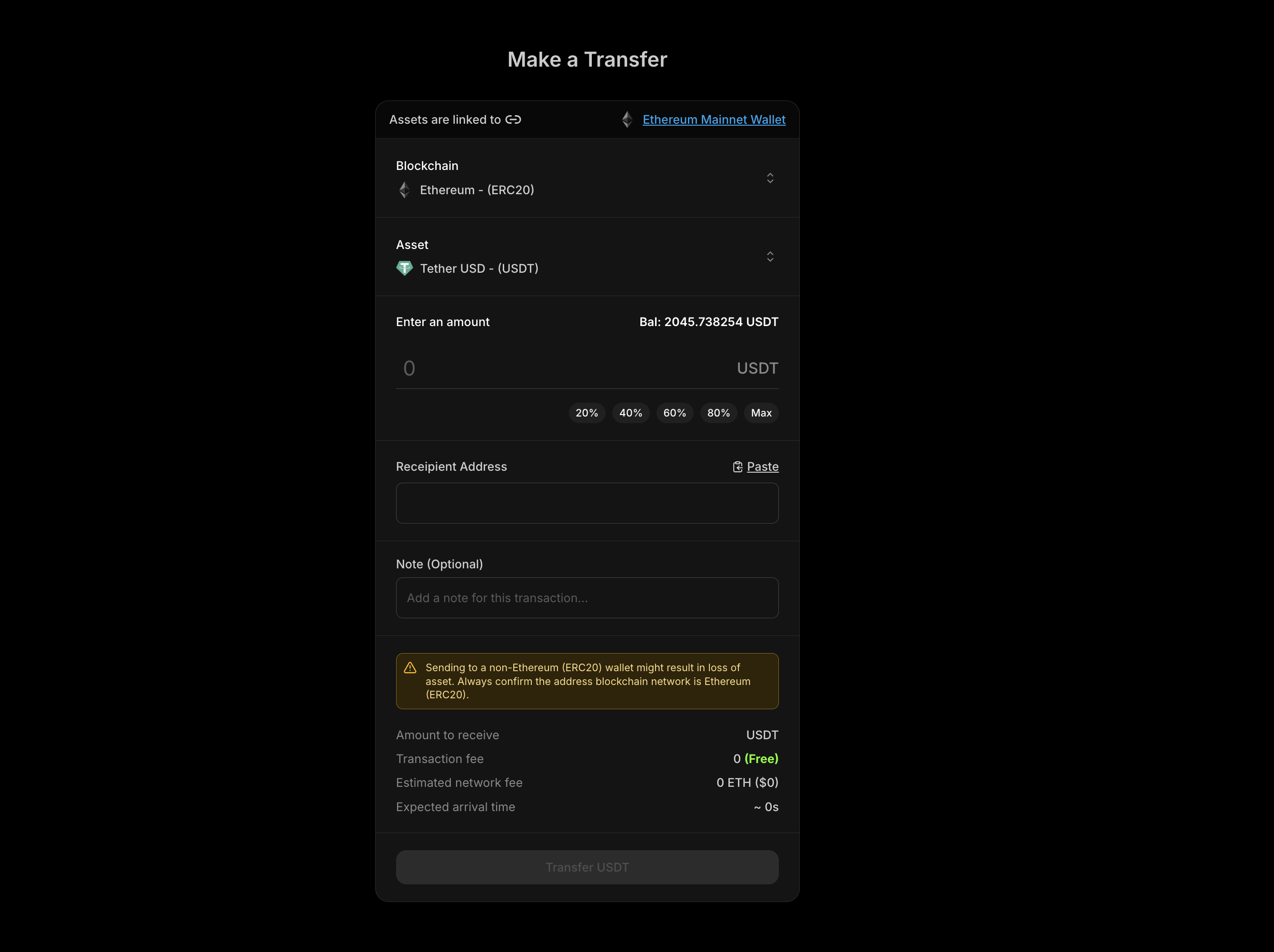
Blockradar Withdraw Interface

Prerequisites

Before using the Withdraw API, ensure you have:
1

API Key

Get your API key from the Blockradar Dashboard. Navigate to Settings → API Keys to generate one.
2

Wallet Created

Create a wallet via the Create Wallet API or dashboard. You’ll need the walletId for withdrawal operations.
3

Asset ID

Get the assetId for the token you want to withdraw from Assets in the dashboard or via the Get Assets API.
4

Sufficient Balance

Ensure your wallet has enough balance of the asset to withdraw, plus native currency (ETH, BNB, MATIC, etc.) to cover network fees.

How It Works

The Withdraw API sends stablecoin assets from your Blockradar wallet to any external blockchain address:

Single Withdrawal

Send assets to one recipient address with a single API call.

Batch Withdrawal

Send assets to multiple recipients in a single API call, reducing overhead and simplifying bulk payouts.

Fee Estimation

Calculate network fees before execution to ensure sufficient balance and display costs to users.

Sign-Only Mode

Sign transactions without broadcasting for advanced use cases like offline signing or custom submission.

Master Wallet vs Child Address

The Withdraw API is available at two levels:

Master Wallet

Withdraw directly from your master wallet. Ideal for treasury operations and centralized fund management.

Child Address

Withdraw from individual child addresses. Perfect for user-specific operations and segregated fund management.

Endpoints

OperationMaster WalletChild Address
WithdrawPOST /v1/wallets/{walletId}/withdrawPOST /v1/wallets/{walletId}/addresses/{addressId}/withdraw
Network FeePOST /v1/wallets/{walletId}/withdraw/network-feePOST /v1/wallets/{walletId}/addresses/{addressId}/withdraw/network-fee
Sign-OnlyPOST /v1/wallets/{walletId}/withdraw/signPOST /v1/wallets/{walletId}/addresses/{addressId}/withdraw/sign

Single Withdrawal

Send assets to a single recipient address.

Request Parameters

ParameterTypeRequiredDescription
assetIdstringYes*The UUID of the asset to withdraw. Required if assets array is not provided.
addressstringYes*The destination wallet address. Required if assets array is not provided.
amountstringYes*The withdrawal amount. Must be greater than 0. Required if assets array is not provided.
referencestringNoYour internal tracking ID for the withdrawal.
notestringNoA short message or internal remark. Not visible on-chain.
metadataobjectNoCustom key-value pairs for additional transaction details.
Parameters marked with * are required for single withdrawals but are not needed if you’re using the assets array for batch withdrawals.

Single Withdrawal Example

curl --request POST \
  --url https://api.blockradar.co/v1/wallets/{walletId}/withdraw \
  --header 'Content-Type: application/json' \
  --header 'x-api-key: <api-key>' \
  --data '{
    "assetId": "asset-uuid-here",
    "address": "0xRecipientAddress...",
    "amount": "100",
    "reference": "payout-12345",
    "note": "Monthly payout",
    "metadata": {
      "userId": "user_abc123",
      "payoutType": "salary"
    }
  }'

Single Withdrawal Response

{
  "message": "Withdrawal initiated successfully",
  "statusCode": 200,
  "data": {
    "id": "tx-uuid-123",
    "hash": "0xabc123...",
    "status": "PENDING",
    "amount": "100",
    "recipientAddress": "0xRecipientAddress...",
    "reference": "payout-12345",
    "note": "Monthly payout",
    "metadata": {
      "userId": "user_abc123",
      "payoutType": "salary"
    },
    "createdAt": "2024-01-15T10:30:00Z"
  }
}

Batch Withdrawals

Send assets to multiple recipients in a single API call. Batch withdrawals are executed sequentially, and each withdrawal is processed as a separate blockchain transaction.

When to Use Batch Withdrawals

  • Bulk payouts: Pay multiple employees, vendors, or partners at once
  • Distributions: Send assets to multiple addresses
  • Multi-recipient transfers: Send different amounts to different addresses
  • Operational efficiency: Reduce API calls and simplify payout logic

Batch Request Parameters

For batch withdrawals, use the assets array instead of individual parameters:
ParameterTypeRequiredDescription
assetsarrayYesArray of withdrawal objects (max 20 per batch)
Each item in the assets array:
FieldTypeRequiredDescription
idstringYesThe UUID of the asset to withdraw
addressstringYesThe destination wallet address
amountstringYesThe withdrawal amount. Must be greater than 0.
referencestringNoOptional reference note for this withdrawal
notestringNoA short message or internal remark. Not visible on-chain.
metadataobjectNoCustom key-value pairs for additional transaction details.

Batch Withdrawal Example

curl --request POST \
  --url https://api.blockradar.co/v1/wallets/{walletId}/withdraw \
  --header 'Content-Type: application/json' \
  --header 'x-api-key: <api-key>' \
  --data '{
    "assets": [
      {
        "id": "asset-uuid-usdc",
        "address": "0xRecipient1...",
        "amount": "100",
        "reference": "payout-001",
        "note": "January salary"
      },
      {
        "id": "asset-uuid-usdc",
        "address": "0xRecipient2...",
        "amount": "150",
        "reference": "payout-002",
        "note": "January salary"
      },
      {
        "id": "asset-uuid-usdt",
        "address": "0xRecipient3...",
        "amount": "200",
        "reference": "payout-003",
        "note": "Vendor payment"
      }
    ]
  }'

Batch Withdrawal Response

{
  "message": "Batch withdrawal initiated successfully",
  "statusCode": 200,
  "data": {
    "success": [
      {
        "index": 0,
        "id": "tx-uuid-1",
        "hash": "0xabc...",
        "status": "PENDING",
        "amount": "100",
        "recipientAddress": "0xRecipient1...",
        "reference": "payout-001"
      },
      {
        "index": 1,
        "id": "tx-uuid-2",
        "hash": "0xdef...",
        "status": "PENDING",
        "amount": "150",
        "recipientAddress": "0xRecipient2...",
        "reference": "payout-002"
      },
      {
        "index": 2,
        "id": "tx-uuid-3",
        "hash": "0xghi...",
        "status": "PENDING",
        "amount": "200",
        "recipientAddress": "0xRecipient3...",
        "reference": "payout-003"
      }
    ],
    "errors": []
  }
}

Handling Partial Failures

Batch withdrawals support partial success. If some withdrawals fail, others will still execute:
const result = await batchWithdrawal.json();

// Process successful withdrawals
result.data.success.forEach(tx => {
  console.log(`✓ ${tx.reference}: ${tx.hash}`);
});

// Handle failed withdrawals
result.data.errors.forEach(error => {
  console.error(`✗ Index ${error.index}: ${error.error}`);
  // Retry logic or error reporting here
});

Batch Withdrawal Rules

RuleValue
Maximum batch size20 withdrawals per request
Minimum batch size1 withdrawal
Execution orderSequential
Error handlingPartial success (failures don’t stop subsequent withdrawals)

Estimating Network Fees

Always estimate fees before executing withdrawals to ensure sufficient native token balance and to display accurate costs to users.

Single Fee Estimation

curl --request POST \
  --url https://api.blockradar.co/v1/wallets/{walletId}/withdraw/network-fee \
  --header 'Content-Type: application/json' \
  --header 'x-api-key: <api-key>' \
  --data '{
    "assetId": "asset-uuid-here",
    "address": "0xRecipientAddress...",
    "amount": "100"
  }'

Single Fee Response

{
  "message": "Network fee fetched successfully",
  "statusCode": 200,
  "data": {
    "networkFee": "0.00001247904",
    "networkFeeInUSD": "0.01",
    "transactionFee": "0",
    "nativeBalance": "0.5",
    "nativeBalanceInUSD": "450.00",
    "estimatedArrivalTime": 30
  }
}

Batch Fee Estimation

Estimate fees for multiple withdrawals at once:
curl --request POST \
  --url https://api.blockradar.co/v1/wallets/{walletId}/withdraw/network-fee \
  --header 'Content-Type: application/json' \
  --header 'x-api-key: <api-key>' \
  --data '{
    "assets": [
      {
        "id": "asset-uuid-1",
        "address": "0xRecipient1...",
        "amount": "100"
      },
      {
        "id": "asset-uuid-2",
        "address": "0xRecipient2...",
        "amount": "50"
      }
    ]
  }'

Batch Fee Response

{
  "message": "Network fee fetched successfully",
  "statusCode": 200,
  "data": {
    "fees": [
      {
        "index": 0,
        "assetId": "asset-uuid-1",
        "address": "0xRecipient1...",
        "amount": "100",
        "networkFee": "0.00001247904",
        "transactionFee": "0",
        "estimatedArrivalTime": 30
      },
      {
        "index": 1,
        "assetId": "asset-uuid-2",
        "address": "0xRecipient2...",
        "amount": "50",
        "networkFee": "0.00000504",
        "transactionFee": "0",
        "estimatedArrivalTime": 30
      }
    ],
    "totalNetworkFee": "0.00001751904",
    "totalNetworkFeeInUSD": "0.02",
    "totalTransactionFee": "0",
    "nativeBalance": "0.073690520542044578",
    "nativeBalanceInUSD": "66.54",
    "estimatedArrivalTime": 60,
    "errors": []
  }
}

Fee Response Fields

FieldDescription
networkFeeGas fee in native token units (single withdrawal)
networkFeeInUSDGas fee converted to USD (single withdrawal)
feesArray of individual fee estimates (batch withdrawal)
totalNetworkFeeSum of all network fees (batch withdrawal)
totalNetworkFeeInUSDTotal network fee in USD (batch withdrawal)
transactionFeePlatform transaction fee (if applicable)
nativeBalanceCurrent native token balance
nativeBalanceInUSDNative token balance in USD
estimatedArrivalTimeExpected confirmation time in seconds
errorsArray of any failed estimations (batch withdrawal)

Sign-Only Mode

Sign transactions without broadcasting them to the blockchain. Useful for:
  • Offline signing: Prepare transactions for later submission
  • Multi-signature workflows: Collect signatures before submission
  • Transaction inspection: Review transaction details before broadcasting

Sign-Only Example

curl --request POST \
  --url https://api.blockradar.co/v1/wallets/{walletId}/withdraw/sign \
  --header 'Content-Type: application/json' \
  --header 'x-api-key: <api-key>' \
  --data '{
    "assetId": "asset-uuid-here",
    "address": "0xRecipientAddress...",
    "amount": "100"
  }'

Sign-Only Response

{
  "message": "Transaction signed successfully",
  "statusCode": 200,
  "data": {
    "id": "tx-uuid-123",
    "signedTransaction": "0xf86c...",
    "status": "SIGNED",
    "amount": "100",
    "recipientAddress": "0xRecipientAddress...",
    "createdAt": "2024-01-15T10:30:00Z"
  }
}

Child Address Withdrawals

Withdraw from individual child addresses instead of the master wallet:
curl --request POST \
  --url https://api.blockradar.co/v1/wallets/{walletId}/addresses/{addressId}/withdraw \
  --header 'Content-Type: application/json' \
  --header 'x-api-key: <api-key>' \
  --data '{
    "assetId": "asset-uuid-here",
    "address": "0xRecipientAddress...",
    "amount": "50",
    "reference": "user-withdrawal-123"
  }'
Child address withdrawals also support batch operations using the assets array, following the same format as master wallet batch withdrawals.

Webhook Events

Monitor withdrawal completion through webhooks:
EventDescription
withdraw.successWithdrawal completed and confirmed on the blockchain
withdraw.failedWithdrawal failed to execute
withdraw.cancelledWithdrawal was cancelled before completion

Webhook Payload

{
  "event": "withdraw.success",
  "data": {
    "id": "081d6315-159f-4c38-b02a-c4708836c5bd",
    "reference": "payout-12345",
    "senderAddress": "0x947514e4B803e312C312da0F1B41fEDdbe15ae7a",
    "recipientAddress": "0x2455eC6700092991Ce0782365A89d5Cd89c8Fa22",
    "amount": "100",
    "amountPaid": "100",
    "fee": null,
    "currency": "USD",
    "blockNumber": 6928833,
    "hash": "0x5fcb7dd11cbb5a6d64da08cf7e0d63c1a1e7b9d1b89e3e8d1c6a5f4b3a2c1d0e",
    "status": "SUCCESS",
    "type": "WITHDRAW",
    "note": "Monthly payout",
    "asset": {
      "id": "asset-uuid",
      "name": "USD Coin",
      "symbol": "USDC",
      "decimals": 6
    },
    "wallet": {
      "id": "wallet-uuid",
      "name": "Main Treasury"
    },
    "blockchain": {
      "id": "blockchain-uuid",
      "name": "ethereum",
      "network": "mainnet"
    },
    "metadata": {
      "userId": "user_abc123",
      "payoutType": "salary"
    },
    "createdAt": "2024-01-15T10:30:00Z",
    "updatedAt": "2024-01-15T10:31:00Z"
  }
}

Complete Flow Example

Here’s a full implementation showing the fee estimation → user confirmation → withdrawal flow:
async function processWithdrawal(walletId, assetId, recipientAddress, amount) {
  const apiKey = process.env.BLOCKRADAR_API_KEY;
  const baseUrl = 'https://api.blockradar.co/v1';

  // Step 1: Estimate network fee
  const feeResponse = await fetch(
    `${baseUrl}/wallets/${walletId}/withdraw/network-fee`,
    {
      method: 'POST',
      headers: {
        'Content-Type': 'application/json',
        'x-api-key': apiKey
      },
      body: JSON.stringify({
        assetId,
        address: recipientAddress,
        amount
      })
    }
  ).then(r => r.json());

  // Step 2: Check if we have enough native balance for gas
  const fee = feeResponse.data;
  if (parseFloat(fee.nativeBalance) < parseFloat(fee.networkFee)) {
    throw new Error(`Insufficient gas: need ${fee.networkFee}, have ${fee.nativeBalance}`);
  }

  // Step 3: Display fee to user (in your UI)
  console.log(`Network fee: ${fee.networkFee} (≈$${fee.networkFeeInUSD})`);
  console.log(`Estimated time: ${fee.estimatedArrivalTime}s`);

  // Step 4: Execute withdrawal (after user confirmation)
  const withdrawal = await fetch(
    `${baseUrl}/wallets/${walletId}/withdraw`,
    {
      method: 'POST',
      headers: {
        'Content-Type': 'application/json',
        'x-api-key': apiKey
      },
      body: JSON.stringify({
        assetId,
        address: recipientAddress,
        amount,
        reference: `withdraw-${Date.now()}`
      })
    }
  ).then(r => r.json());

  console.log('Withdrawal initiated:', withdrawal.data.id);
  console.log('Transaction hash:', withdrawal.data.hash);

  // Step 5: Listen for webhook to confirm completion
  return withdrawal.data;
}

// Usage
processWithdrawal(
  'wallet-uuid',
  'asset-uuid-usdc',
  '0xRecipientAddress...',
  '100'
);

Error Responses

{
  "message": "Insufficient balance for withdrawal",
  "statusCode": 400,
  "error": "INSUFFICIENT_BALANCE",
  "data": {
    "required": "100",
    "available": "50.25",
    "asset": "USDC"
  }
}
{
  "message": "Insufficient native token balance for gas",
  "statusCode": 400,
  "error": "INSUFFICIENT_GAS",
  "data": {
    "required": "0.005",
    "available": "0.001",
    "token": "ETH"
  }
}
{
  "message": "Invalid recipient address",
  "statusCode": 400,
  "error": "INVALID_ADDRESS",
  "data": {
    "address": "invalid_address_here"
  }
}
{
  "message": "Asset not found",
  "statusCode": 404,
  "error": "ASSET_NOT_FOUND",
  "data": {
    "assetId": "invalid-asset-uuid"
  }
}
{
  "message": "Amount must be greater than 0",
  "statusCode": 400,
  "error": "INVALID_AMOUNT",
  "data": {
    "amount": "0"
  }
}
{
  "message": "Batch size exceeds maximum limit",
  "statusCode": 400,
  "error": "BATCH_SIZE_EXCEEDED",
  "data": {
    "maximum": 20,
    "provided": 25
  }
}

Best Practices

Security

  • Validate addresses: Always verify recipient addresses before initiating withdrawals
  • Use references: Track withdrawals with unique reference IDs for reconciliation
  • Implement webhooks: Listen for withdraw.success and withdraw.failed events to confirm status
  • Check AML: Blockradar automatically screens addresses—review any flagged transactions

Fee Management

  • Estimate before execution: Always call the network-fee endpoint before withdrawals
  • Monitor native balance: Ensure sufficient ETH/BNB/MATIC for gas fees
  • Use batch for efficiency: Group multiple withdrawals to reduce API calls and operational overhead

Error Handling

  • Handle partial failures: In batch withdrawals, check both success and errors arrays
  • Implement retries: Use exponential backoff for transient failures
  • Log all transactions: Store transaction IDs and hashes for debugging and reconciliation

Performance

  • Use appropriate batch sizes: Larger batches reduce API calls but increase individual request time
  • Cache asset IDs: Store asset IDs locally to avoid repeated lookups
  • Implement rate limiting: Respect API rate limits to avoid throttling

API Reference

Master Wallet Endpoints

EndpointDescription
WithdrawExecute single or batch withdrawal
Network FeeEstimate withdrawal fees
Sign-OnlySign without broadcasting

Child Address Endpoints

EndpointDescription
WithdrawExecute single or batch withdrawal
Network FeeEstimate withdrawal fees
Sign-OnlySign without broadcasting

Support

The Withdraw API provides a flexible interface for sending stablecoin assets to external addresses. Start with single withdrawals and fee estimation, then incorporate batch operations for bulk payouts as your needs grow.