

In a nutshell
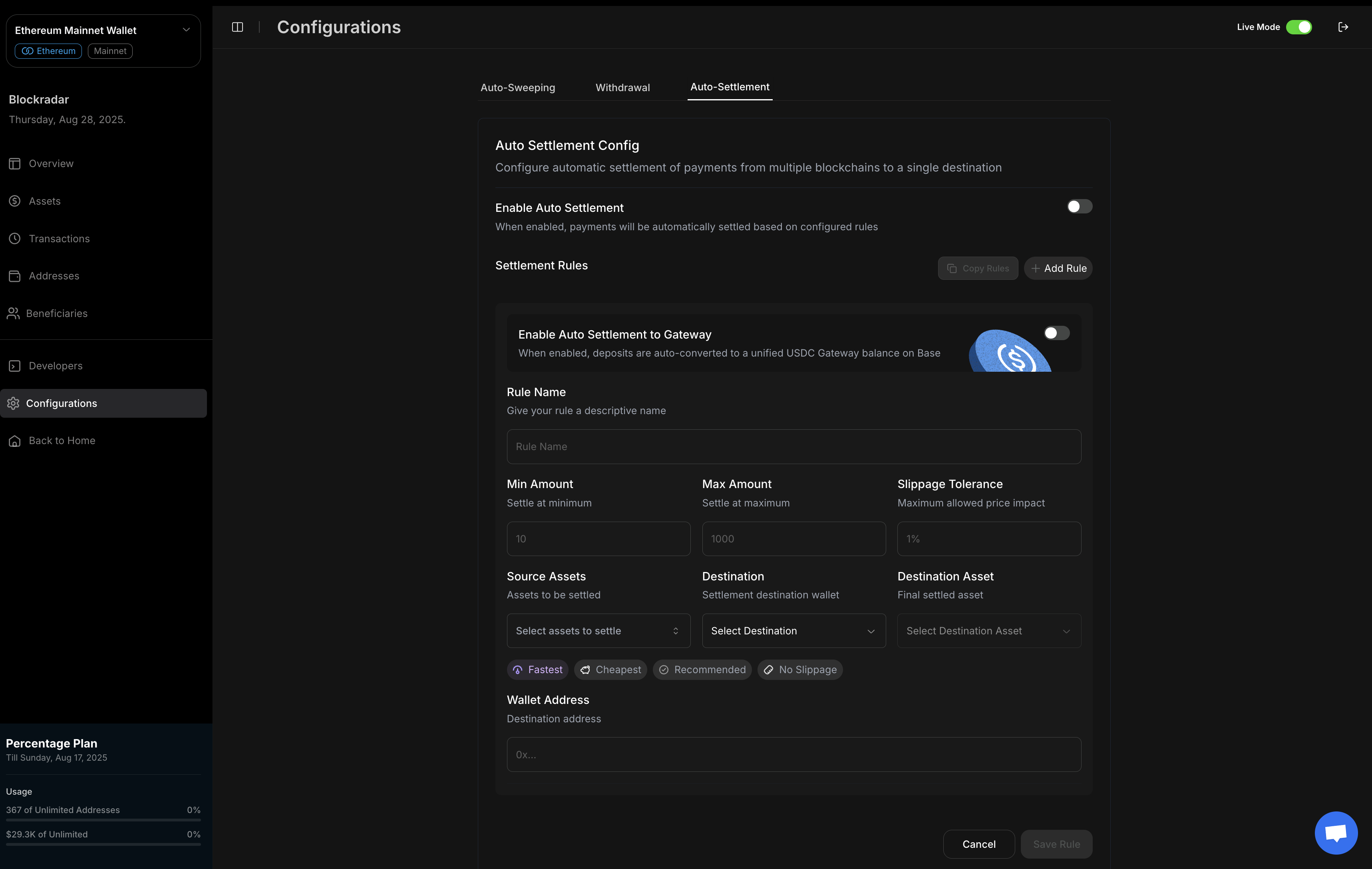
Auto Settlements automatically convert incoming deposits to your preferred asset on any blockchain. Define rules once, and all matching deposits are swapped and routed to your destination chain—no manual intervention required.
Auto Settlements automatically convert incoming deposits to your preferred asset on any blockchain. Define rules once, and all matching deposits are swapped and routed to your destination chain—no manual intervention required.
Prerequisites
Before setting up auto-settlement rules, ensure you have:1
API Key
Get your API key from the Blockradar Dashboard. Navigate to Developers to generate one.
2
Master Wallet Created
Create a master wallet in the Blockradar Dashboard. Rules are configured per wallet — look one up with Get Wallet.
3
Destination Wallet
If settling cross-chain, ensure you have a wallet on the destination blockchain to receive converted assets.
4
Sufficient Gas
Fund your wallets with native tokens (ETH, BNB, MATIC, etc.) to cover swap and transfer fees.
5
Webhook Configured
Set up webhooks to receive settlement notifications. The event family depends on which settlement type ran:
swap.*, withdraw.*, gateway-deposit.*, or reward-deposit.*. See Webhook notifications below and the Webhooks guide for details.How It Works
Auto Settlements allow you to automatically convert incoming deposits into any destination asset on any blockchain network based on your configured rules. This eliminates the need to manually swap or bridge assets, ensuring your treasury can be automatically converted to your preferred assets across multiple chains.Rules Management
Create and manage auto-settlement rules to automate asset conversions.
Asset Conversion
Automatically convert any stablecoin to any other asset based on your rules.
Cross-Chain
Settle assets to any blockchain network seamlessly.
Risk Management
Apply slippage tolerance and rules to protect against poor executions.
How Auto Settlements Work
1. Rule Creation
Define settlement rules that specify when and how deposits should be automatically converted.2. Deposit Detection
When funds arrive at your addresses, Blockradar automatically detects deposits matching your rules.3. Asset Conversion
Deposits are automatically swapped to your destination asset (typically USDC) on your chosen chain.4. Balance Unification
All converted assets are consolidated into a single, unified balance on your destination chain.Settlement Types
Every rule resolves to one of four settlement flows. Set it explicitly with thetype field:
type is optional for backwards compatibility. Rules created before it existed have no type and keep their inferred behavior — Blockradar decides between withdraw and swap by comparing the source and destination asset and chain. Send type on every new rule so the flow is explicit, and send it on an update to migrate a legacy rule onto the explicit system.Type validation rules
The API rejects contradictory combinations:type: gatewayrequiresisGateway: true, andisGateway: truerequirestype: gatewaytype: earnrequiresisReward: true, andisReward: truerequirestype: earn- A rule can never be both gateway and earn
type: withdrawrequires adestination.address, and the destination blockchain must equal the source blockchaintype: swaprejects a source asset that equals the destination asset on the same blockchain- Two rules on the same wallet cannot cover the same source asset on the same blockchain
Gateway rules can fall through to swap
Agateway rule only performs a Gateway deposit when the source chain and asset are Gateway-eligible. When they are not, the rule falls through and executes as a swap to destination.blockchain / destination.asset instead. The funds still settle, but you receive swap.* webhooks rather than gateway-deposit.*, so handle both when you configure gateway rules on chains outside Gateway’s supported set.
Auto Settlement Rules
Rule Components
Each auto-settlement rule defines the following parameters:How much gets settled
By default a settlement is sized from the address’s balance, not from the deposit that triggered it. SetuseTransactionAmount to choose:
The amount is then clamped and adjusted in this order:
- The amount is compared against
source.minAmount. Below it, nothing settles. - The amount is capped at
source.maxAmount("-1"means no cap). deductionPercentageis withheld from what remains."2.5"settles 97.5% and leaves 2.5% on the address.
Earn Settlement Rules
Anearn rule deposits incoming funds into a yield position instead of transferring them out. It is the auto-settlement entry point to Earn.
Constraints:
- Mainnet only. Earn rules are rejected on testnet.
- Every asset in
source.assetsmust be supported by the chosen provider on the wallet’s blockchain, otherwise the rule is rejected at creation. rewardTypeis optional and defaults from the resolved product — both providers aredefi.productKey(optional) pins a specific earn product; only needed when a provider offers more than one product for a source asset, and the rule must then have exactly one source asset.- A rule cannot be both
isGatewayandisReward.
REWARD_DEPOSIT transaction and emit reward-deposit.* webhooks.
Balance-based earn rules (
useTransactionAmount: false) skip a new settlement while one is already pending or processing for the same address and asset — the in-flight settlement will absorb the newly arrived funds anyway. Amount-based earn rules (useTransactionAmount: true) are never skipped.Rule Configuration Options
Amount Thresholds
- Minimum Amount: Only settle when the amount is above this threshold
- Maximum Amount: Cap the size of individual settlements
- Accumulation: With
useTransactionAmount: false(the default), the rule settles the address’s whole balance of the source asset, so deposits that individually fell belowminAmountare picked up together once the balance clears it
Slippage Protection
- Unlimited:
-1(no slippage limit) - Conservative: 0.1% - 0.5% (minimal price impact)
- Moderate: 0.5% - 1.0% (balanced approach)
- Aggressive: 1.0% - 2.0% (faster execution)
Destination Address (Optional)
Thedestination.address field is optional for swap, gateway, and earn rules. When not provided, the system uses smart fallback logic to determine the recipient address:
Execution Preferences
- Fastest: Prioritize speed over cost
- Cheapest: Optimize for lowest fees
- Recommended: Balance speed and cost with reliability
- No Slippage: Execute only when no price deviation occurs
Rule Hierarchy and Precedence
How Rules Apply
Key Concept: By default, rules created on a master wallet apply to the master wallet and all child addresses under it. A rule on a child address takes precedence over the master wallet’s rules for the deposit it matches.
Rule Application Order
Precedence is evaluated per deposit, not per address:- Look for a matching child address rule. A rule matches when it is active and its
source.assetsandsource.blockchaincover the deposit. - Fall back to the master wallet rules. A master rule is then considered only if its
inheritancesetting allows it to apply to the address that received the deposit. - No match at either level: no auto-settlement occurs.
Per-Rule Inheritance
Each master-wallet rule controls which child addresses it cascades to through the optionalinheritance object:
Omitting
inheritance entirely keeps the original behavior and is equivalent to all_children.
selected_children:
childAddressIdsmust be present and non-empty, otherwise the request fails withAt least one child address must be selected.- Every ID must be an active address belonging to your business on the same network.
- The addresses must match the wallet’s chain family. A rule on a non-EVM wallet (for example Tron, Solana, or Stellar) only accepts addresses on that same chain; a rule on an EVM wallet accepts any EVM address. A mismatch fails with
One or more selected child addresses are not valid for this chain or are inactive.
inheritance only exists on master-wallet rules. A rule created directly on a child address has nothing to cascade to, so the field is ignored and never stored there.Blockchain-Specific Rules
Important: Rules are isolated and tied to each blockchain. A rule configured for one blockchain (e.g., Ethereum) will NOT affect deposits on another blockchain (e.g., Base or Optimism).
- You must create separate rules for each source blockchain you want to auto-settle
- A rule for “USDC on Ethereum” will not trigger for “USDC on Base”
- This allows granular control over settlement behavior per chain
- Rule for Ethereum USDC → Optimism USDC
- Rule for Base USDC → Optimism USDC
Use Cases for Each Level
Master Wallet Rules
- Consistent Strategy: Same settlement behavior across all child addresses
- Simplified Management: Single place to configure default behavior
- Bulk Operations: Apply rules to multiple addresses at once
- Standardization: Ensure compliance and consistency
Child Address Rules
- Testing: Try different settlement strategies on specific addresses
- Custom Requirements: Address-specific settlement needs
- Override Defaults: Modify behavior for particular use cases
- Granular Control: Fine-tune settlement for specific addresses
Creating Auto Settlement Rules
Via Dashboard
- Navigate to your wallet’s Auto Settlements section
- Click “Create New Rule”
- Configure rule parameters
- Set amount thresholds and slippage tolerance
- Choose source and destination assets/chains
- Save and activate the rule
Via API
Create settlement rules programmatically using the Auto Settlement Rules API:In this example,
slippageTolerance is set to -1 for unlimited slippage, and destination.address is omitted. The system will automatically use smart fallback logic to determine the recipient address.Copying Rules Across Wallets
Rules are per-blockchain, so rolling one strategy out across every chain you operate on means recreating the same rule many times. The copy endpoint does it in one call:source.blockchain is rewritten to the target wallet’s own blockchain before it is saved.
Partial success is normal
The call returns200 even when some rules are skipped or some wallets fail. Always read the response rather than relying on the status code:
Each target wallet is locked and written in its own transaction, so a failure on one target never leaves another partially written. Applying at least one rule to a wallet also switches auto-settlement on for that wallet.
400 when the rules array is malformed, when rules or targetWalletIds is empty, or when the only target listed is the source wallet (the source is always removed from the target list).
Use Cases
Treasury Management
- Flexible Asset Conversion: Convert to any preferred asset (USDC, ETH, USDT, etc.)
- Cross-Chain Operations: Maintain balances across multiple networks
- Automated Consolidation: No manual intervention required
- Multi-Asset Strategy: Support various asset preferences and strategies
Business Operations
- Payment Processing: Automatically settle incoming payments to preferred assets
- Revenue Management: Convert various stablecoins to your chosen destination asset
- Risk Mitigation: Apply slippage protection automatically
- Asset Diversification: Maintain target asset allocations automatically
DeFi Integration
- Yield Farming: Automatically settle rewards to preferred asset
- Liquidity Management: Consolidate LP rewards and fees
- Portfolio Rebalancing: Maintain target asset allocations
Best Practices
Rule Configuration
- Start Conservative: Begin with low slippage tolerance
- Monitor Performance: Track settlement success rates
- Adjust Gradually: Fine-tune rules based on market conditions
- Test on Testnet: Validate rules before mainnet deployment
Risk Management
- Slippage Limits: Set appropriate tolerance levels
- Amount Caps: Limit maximum settlement sizes
- Network Selection: Choose reliable destination chains
- Fallback Rules: Create backup settlement options
Operational Efficiency
- Accumulation: Leave
useTransactionAmountatfalseso small deposits settle together once the balance clearsminAmount - Timing Optimization: Consider network congestion patterns
- Cost Analysis: Balance speed vs. cost preferences
- Monitoring: Set up alerts for failed settlements
Monitoring and Alerts
Dashboard Monitoring
- Rule Status: Active/inactive rule indicators
- Settlement History: Track successful and failed settlements
- Performance Metrics: Success rates and execution times
- Asset Balances: Monitor unified balance growth
Webhook Notifications
Auto-settlements trigger webhook events when settlements are executed. Which event family you receive depends on the settlement type that ran:Webhook Payload Example
Identifying Auto-Settlement Transactions
The best way to identify auto-settlement transactions is by checking the metadata field. Depending on the action, the metadata will contain one of these keys:
The swap, gateway, and withdraw objects contain:
rewardAutoSettlement has a different shape — it carries the rule ID rather than the whole rule:
When any of these metadata keys is present, the transaction was triggered by an auto-settlement rule. For swap, gateway, and withdraw settlements the
rule field contains the complete rule configuration, not just an ID; for earn settlements, look up the rule with ruleId.Key Webhook Data Fields
API Reference
Endpoints
Master Wallet Auto Settlements
Child Address Auto Settlements
There is no copy endpoint for child addresses — copying always targets master wallets, though the rules you copy can come from a child address.
Update semantics differ by level
In both cases the merged rule is re-validated, so an update can be rejected because of a field you did not send.
Rule Parameters
Getting Started
1. Enable Auto Settlements
- Navigate to your wallet settings
- Enable auto-settlement functionality
- Configure default preferences
2. Create Your First Rule
- Start with a simple USDT to ETH rule (or any asset you prefer)
- Set conservative slippage tolerance
- Choose your preferred destination chain and asset
3. Test and Monitor
- Deploy on testnet first
- Monitor settlement success rates
- Adjust parameters as needed
4. Scale Gradually
- Add rules for additional assets
- Implement batch processing
- Optimize for your use case
Support and Resources
Getting Help
- Email: [email protected]
- API Reference: Auto Settlement Rules
- Documentation: Gateway Configuration
Auto settlements are a powerful way to automate your treasury management. Start with simple rules and gradually add complexity as you become more familiar with the system.