

跳转到主要内容
简而言之
Blockradar 的法币提现 API 支持将已支持的稳定币兑换为法币并转入银行账户。您可以查询支持的资产、校验银行账户、获取报价,并从主钱包或子地址发起提现。
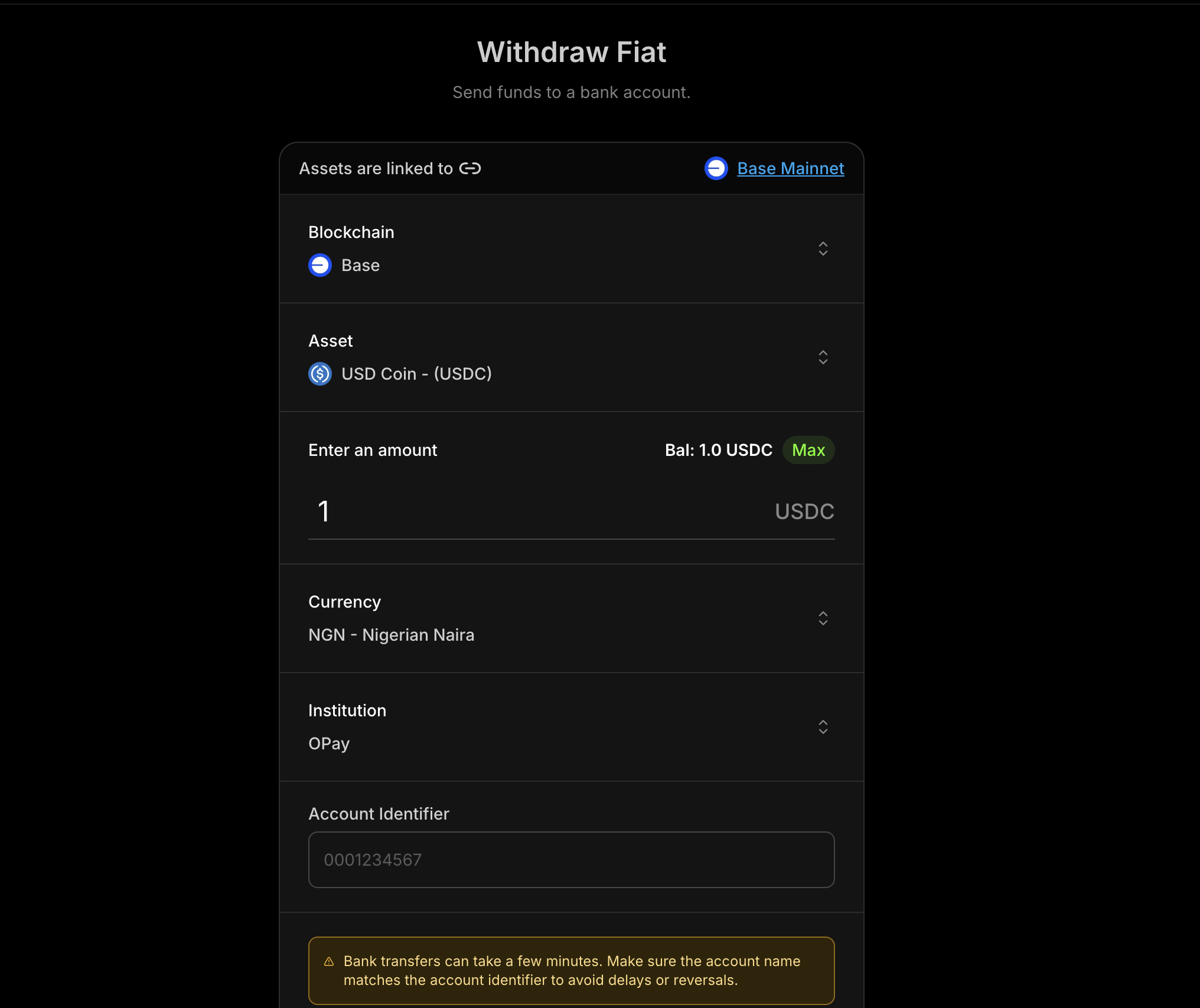
Blockradar 法币提现界面

前提条件

在使用法币提现前,请确保您已完成以下准备:
1

合规要求

在申请开通法币提现前,请先完成合作伙伴入驻流程(见下方 合规要求)。
2

API 密钥

Blockradar 控制台 获取 API 密钥。 前往 Developers 页面生成密钥。
3

已创建钱包

通过控制台创建钱包。提现操作需要使用 walletId
4

资产 ID

通过 获取支持资产 查询支持的法币提现资产。
5

银行账户信息

准备有效的账户标识以及机构标识(银行代码)。

工作流程

法币提现通常按以下步骤进行:

查询资产

查询支持提现的资产列表。

获取法币币种

获取全部支持的法币币种。

获取汇率

查询所选资产当前可用汇率。

校验账户

在发起提现前校验银行账户信息。

获取报价

估算提现金额对应的手续费和汇率。

执行提现

提交提现申请并进入处理流程。

支持的法币

货币代码
Kenyan ShillingKES
Nigerian NairaNGN
Tanzanian ShillingTZS
Ugandan ShillingUGX
Brazilian RealBRL
Malawian KwachaMWK

合规要求

在使用法币提现前,请先完成与您的出款币种覆盖范围对应的合规入驻流程。

选择您的入驻路径

如果您同时需要 NGN 和其他支持的非洲货币,请完成这两个入驻流程。

审批要求

法币提现功能会在合规审核通过并完成对应路径审批后开通。

主钱包 vs 子地址

法币提现支持两个层级:

主钱包

从主钱包发起提现,适合资金归集和财务/资金管理场景。

子地址

从指定子地址发起提现,适合按用户隔离的业务流程。

接口列表

操作主钱包子地址
获取支持资产GET /v1/wallets/{walletId}/withdraw/fiat/assets
获取机构列表GET /v1/wallets/{walletId}/withdraw/fiat/institutions
获取汇率GET /v1/wallets/{walletId}/withdraw/fiat/rates
获取币种GET /v1/wallets/{walletId}/withdraw/fiat/currencies
校验机构账户POST /v1/wallets/{walletId}/withdraw/fiat/institution-account-verification
获取报价POST /v1/wallets/{walletId}/withdraw/fiat/quotePOST /v1/wallets/{walletId}/addresses/{addressId}/withdraw/fiat/quote
执行提现POST /v1/wallets/{walletId}/withdraw/fiat/executePOST /v1/wallets/{walletId}/addresses/{addressId}/withdraw/fiat/execute

典型流程

  1. 查询支持资产,选择要提现的稳定币。
  2. 查询机构列表,选择银行/机构标识。
  3. 校验账户,确认账户名称和账户信息。
  4. 获取报价,在执行前向用户展示手续费和汇率。
  5. 执行提现,并在您的系统中跟踪状态。

第 1 步:获取报价

在执行提现前,建议先获取报价,以便向用户展示汇率和手续费。

请求参数

参数类型必填说明
assetIdstring要提现的稳定币资产 ID
amountstring提现金额(按资产单位)
currencystring目标法币币种(例如 NGN
accountIdentifierstring银行账号或账户标识
institutionIdentifierstring银行/机构代码

报价示例

curl --request POST \
  --url https://api.blockradar.co/v1/wallets/{walletId}/withdraw/fiat/quote \
  --header 'Content-Type: application/json' \
  --header 'x-api-key: <api-key>' \
  --data '{
    "assetId": "asset-uuid-here",
    "amount": "1000",
    "currency": "NGN",
    "accountIdentifier": "0023103996",
    "institutionIdentifier": "SBICNGLA"
  }'

第 2 步:执行提现

确认报价后,使用相同参数发起提现。

请求参数

参数类型必填说明
assetIdstring要提现的稳定币资产 ID
amountstring提现金额(按资产单位)
currencystring目标法币币种(例如 NGN
accountIdentifierstring银行账号或账户标识
institutionIdentifierstring银行/机构代码
referencestring用于幂等和跟踪的客户端参考号
metadataobject附加到交易的键值对元数据
notestring本次提现的人类可读备注

执行示例

curl --request POST \
  --url https://api.blockradar.co/v1/wallets/{walletId}/withdraw/fiat/execute \
  --header 'Content-Type: application/json' \
  --header 'x-api-key: <api-key>' \
  --data '{
    "assetId": "asset-uuid-here",
    "amount": "1000",
    "currency": "NGN",
    "accountIdentifier": "8034007516",
    "institutionIdentifier": "OPAYNGPC",
    "reference": "WD-20260303-001",
    "metadata": {
      "source": "payroll",
      "initiatedBy": "treasury-bot"
    },
    "note": "March payroll payout"
  }'

执行响应

{
  "status": true,
  "message": "Successful",
  "data": {
    "id": "db53c3ef-5643-4f98-92cf-d02aef300f45",
    "reference": "WD-20260303-001",
    "senderAddress": "0x969838345E5cd5F755DfcADB57e72F5d23271e48",
    "recipientAddress": "0x30F6A8457F8E42371E204a9c103f2Bd42341dD0F",
    "tokenAddress": "0x46C85152bFe9f96829aA94755D9f915F9B10EF5F",
    "amount": "1000",
    "amountPaid": "1000",
    "amountUSD": "0.68",
    "rateUSD": "0.00068",
    "fee": "2",
    "currency": "NGN",
    "toAmount": "1000.00",
    "toCurrency": "NGN",
    "status": "PENDING",
    "processingStatus": "PENDING",
    "processingProviderReference": null,
    "processingReason": null,
    "type": "OFFRAMP",
    "createdChannel": "api",
    "network": "mainnet",
    "chainId": null,
    "note": "March payroll payout",
    "metadata": {
      "source": "payroll",
      "initiatedBy": "treasury-bot"
    },
    "beneficiary": {
      "id": "4dd8d16e-8550-4f51-84a1-60df9c608c5d",
      "name": "JOHN DOE",
      "type": "FIAT",
      "isActive": true,
      "institutionIdentifier": "OPAYNGPC",
      "institutionAccountIdentifier": "8034007516",
      "currency": "NGN"
    }
  }
}

Webhooks

您可以通过以下 webhook 事件跟踪提现状态:
事件说明
offramp.processing提现处理中
offramp.success提现成功完成
offramp.failed提现失败

Webhook Payload 示例

{
  "event": "offramp.processing",
  "data": {
    "id": "d2b985da-7f7e-4494-a6bc-0e675d50eed3",
    "reference": "EVF2g9X70Sj4hoX3ma8l",
    "senderAddress": "0x969838345E5cd5F755DfcADB57e72F5d23271e48",
    "tokenAddress": "0x833589fCD6eDb6E08f4c7C32D4f71b54bdA02913",
    "amount": "0.5",
    "amountPaid": "0.5",
    "amountUSD": "0.4998",
    "rateUSD": "0.9996",
    "fee": "0",
    "feeUSD": null,
    "currency": "USD",
    "toCurrency": "NGN",
    "status": "PROCESSING",
    "processingStatus": "SUCCESS",
    "processingProviderReference": "0x25003cb8356c92e3c296e7dd384ead681c5f57fb6182760fa4178750464ffd35",
    "processingReason": null,
    "type": "OFFRAMP",
    "createdChannel": "api",
    "network": "mainnet",
    "chainId": 8453,
    "metadata": null,
    "toAmount": "711.21",
    "rate": "1422.42",
    "beneficiary": {
      "id": "4dd8d16e-8550-4f51-84a1-60df9c608c5d",
      "name": "JOHN DOE",
      "type": "FIAT",
      "isActive": true,
      "reference": "d7dd5c7cf57acb5e2ff62eb23bceaca84d5dad6e62fec3d3836f20cfa1ea735c",
      "institutionIdentifier": "OPAYNGPC",
      "institutionAccountIdentifier": "8030303030",
      "currency": "NGN"
    }
  }
}

完整流程示例

下面是一个完整实现,演示校验 → 报价 → 执行流程:
async function executeFiatWithdrawal({
  walletId,
  currency,
  accountIdentifier,
}) {
  const apiKey = process.env.BLOCKRADAR_API_KEY;
  const baseUrl = "https://api.blockradar.co/v1";
  const headers = { "x-api-key": apiKey };

  // Step 1: Get supported assets
  const assetsRes = await fetch(
    `${baseUrl}/wallets/${walletId}/withdraw/fiat/assets`,
    { headers },
  ).then((r) => r.json());

  // Pick the first asset (example)
  const assetId = assetsRes.data?.[0]?.asset?.id;

  // Step 2: Get supported currencies
  const currenciesRes = await fetch(
    `${baseUrl}/wallets/${walletId}/withdraw/fiat/currencies`,
    { headers },
  ).then((r) => r.json());

  console.log("Supported currencies:", currenciesRes.data);

  // Step 3: Get institutions for the currency
  const institutionsRes = await fetch(
    `${baseUrl}/wallets/${walletId}/withdraw/fiat/institutions?currency=${currency}`,
    { headers },
  ).then((r) => r.json());

  // Pick the first institution (example)
  const institutionIdentifier = institutionsRes.data?.[0]?.code;

  // Step 4: Verify account
  const verification = await fetch(
    `${baseUrl}/wallets/${walletId}/withdraw/fiat/institution-account-verification`,
    {
      method: "POST",
      headers: {
        ...headers,
        "Content-Type": "application/json",
      },
      body: JSON.stringify({
        accountIdentifier,
        currency,
        institutionIdentifier,
      }),
    },
  ).then((r) => r.json());

  console.log("Account name:", verification.data?.accountName);

  // Step 5: Get exchange rate (optional)
  const amount = "1000";
  const ratesRes = await fetch(
    `${baseUrl}/wallets/${walletId}/withdraw/fiat/rates?currency=${currency}&assetId=${assetId}&amount=${amount}`,
    { headers },
  ).then((r) => r.json());

  console.log("Rate:", ratesRes.data);

  // Step 6: Get quote
  const quote = await fetch(
    `${baseUrl}/wallets/${walletId}/withdraw/fiat/quote`,
    {
      method: "POST",
      headers: {
        ...headers,
        "Content-Type": "application/json",
      },
      body: JSON.stringify({
        assetId,
        amount,
        currency,
        accountIdentifier,
        institutionIdentifier,
      }),
    },
  ).then((r) => r.json());

  console.log("Estimated arrival:", quote.data?.estimatedArrivalTime);
  console.log("Network fee:", quote.data?.networkFee);

  // Step 7: Execute (after user confirmation)
  const execution = await fetch(
    `${baseUrl}/wallets/${walletId}/withdraw/fiat/execute`,
    {
      method: "POST",
      headers: {
        ...headers,
        "Content-Type": "application/json",
      },
      body: JSON.stringify({
        assetId,
        amount,
        currency,
        accountIdentifier,
        institutionIdentifier,
      }),
    },
  ).then((r) => r.json());

  console.log("Withdrawal initiated:", execution.data?.id);
  console.log("Status:", execution.data?.status);

  // Step 8: Listen for webhook to confirm completion
  return execution.data;
}

// Usage
executeFiatWithdrawal({
  walletId: "wallet-uuid",
  currency: "NGN",
  accountIdentifier: "0023103996",
});

错误响应

{
  "message": "Institution not supported",
  "statusCode": 400
}
{
  "message": "Currency not supported",
  "statusCode": 400
}
{
  "message": "Asset not supported",
  "statusCode": 404
}
{
  "message": "Fiat withdrawal feature is not enabled for this business, please contact support via the live chat or email support for more information",
}
{
  "message": "Insufficient token balance for withdrawal",
  "statusCode": 400,
}
{
  "message": "Insufficient native balance for gas fees",
  "statusCode": 400
}
{
  "message": "Insufficient master balance for gas top-up",
  "statusCode": 400
}

最佳实践

用户体验

  • 先校验账户:展示报价前始终先确认账户名称
  • 展示完整成本:展示汇率、网络手续费和总金额
  • 呈现处理状态:使用 webhook 实时更新用户状态

安全性

  • 校验输入参数:确保币种、机构和账户标识格式正确
  • 使用业务参考号:使用唯一 reference 跟踪提现
  • 通过 webhook 确认结果:将 offramp.success 作为最终事实来源

性能

  • 缓存机构列表:定期刷新,而不是每次请求都拉取
  • 复用资产元数据:缓存支持的资产和币种
  • 重试瞬时错误:对 5xx 响应使用指数退避重试

API 参考

Endpoint说明
获取支持资产列出支持的稳定币资产
获取机构列表按币种列出机构
获取汇率获取报价所需汇率
获取币种列出支持的法币币种
校验机构账户校验银行账户信息
主钱包报价从主钱包获取报价
主钱包执行从主钱包执行提现
子地址报价从子地址获取报价
子地址执行从子地址执行提现

支持