> ## Documentation Index
> Fetch the complete documentation index at: https://docs.blockradar.co/llms.txt
> Use this file to discover all available pages before exploring further.
# 提取稳定币
> 通过单笔和批量操作向外部地址发送稳定币资产
简而言之
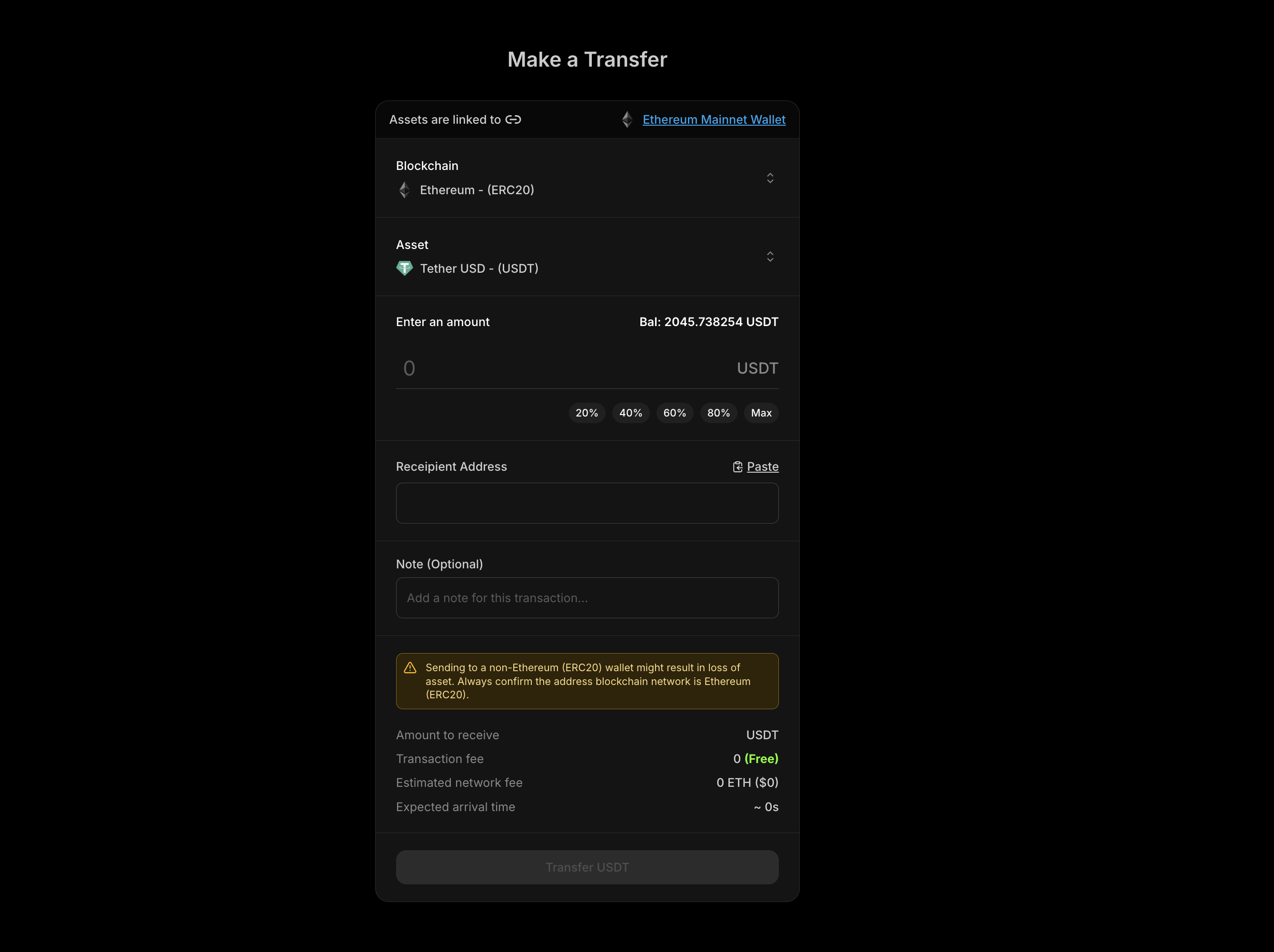
Blockradar Withdraw API 允许您将稳定币资产从钱包发送到外部区块链地址。它支持单笔提款、向多个收款人的批量提款,并在执行前提供费用估算。
 ## 前提条件
在使用 Withdraw API 之前,请确保您已具备:
从 [Blockradar 控制台](https://dashboard.blockradar.co) 获取您的 API 密钥。前往 **Developers** 生成密钥。
通过 [Create Wallet API](/en/api-reference/wallets/create-wallet) 或控制台创建钱包。提款操作需要使用 `walletId`。
在控制台的 **Assets** 中或通过 [Get Assets API](/en/api-reference/miscellaneous/get-assets) 获取要提取的代币的 `assetId`。
确保钱包中有足够的待提取资产余额,以及用于支付网络手续费的原生代币(ETH、BNB、MATIC 等)。
## 工作原理
Withdraw API 将稳定币资产从您的 Blockradar 钱包发送到任意外部区块链地址:
通过单次 API 调用将资产发送到一个收款地址。
通过单次 API 调用将资产发送给多个收款人,减少开销并简化批量支付。
在执行前计算网络手续费,以确保余额充足并向用户展示成本。
签署交易但不广播,适用于离线签名或自定义提交等高级用例。
## Master Wallet vs Child Address
Withdraw API 在两个层级可用:
直接从主钱包提款。适合财务运营和集中式资金管理。
从单个 child address 提款。适合用户专属操作和资金隔离管理。
### 端点
| 操作 | Master Wallet | Child Address |
| --------- | -------------------------------------------------- | ------------------------------------------------------------------------ |
| Withdraw | `POST /v1/wallets/{walletId}/withdraw` | `POST /v1/wallets/{walletId}/addresses/{addressId}/withdraw` |
| 网络费用 | `POST /v1/wallets/{walletId}/withdraw/network-fee` | `POST /v1/wallets/{walletId}/addresses/{addressId}/withdraw/network-fee` |
| Sign-Only | `POST /v1/wallets/{walletId}/withdraw/sign` | `POST /v1/wallets/{walletId}/addresses/{addressId}/withdraw/sign` |
***
## 单笔提款
将资产发送到单个收款地址。
### 请求参数
| 参数 | 类型 | 是否必填 | 描述 |
| ----------- | ------ | ---- | ---------------------------------- |
| `assetId` | string | 是\* | 要提取资产的 UUID。如果未提供 `assets` 数组则为必填。 |
| `address` | string | 是\* | 目标地址。如果未提供 `assets` 数组则为必填。 |
| `amount` | string | 是\* | 提款金额。必须大于 0。如果未提供 `assets` 数组则为必填。 |
| `reference` | string | 否 | 您内部用于跟踪此次提款的 ID。 |
| `note` | string | 否 | 简短消息或内部备注。链上不可见。 |
| `metadata` | object | 否 | 自定义键值对,用于补充交易细节。 |
标记为 `*` 的参数对于单笔提款是必填的,但如果您使用 `assets` 数组进行批量提款则不需要。
### 单笔提款示例
```bash Curl theme={null}
curl --request POST \
--url https://api.blockradar.co/v1/wallets/{walletId}/withdraw \
--header 'Content-Type: application/json' \
--header 'x-api-key: ' \
--data '{
"assetId": "asset-uuid-here",
"address": "0xRecipientAddress...",
"amount": "100",
"reference": "payout-12345",
"note": "Monthly payout",
"metadata": {
"userId": "user_abc123",
"payoutType": "salary"
}
}'
```
```javascript JavaScript theme={null}
const withdrawal = await fetch(
`https://api.blockradar.co/v1/wallets/${walletId}/withdraw`,
{
method: 'POST',
headers: {
'Content-Type': 'application/json',
'x-api-key': apiKey
},
body: JSON.stringify({
assetId: 'asset-uuid-here',
address: '0xRecipientAddress...',
amount: '100',
reference: 'payout-12345',
note: 'Monthly payout',
metadata: {
userId: 'user_abc123',
payoutType: 'salary'
}
})
}
).then(r => r.json());
console.log('Withdrawal initiated:', withdrawal.data);
```
### 单笔提款响应
```json theme={null}
{
"message": "Withdrawal initiated successfully",
"statusCode": 200,
"data": {
"id": "tx-uuid-123",
"hash": "0xabc123...",
"status": "PENDING",
"amount": "100",
"recipientAddress": "0xRecipientAddress...",
"reference": "payout-12345",
"note": "Monthly payout",
"metadata": {
"userId": "user_abc123",
"payoutType": "salary"
},
"createdAt": "2024-01-15T10:30:00Z"
}
}
```
***
## 批量提款
通过单次 API 调用向多个收款人发送资产。批量提款按顺序执行,每笔提款作为独立的区块链交易处理。
### 何时使用批量提款
* **批量支付**:一次性向多个员工、供应商或合作伙伴付款
* **分发**:将资产发送到多个地址
* **多收款人转账**:向不同地址发送不同金额
* **提升运营效率**:减少 API 调用并简化支付逻辑
### 批量请求参数
对于批量提款,请使用 `assets` 数组而不是单独的参数:
| 参数 | 类型 | 是否必填 | 描述 |
| -------- | ----- | ---- | ----------------- |
| `assets` | array | 是 | 提款对象数组(每批最多 20 个) |
**`assets` 数组中的每一项:**
| 字段 | 类型 | 是否必填 | 描述 |
| ----------- | ------ | ---- | ---------------- |
| `id` | string | 是 | 要提取资产的 UUID |
| `address` | string | 是 | 目标地址 |
| `amount` | string | 是 | 提款金额。必须大于 0。 |
| `reference` | string | 否 | 此次提款的可选参考备注 |
| `note` | string | 否 | 简短消息或内部备注。链上不可见。 |
| `metadata` | object | 否 | 自定义键值对,用于补充交易细节。 |
### 批量提款示例
```bash Curl theme={null}
curl --request POST \
--url https://api.blockradar.co/v1/wallets/{walletId}/withdraw \
--header 'Content-Type: application/json' \
--header 'x-api-key: ' \
--data '{
"assets": [
{
"id": "asset-uuid-usdc",
"address": "0xRecipient1...",
"amount": "100",
"reference": "payout-001",
"note": "January salary"
},
{
"id": "asset-uuid-usdc",
"address": "0xRecipient2...",
"amount": "150",
"reference": "payout-002",
"note": "January salary"
},
{
"id": "asset-uuid-usdt",
"address": "0xRecipient3...",
"amount": "200",
"reference": "payout-003",
"note": "Vendor payment"
}
]
}'
```
```javascript JavaScript theme={null}
const batchWithdrawal = await fetch(
`https://api.blockradar.co/v1/wallets/${walletId}/withdraw`,
{
method: 'POST',
headers: {
'Content-Type': 'application/json',
'x-api-key': apiKey
},
body: JSON.stringify({
assets: [
{
id: 'asset-uuid-usdc',
address: '0xRecipient1...',
amount: '100',
reference: 'payout-001',
note: 'January salary'
},
{
id: 'asset-uuid-usdc',
address: '0xRecipient2...',
amount: '150',
reference: 'payout-002',
note: 'January salary'
},
{
id: 'asset-uuid-usdt',
address: '0xRecipient3...',
amount: '200',
reference: 'payout-003',
note: 'Vendor payment'
}
]
})
}
).then(r => r.json());
console.log('Batch withdrawal result:', batchWithdrawal.data);
```
### 批量提款响应
```json theme={null}
{
"message": "Batch withdrawal initiated successfully",
"statusCode": 200,
"data": {
"success": [
{
"index": 0,
"id": "tx-uuid-1",
"hash": "0xabc...",
"status": "PENDING",
"amount": "100",
"recipientAddress": "0xRecipient1...",
"reference": "payout-001"
},
{
"index": 1,
"id": "tx-uuid-2",
"hash": "0xdef...",
"status": "PENDING",
"amount": "150",
"recipientAddress": "0xRecipient2...",
"reference": "payout-002"
},
{
"index": 2,
"id": "tx-uuid-3",
"hash": "0xghi...",
"status": "PENDING",
"amount": "200",
"recipientAddress": "0xRecipient3...",
"reference": "payout-003"
}
],
"errors": []
}
}
```
### 处理部分失败
批量提款支持部分成功。如果某些提款失败,其余的仍会执行:
```javascript theme={null}
const result = await batchWithdrawal.json();
// Process successful withdrawals
result.data.success.forEach(tx => {
console.log(`✓ ${tx.reference}: ${tx.hash}`);
});
// Handle failed withdrawals
result.data.errors.forEach(error => {
console.error(`✗ Index ${error.index}: ${error.error}`);
// Retry logic or error reporting here
});
```
### 批量提款规则
| 规则 | 值 |
| ------ | ---------------- |
| 最大批次大小 | 每次请求 20 笔提款 |
| 最小批次大小 | 1 笔提款 |
| 执行顺序 | 顺序执行 |
| 错误处理 | 部分成功(失败不会中断后续提款) |
***
## 估算网络费用
在执行提款前请始终估算费用,以确保有足够的原生代币余额,并向用户展示准确的成本。
### 单笔费用估算
```bash Curl theme={null}
curl --request POST \
--url https://api.blockradar.co/v1/wallets/{walletId}/withdraw/network-fee \
--header 'Content-Type: application/json' \
--header 'x-api-key: ' \
--data '{
"assetId": "asset-uuid-here",
"address": "0xRecipientAddress...",
"amount": "100"
}'
```
```javascript JavaScript theme={null}
const fee = await fetch(
`https://api.blockradar.co/v1/wallets/${walletId}/withdraw/network-fee`,
{
method: 'POST',
headers: {
'Content-Type': 'application/json',
'x-api-key': apiKey
},
body: JSON.stringify({
assetId: 'asset-uuid-here',
address: '0xRecipientAddress...',
amount: '100'
})
}
).then(r => r.json());
console.log('Network fee:', fee.data.networkFee);
console.log('Fee in USD:', fee.data.networkFeeInUSD);
```
### 单笔费用响应
```json theme={null}
{
"message": "Network fee fetched successfully",
"statusCode": 200,
"data": {
"networkFee": "0.00001247904",
"networkFeeInUSD": "0.01",
"transactionFee": "0",
"nativeBalance": "0.5",
"nativeBalanceInUSD": "450.00",
"estimatedArrivalTime": 30
}
}
```
### 批量费用估算
一次性估算多笔提款的费用:
```bash Curl theme={null}
curl --request POST \
--url https://api.blockradar.co/v1/wallets/{walletId}/withdraw/network-fee \
--header 'Content-Type: application/json' \
--header 'x-api-key: ' \
--data '{
"assets": [
{
"id": "asset-uuid-1",
"address": "0xRecipient1...",
"amount": "100"
},
{
"id": "asset-uuid-2",
"address": "0xRecipient2...",
"amount": "50"
}
]
}'
```
```javascript JavaScript theme={null}
const batchFee = await fetch(
`https://api.blockradar.co/v1/wallets/${walletId}/withdraw/network-fee`,
{
method: 'POST',
headers: {
'Content-Type': 'application/json',
'x-api-key': apiKey
},
body: JSON.stringify({
assets: [
{
id: 'asset-uuid-1',
address: '0xRecipient1...',
amount: '100'
},
{
id: 'asset-uuid-2',
address: '0xRecipient2...',
amount: '50'
}
]
})
}
).then(r => r.json());
console.log('Total network fee:', batchFee.data.totalNetworkFee);
console.log('Total fee in USD:', batchFee.data.totalNetworkFeeInUSD);
```
### 批量费用响应
```json theme={null}
{
"message": "Network fee fetched successfully",
"statusCode": 200,
"data": {
"fees": [
{
"index": 0,
"assetId": "asset-uuid-1",
"address": "0xRecipient1...",
"amount": "100",
"networkFee": "0.00001247904",
"transactionFee": "0",
"estimatedArrivalTime": 30
},
{
"index": 1,
"assetId": "asset-uuid-2",
"address": "0xRecipient2...",
"amount": "50",
"networkFee": "0.00000504",
"transactionFee": "0",
"estimatedArrivalTime": 30
}
],
"totalNetworkFee": "0.00001751904",
"totalNetworkFeeInUSD": "0.02",
"totalTransactionFee": "0",
"nativeBalance": "0.073690520542044578",
"nativeBalanceInUSD": "66.54",
"estimatedArrivalTime": 60,
"errors": []
}
}
```
### 费用响应字段
| 字段 | 描述 |
| ---------------------- | --------------------- |
| `networkFee` | 以原生代币单位计的 Gas 费(单笔提款) |
| `networkFeeInUSD` | 转换为 USD 的 Gas 费(单笔提款) |
| `fees` | 各项费用估算的数组(批量提款) |
| `totalNetworkFee` | 所有网络费用之和(批量提款) |
| `totalNetworkFeeInUSD` | 总网络费用(USD,批量提款) |
| `transactionFee` | 平台交易费(如适用) |
| `nativeBalance` | 当前原生代币余额 |
| `nativeBalanceInUSD` | 原生代币余额(USD) |
| `estimatedArrivalTime` | 预计确认时间(秒) |
| `errors` | 任何失败估算的数组(批量提款) |
***
## 仅签名模式
签署交易但不将其广播到区块链。适用于:
* **离线签名**:准备交易以便稍后提交
* **多重签名工作流**:在提交前收集签名
* **交易检查**:在广播前审查交易细节
### Sign-Only 示例
```bash Curl theme={null}
curl --request POST \
--url https://api.blockradar.co/v1/wallets/{walletId}/withdraw/sign \
--header 'Content-Type: application/json' \
--header 'x-api-key: ' \
--data '{
"assetId": "asset-uuid-here",
"address": "0xRecipientAddress...",
"amount": "100"
}'
```
```javascript JavaScript theme={null}
const signedTx = await fetch(
`https://api.blockradar.co/v1/wallets/${walletId}/withdraw/sign`,
{
method: 'POST',
headers: {
'Content-Type': 'application/json',
'x-api-key': apiKey
},
body: JSON.stringify({
assetId: 'asset-uuid-here',
address: '0xRecipientAddress...',
amount: '100'
})
}
).then(r => r.json());
console.log('Signed transaction:', signedTx.data.signedTransaction);
```
### Sign-Only 响应
```json theme={null}
{
"message": "Transaction signed successfully",
"statusCode": 200,
"data": {
"id": "tx-uuid-123",
"signedTransaction": "0xf86c...",
"status": "SIGNED",
"amount": "100",
"recipientAddress": "0xRecipientAddress...",
"createdAt": "2024-01-15T10:30:00Z"
}
}
```
***
## Child Address 提款
从单个 child address 而非 master wallet 进行提款:
```bash Curl theme={null}
curl --request POST \
--url https://api.blockradar.co/v1/wallets/{walletId}/addresses/{addressId}/withdraw \
--header 'Content-Type: application/json' \
--header 'x-api-key: ' \
--data '{
"assetId": "asset-uuid-here",
"address": "0xRecipientAddress...",
"amount": "50",
"reference": "user-withdrawal-123"
}'
```
```javascript JavaScript theme={null}
const childWithdrawal = await fetch(
`https://api.blockradar.co/v1/wallets/${walletId}/addresses/${addressId}/withdraw`,
{
method: 'POST',
headers: {
'Content-Type': 'application/json',
'x-api-key': apiKey
},
body: JSON.stringify({
assetId: 'asset-uuid-here',
address: '0xRecipientAddress...',
amount: '50',
reference: 'user-withdrawal-123'
})
}
).then(r => r.json());
console.log('Child address withdrawal:', childWithdrawal.data);
```
Child address 提款也支持使用 `assets` 数组进行批量操作,格式与 master wallet 批量提款相同。
***
## Webhook 事件
通过 webhook 监控提款完成情况:
| 事件 | 描述 |
| -------------------- | ------------- |
| `withdraw.success` | 提款已完成并在区块链上确认 |
| `withdraw.failed` | 提款执行失败 |
| `withdraw.cancelled` | 提款在完成前被取消 |
### Webhook 负载
```json theme={null}
{
"event": "withdraw.success",
"data": {
"id": "081d6315-159f-4c38-b02a-c4708836c5bd",
"reference": "payout-12345",
"senderAddress": "0x947514e4B803e312C312da0F1B41fEDdbe15ae7a",
"recipientAddress": "0x2455eC6700092991Ce0782365A89d5Cd89c8Fa22",
"amount": "100",
"amountPaid": "100",
"fee": null,
"currency": "USD",
"blockNumber": 6928833,
"hash": "0x5fcb7dd11cbb5a6d64da08cf7e0d63c1a1e7b9d1b89e3e8d1c6a5f4b3a2c1d0e",
"status": "SUCCESS",
"type": "WITHDRAW",
"note": "Monthly payout",
"asset": {
"id": "asset-uuid",
"name": "USD Coin",
"symbol": "USDC",
"decimals": 6
},
"wallet": {
"id": "wallet-uuid",
"name": "Main Treasury"
},
"blockchain": {
"id": "blockchain-uuid",
"name": "ethereum",
"network": "mainnet"
},
"metadata": {
"userId": "user_abc123",
"payoutType": "salary"
},
"createdAt": "2024-01-15T10:30:00Z",
"updatedAt": "2024-01-15T10:31:00Z"
}
}
```
***
## 完整流程示例
以下是展示费用估算 → 用户确认 → 提款流程的完整实现:
```javascript theme={null}
async function processWithdrawal(walletId, assetId, recipientAddress, amount) {
const apiKey = process.env.BLOCKRADAR_API_KEY;
const baseUrl = 'https://api.blockradar.co/v1';
// Step 1: Estimate network fee
const feeResponse = await fetch(
`${baseUrl}/wallets/${walletId}/withdraw/network-fee`,
{
method: 'POST',
headers: {
'Content-Type': 'application/json',
'x-api-key': apiKey
},
body: JSON.stringify({
assetId,
address: recipientAddress,
amount
})
}
).then(r => r.json());
// Step 2: Check if we have enough native balance for gas
const fee = feeResponse.data;
if (parseFloat(fee.nativeBalance) < parseFloat(fee.networkFee)) {
throw new Error(`Insufficient gas: need ${fee.networkFee}, have ${fee.nativeBalance}`);
}
// Step 3: Display fee to user (in your UI)
console.log(`Network fee: ${fee.networkFee} (≈$${fee.networkFeeInUSD})`);
console.log(`Estimated time: ${fee.estimatedArrivalTime}s`);
// Step 4: Execute withdrawal (after user confirmation)
const withdrawal = await fetch(
`${baseUrl}/wallets/${walletId}/withdraw`,
{
method: 'POST',
headers: {
'Content-Type': 'application/json',
'x-api-key': apiKey
},
body: JSON.stringify({
assetId,
address: recipientAddress,
amount,
reference: `withdraw-${Date.now()}`
})
}
).then(r => r.json());
console.log('Withdrawal initiated:', withdrawal.data.id);
console.log('Transaction hash:', withdrawal.data.hash);
// Step 5: Listen for webhook to confirm completion
return withdrawal.data;
}
// Usage
processWithdrawal(
'wallet-uuid',
'asset-uuid-usdc',
'0xRecipientAddress...',
'100'
);
```
***
## 错误响应
```json theme={null}
{
"message": "Insufficient balance for withdrawal",
"statusCode": 400,
"error": "INSUFFICIENT_BALANCE",
"data": {
"required": "100",
"available": "50.25",
"asset": "USDC"
}
}
```
```json theme={null}
{
"message": "Insufficient native token balance for gas",
"statusCode": 400,
"error": "INSUFFICIENT_GAS",
"data": {
"required": "0.005",
"available": "0.001",
"token": "ETH"
}
}
```
```json theme={null}
{
"message": "Invalid recipient address",
"statusCode": 400,
"error": "INVALID_ADDRESS",
"data": {
"address": "invalid_address_here"
}
}
```
```json theme={null}
{
"message": "Asset not found",
"statusCode": 404,
"error": "ASSET_NOT_FOUND",
"data": {
"assetId": "invalid-asset-uuid"
}
}
```
```json theme={null}
{
"message": "Amount must be greater than 0",
"statusCode": 400,
"error": "INVALID_AMOUNT",
"data": {
"amount": "0"
}
}
```
```json theme={null}
{
"message": "Batch size exceeds maximum limit",
"statusCode": 400,
"error": "BATCH_SIZE_EXCEEDED",
"data": {
"maximum": 20,
"provided": 25
}
}
```
***
## 最佳实践
### 安全
* **验证地址**:在发起提款前始终验证收款地址
* **使用引用**:使用唯一的 reference ID 跟踪提款,便于对账
* **实现 webhook**:监听 `withdraw.success` 和 `withdraw.failed` 事件以确认状态
* **检查 AML**:Blockradar 会自动筛查地址—请审查任何被标记的交易
### 费用管理
* **执行前估算**:在提款前始终调用 network-fee 端点
* **监控原生余额**:确保有足够的 ETH/BNB/MATIC 用于支付 Gas 费
* **使用批量提升效率**:将多笔提款分组以减少 API 调用和运营开销
### 错误处理
* **处理部分失败**:在批量提款中,同时检查 `success` 和 `errors` 数组
* **实现重试**:对临时故障使用指数退避
* **记录所有交易**:存储交易 ID 和哈希以便调试和对账
### 性能
* **使用合适的批次大小**:较大的批次可减少 API 调用,但会增加单次请求时间
* **缓存资产 ID**:在本地存储资产 ID 以避免重复查询
* **实施限流**:遵守 API 速率限制以避免被节流
***
## API 参考
### Master Wallet 端点
| Endpoint | 描述 |
| ------------------------------------------------------------------- | --------- |
| [Withdraw](/en/api-reference/withdraw/master-wallet) | 执行单笔或批量提款 |
| [Network Fee](/en/api-reference/withdraw/master-wallet-network-fee) | 估算提款费用 |
| [Sign-Only](/en/api-reference/withdraw/master-wallet-sign-only) | 签名但不广播 |
### Child Address 端点
| Endpoint | 描述 |
| ------------------------------------------------------------------- | --------- |
| [Withdraw](/en/api-reference/withdraw/child-address) | 执行单笔或批量提款 |
| [Network Fee](/en/api-reference/withdraw/child-address-network-fee) | 估算提款费用 |
| [Sign-Only](/en/api-reference/withdraw/child-address-sign-only) | 签名但不广播 |
***
## 支持
* **邮箱**:[support@blockradar.co](mailto:support@blockradar.co)
* **文档**:[API 参考](/en/api-reference/withdraw/master-wallet)
* **Webhook 指南**:[Webhooks](/en/essentials/webhooks)
Withdraw API 提供了向外部地址发送稳定币资产的灵活接口。先从单笔提款和费用估算入手,随着需求增长再引入批量操作以处理批量支付。
## 前提条件
在使用 Withdraw API 之前,请确保您已具备:
从 [Blockradar 控制台](https://dashboard.blockradar.co) 获取您的 API 密钥。前往 **Developers** 生成密钥。
通过 [Create Wallet API](/en/api-reference/wallets/create-wallet) 或控制台创建钱包。提款操作需要使用 `walletId`。
在控制台的 **Assets** 中或通过 [Get Assets API](/en/api-reference/miscellaneous/get-assets) 获取要提取的代币的 `assetId`。
确保钱包中有足够的待提取资产余额,以及用于支付网络手续费的原生代币(ETH、BNB、MATIC 等)。
## 工作原理
Withdraw API 将稳定币资产从您的 Blockradar 钱包发送到任意外部区块链地址:
通过单次 API 调用将资产发送到一个收款地址。
通过单次 API 调用将资产发送给多个收款人,减少开销并简化批量支付。
在执行前计算网络手续费,以确保余额充足并向用户展示成本。
签署交易但不广播,适用于离线签名或自定义提交等高级用例。
## Master Wallet vs Child Address
Withdraw API 在两个层级可用:
直接从主钱包提款。适合财务运营和集中式资金管理。
从单个 child address 提款。适合用户专属操作和资金隔离管理。
### 端点
| 操作 | Master Wallet | Child Address |
| --------- | -------------------------------------------------- | ------------------------------------------------------------------------ |
| Withdraw | `POST /v1/wallets/{walletId}/withdraw` | `POST /v1/wallets/{walletId}/addresses/{addressId}/withdraw` |
| 网络费用 | `POST /v1/wallets/{walletId}/withdraw/network-fee` | `POST /v1/wallets/{walletId}/addresses/{addressId}/withdraw/network-fee` |
| Sign-Only | `POST /v1/wallets/{walletId}/withdraw/sign` | `POST /v1/wallets/{walletId}/addresses/{addressId}/withdraw/sign` |
***
## 单笔提款
将资产发送到单个收款地址。
### 请求参数
| 参数 | 类型 | 是否必填 | 描述 |
| ----------- | ------ | ---- | ---------------------------------- |
| `assetId` | string | 是\* | 要提取资产的 UUID。如果未提供 `assets` 数组则为必填。 |
| `address` | string | 是\* | 目标地址。如果未提供 `assets` 数组则为必填。 |
| `amount` | string | 是\* | 提款金额。必须大于 0。如果未提供 `assets` 数组则为必填。 |
| `reference` | string | 否 | 您内部用于跟踪此次提款的 ID。 |
| `note` | string | 否 | 简短消息或内部备注。链上不可见。 |
| `metadata` | object | 否 | 自定义键值对,用于补充交易细节。 |
标记为 `*` 的参数对于单笔提款是必填的,但如果您使用 `assets` 数组进行批量提款则不需要。
### 单笔提款示例
```bash Curl theme={null}
curl --request POST \
--url https://api.blockradar.co/v1/wallets/{walletId}/withdraw \
--header 'Content-Type: application/json' \
--header 'x-api-key: ' \
--data '{
"assetId": "asset-uuid-here",
"address": "0xRecipientAddress...",
"amount": "100",
"reference": "payout-12345",
"note": "Monthly payout",
"metadata": {
"userId": "user_abc123",
"payoutType": "salary"
}
}'
```
```javascript JavaScript theme={null}
const withdrawal = await fetch(
`https://api.blockradar.co/v1/wallets/${walletId}/withdraw`,
{
method: 'POST',
headers: {
'Content-Type': 'application/json',
'x-api-key': apiKey
},
body: JSON.stringify({
assetId: 'asset-uuid-here',
address: '0xRecipientAddress...',
amount: '100',
reference: 'payout-12345',
note: 'Monthly payout',
metadata: {
userId: 'user_abc123',
payoutType: 'salary'
}
})
}
).then(r => r.json());
console.log('Withdrawal initiated:', withdrawal.data);
```
### 单笔提款响应
```json theme={null}
{
"message": "Withdrawal initiated successfully",
"statusCode": 200,
"data": {
"id": "tx-uuid-123",
"hash": "0xabc123...",
"status": "PENDING",
"amount": "100",
"recipientAddress": "0xRecipientAddress...",
"reference": "payout-12345",
"note": "Monthly payout",
"metadata": {
"userId": "user_abc123",
"payoutType": "salary"
},
"createdAt": "2024-01-15T10:30:00Z"
}
}
```
***
## 批量提款
通过单次 API 调用向多个收款人发送资产。批量提款按顺序执行,每笔提款作为独立的区块链交易处理。
### 何时使用批量提款
* **批量支付**:一次性向多个员工、供应商或合作伙伴付款
* **分发**:将资产发送到多个地址
* **多收款人转账**:向不同地址发送不同金额
* **提升运营效率**:减少 API 调用并简化支付逻辑
### 批量请求参数
对于批量提款,请使用 `assets` 数组而不是单独的参数:
| 参数 | 类型 | 是否必填 | 描述 |
| -------- | ----- | ---- | ----------------- |
| `assets` | array | 是 | 提款对象数组(每批最多 20 个) |
**`assets` 数组中的每一项:**
| 字段 | 类型 | 是否必填 | 描述 |
| ----------- | ------ | ---- | ---------------- |
| `id` | string | 是 | 要提取资产的 UUID |
| `address` | string | 是 | 目标地址 |
| `amount` | string | 是 | 提款金额。必须大于 0。 |
| `reference` | string | 否 | 此次提款的可选参考备注 |
| `note` | string | 否 | 简短消息或内部备注。链上不可见。 |
| `metadata` | object | 否 | 自定义键值对,用于补充交易细节。 |
### 批量提款示例
```bash Curl theme={null}
curl --request POST \
--url https://api.blockradar.co/v1/wallets/{walletId}/withdraw \
--header 'Content-Type: application/json' \
--header 'x-api-key: ' \
--data '{
"assets": [
{
"id": "asset-uuid-usdc",
"address": "0xRecipient1...",
"amount": "100",
"reference": "payout-001",
"note": "January salary"
},
{
"id": "asset-uuid-usdc",
"address": "0xRecipient2...",
"amount": "150",
"reference": "payout-002",
"note": "January salary"
},
{
"id": "asset-uuid-usdt",
"address": "0xRecipient3...",
"amount": "200",
"reference": "payout-003",
"note": "Vendor payment"
}
]
}'
```
```javascript JavaScript theme={null}
const batchWithdrawal = await fetch(
`https://api.blockradar.co/v1/wallets/${walletId}/withdraw`,
{
method: 'POST',
headers: {
'Content-Type': 'application/json',
'x-api-key': apiKey
},
body: JSON.stringify({
assets: [
{
id: 'asset-uuid-usdc',
address: '0xRecipient1...',
amount: '100',
reference: 'payout-001',
note: 'January salary'
},
{
id: 'asset-uuid-usdc',
address: '0xRecipient2...',
amount: '150',
reference: 'payout-002',
note: 'January salary'
},
{
id: 'asset-uuid-usdt',
address: '0xRecipient3...',
amount: '200',
reference: 'payout-003',
note: 'Vendor payment'
}
]
})
}
).then(r => r.json());
console.log('Batch withdrawal result:', batchWithdrawal.data);
```
### 批量提款响应
```json theme={null}
{
"message": "Batch withdrawal initiated successfully",
"statusCode": 200,
"data": {
"success": [
{
"index": 0,
"id": "tx-uuid-1",
"hash": "0xabc...",
"status": "PENDING",
"amount": "100",
"recipientAddress": "0xRecipient1...",
"reference": "payout-001"
},
{
"index": 1,
"id": "tx-uuid-2",
"hash": "0xdef...",
"status": "PENDING",
"amount": "150",
"recipientAddress": "0xRecipient2...",
"reference": "payout-002"
},
{
"index": 2,
"id": "tx-uuid-3",
"hash": "0xghi...",
"status": "PENDING",
"amount": "200",
"recipientAddress": "0xRecipient3...",
"reference": "payout-003"
}
],
"errors": []
}
}
```
### 处理部分失败
批量提款支持部分成功。如果某些提款失败,其余的仍会执行:
```javascript theme={null}
const result = await batchWithdrawal.json();
// Process successful withdrawals
result.data.success.forEach(tx => {
console.log(`✓ ${tx.reference}: ${tx.hash}`);
});
// Handle failed withdrawals
result.data.errors.forEach(error => {
console.error(`✗ Index ${error.index}: ${error.error}`);
// Retry logic or error reporting here
});
```
### 批量提款规则
| 规则 | 值 |
| ------ | ---------------- |
| 最大批次大小 | 每次请求 20 笔提款 |
| 最小批次大小 | 1 笔提款 |
| 执行顺序 | 顺序执行 |
| 错误处理 | 部分成功(失败不会中断后续提款) |
***
## 估算网络费用
在执行提款前请始终估算费用,以确保有足够的原生代币余额,并向用户展示准确的成本。
### 单笔费用估算
```bash Curl theme={null}
curl --request POST \
--url https://api.blockradar.co/v1/wallets/{walletId}/withdraw/network-fee \
--header 'Content-Type: application/json' \
--header 'x-api-key: ' \
--data '{
"assetId": "asset-uuid-here",
"address": "0xRecipientAddress...",
"amount": "100"
}'
```
```javascript JavaScript theme={null}
const fee = await fetch(
`https://api.blockradar.co/v1/wallets/${walletId}/withdraw/network-fee`,
{
method: 'POST',
headers: {
'Content-Type': 'application/json',
'x-api-key': apiKey
},
body: JSON.stringify({
assetId: 'asset-uuid-here',
address: '0xRecipientAddress...',
amount: '100'
})
}
).then(r => r.json());
console.log('Network fee:', fee.data.networkFee);
console.log('Fee in USD:', fee.data.networkFeeInUSD);
```
### 单笔费用响应
```json theme={null}
{
"message": "Network fee fetched successfully",
"statusCode": 200,
"data": {
"networkFee": "0.00001247904",
"networkFeeInUSD": "0.01",
"transactionFee": "0",
"nativeBalance": "0.5",
"nativeBalanceInUSD": "450.00",
"estimatedArrivalTime": 30
}
}
```
### 批量费用估算
一次性估算多笔提款的费用:
```bash Curl theme={null}
curl --request POST \
--url https://api.blockradar.co/v1/wallets/{walletId}/withdraw/network-fee \
--header 'Content-Type: application/json' \
--header 'x-api-key: ' \
--data '{
"assets": [
{
"id": "asset-uuid-1",
"address": "0xRecipient1...",
"amount": "100"
},
{
"id": "asset-uuid-2",
"address": "0xRecipient2...",
"amount": "50"
}
]
}'
```
```javascript JavaScript theme={null}
const batchFee = await fetch(
`https://api.blockradar.co/v1/wallets/${walletId}/withdraw/network-fee`,
{
method: 'POST',
headers: {
'Content-Type': 'application/json',
'x-api-key': apiKey
},
body: JSON.stringify({
assets: [
{
id: 'asset-uuid-1',
address: '0xRecipient1...',
amount: '100'
},
{
id: 'asset-uuid-2',
address: '0xRecipient2...',
amount: '50'
}
]
})
}
).then(r => r.json());
console.log('Total network fee:', batchFee.data.totalNetworkFee);
console.log('Total fee in USD:', batchFee.data.totalNetworkFeeInUSD);
```
### 批量费用响应
```json theme={null}
{
"message": "Network fee fetched successfully",
"statusCode": 200,
"data": {
"fees": [
{
"index": 0,
"assetId": "asset-uuid-1",
"address": "0xRecipient1...",
"amount": "100",
"networkFee": "0.00001247904",
"transactionFee": "0",
"estimatedArrivalTime": 30
},
{
"index": 1,
"assetId": "asset-uuid-2",
"address": "0xRecipient2...",
"amount": "50",
"networkFee": "0.00000504",
"transactionFee": "0",
"estimatedArrivalTime": 30
}
],
"totalNetworkFee": "0.00001751904",
"totalNetworkFeeInUSD": "0.02",
"totalTransactionFee": "0",
"nativeBalance": "0.073690520542044578",
"nativeBalanceInUSD": "66.54",
"estimatedArrivalTime": 60,
"errors": []
}
}
```
### 费用响应字段
| 字段 | 描述 |
| ---------------------- | --------------------- |
| `networkFee` | 以原生代币单位计的 Gas 费(单笔提款) |
| `networkFeeInUSD` | 转换为 USD 的 Gas 费(单笔提款) |
| `fees` | 各项费用估算的数组(批量提款) |
| `totalNetworkFee` | 所有网络费用之和(批量提款) |
| `totalNetworkFeeInUSD` | 总网络费用(USD,批量提款) |
| `transactionFee` | 平台交易费(如适用) |
| `nativeBalance` | 当前原生代币余额 |
| `nativeBalanceInUSD` | 原生代币余额(USD) |
| `estimatedArrivalTime` | 预计确认时间(秒) |
| `errors` | 任何失败估算的数组(批量提款) |
***
## 仅签名模式
签署交易但不将其广播到区块链。适用于:
* **离线签名**:准备交易以便稍后提交
* **多重签名工作流**:在提交前收集签名
* **交易检查**:在广播前审查交易细节
### Sign-Only 示例
```bash Curl theme={null}
curl --request POST \
--url https://api.blockradar.co/v1/wallets/{walletId}/withdraw/sign \
--header 'Content-Type: application/json' \
--header 'x-api-key: ' \
--data '{
"assetId": "asset-uuid-here",
"address": "0xRecipientAddress...",
"amount": "100"
}'
```
```javascript JavaScript theme={null}
const signedTx = await fetch(
`https://api.blockradar.co/v1/wallets/${walletId}/withdraw/sign`,
{
method: 'POST',
headers: {
'Content-Type': 'application/json',
'x-api-key': apiKey
},
body: JSON.stringify({
assetId: 'asset-uuid-here',
address: '0xRecipientAddress...',
amount: '100'
})
}
).then(r => r.json());
console.log('Signed transaction:', signedTx.data.signedTransaction);
```
### Sign-Only 响应
```json theme={null}
{
"message": "Transaction signed successfully",
"statusCode": 200,
"data": {
"id": "tx-uuid-123",
"signedTransaction": "0xf86c...",
"status": "SIGNED",
"amount": "100",
"recipientAddress": "0xRecipientAddress...",
"createdAt": "2024-01-15T10:30:00Z"
}
}
```
***
## Child Address 提款
从单个 child address 而非 master wallet 进行提款:
```bash Curl theme={null}
curl --request POST \
--url https://api.blockradar.co/v1/wallets/{walletId}/addresses/{addressId}/withdraw \
--header 'Content-Type: application/json' \
--header 'x-api-key: ' \
--data '{
"assetId": "asset-uuid-here",
"address": "0xRecipientAddress...",
"amount": "50",
"reference": "user-withdrawal-123"
}'
```
```javascript JavaScript theme={null}
const childWithdrawal = await fetch(
`https://api.blockradar.co/v1/wallets/${walletId}/addresses/${addressId}/withdraw`,
{
method: 'POST',
headers: {
'Content-Type': 'application/json',
'x-api-key': apiKey
},
body: JSON.stringify({
assetId: 'asset-uuid-here',
address: '0xRecipientAddress...',
amount: '50',
reference: 'user-withdrawal-123'
})
}
).then(r => r.json());
console.log('Child address withdrawal:', childWithdrawal.data);
```
Child address 提款也支持使用 `assets` 数组进行批量操作,格式与 master wallet 批量提款相同。
***
## Webhook 事件
通过 webhook 监控提款完成情况:
| 事件 | 描述 |
| -------------------- | ------------- |
| `withdraw.success` | 提款已完成并在区块链上确认 |
| `withdraw.failed` | 提款执行失败 |
| `withdraw.cancelled` | 提款在完成前被取消 |
### Webhook 负载
```json theme={null}
{
"event": "withdraw.success",
"data": {
"id": "081d6315-159f-4c38-b02a-c4708836c5bd",
"reference": "payout-12345",
"senderAddress": "0x947514e4B803e312C312da0F1B41fEDdbe15ae7a",
"recipientAddress": "0x2455eC6700092991Ce0782365A89d5Cd89c8Fa22",
"amount": "100",
"amountPaid": "100",
"fee": null,
"currency": "USD",
"blockNumber": 6928833,
"hash": "0x5fcb7dd11cbb5a6d64da08cf7e0d63c1a1e7b9d1b89e3e8d1c6a5f4b3a2c1d0e",
"status": "SUCCESS",
"type": "WITHDRAW",
"note": "Monthly payout",
"asset": {
"id": "asset-uuid",
"name": "USD Coin",
"symbol": "USDC",
"decimals": 6
},
"wallet": {
"id": "wallet-uuid",
"name": "Main Treasury"
},
"blockchain": {
"id": "blockchain-uuid",
"name": "ethereum",
"network": "mainnet"
},
"metadata": {
"userId": "user_abc123",
"payoutType": "salary"
},
"createdAt": "2024-01-15T10:30:00Z",
"updatedAt": "2024-01-15T10:31:00Z"
}
}
```
***
## 完整流程示例
以下是展示费用估算 → 用户确认 → 提款流程的完整实现:
```javascript theme={null}
async function processWithdrawal(walletId, assetId, recipientAddress, amount) {
const apiKey = process.env.BLOCKRADAR_API_KEY;
const baseUrl = 'https://api.blockradar.co/v1';
// Step 1: Estimate network fee
const feeResponse = await fetch(
`${baseUrl}/wallets/${walletId}/withdraw/network-fee`,
{
method: 'POST',
headers: {
'Content-Type': 'application/json',
'x-api-key': apiKey
},
body: JSON.stringify({
assetId,
address: recipientAddress,
amount
})
}
).then(r => r.json());
// Step 2: Check if we have enough native balance for gas
const fee = feeResponse.data;
if (parseFloat(fee.nativeBalance) < parseFloat(fee.networkFee)) {
throw new Error(`Insufficient gas: need ${fee.networkFee}, have ${fee.nativeBalance}`);
}
// Step 3: Display fee to user (in your UI)
console.log(`Network fee: ${fee.networkFee} (≈$${fee.networkFeeInUSD})`);
console.log(`Estimated time: ${fee.estimatedArrivalTime}s`);
// Step 4: Execute withdrawal (after user confirmation)
const withdrawal = await fetch(
`${baseUrl}/wallets/${walletId}/withdraw`,
{
method: 'POST',
headers: {
'Content-Type': 'application/json',
'x-api-key': apiKey
},
body: JSON.stringify({
assetId,
address: recipientAddress,
amount,
reference: `withdraw-${Date.now()}`
})
}
).then(r => r.json());
console.log('Withdrawal initiated:', withdrawal.data.id);
console.log('Transaction hash:', withdrawal.data.hash);
// Step 5: Listen for webhook to confirm completion
return withdrawal.data;
}
// Usage
processWithdrawal(
'wallet-uuid',
'asset-uuid-usdc',
'0xRecipientAddress...',
'100'
);
```
***
## 错误响应
```json theme={null}
{
"message": "Insufficient balance for withdrawal",
"statusCode": 400,
"error": "INSUFFICIENT_BALANCE",
"data": {
"required": "100",
"available": "50.25",
"asset": "USDC"
}
}
```
```json theme={null}
{
"message": "Insufficient native token balance for gas",
"statusCode": 400,
"error": "INSUFFICIENT_GAS",
"data": {
"required": "0.005",
"available": "0.001",
"token": "ETH"
}
}
```
```json theme={null}
{
"message": "Invalid recipient address",
"statusCode": 400,
"error": "INVALID_ADDRESS",
"data": {
"address": "invalid_address_here"
}
}
```
```json theme={null}
{
"message": "Asset not found",
"statusCode": 404,
"error": "ASSET_NOT_FOUND",
"data": {
"assetId": "invalid-asset-uuid"
}
}
```
```json theme={null}
{
"message": "Amount must be greater than 0",
"statusCode": 400,
"error": "INVALID_AMOUNT",
"data": {
"amount": "0"
}
}
```
```json theme={null}
{
"message": "Batch size exceeds maximum limit",
"statusCode": 400,
"error": "BATCH_SIZE_EXCEEDED",
"data": {
"maximum": 20,
"provided": 25
}
}
```
***
## 最佳实践
### 安全
* **验证地址**:在发起提款前始终验证收款地址
* **使用引用**:使用唯一的 reference ID 跟踪提款,便于对账
* **实现 webhook**:监听 `withdraw.success` 和 `withdraw.failed` 事件以确认状态
* **检查 AML**:Blockradar 会自动筛查地址—请审查任何被标记的交易
### 费用管理
* **执行前估算**:在提款前始终调用 network-fee 端点
* **监控原生余额**:确保有足够的 ETH/BNB/MATIC 用于支付 Gas 费
* **使用批量提升效率**:将多笔提款分组以减少 API 调用和运营开销
### 错误处理
* **处理部分失败**:在批量提款中,同时检查 `success` 和 `errors` 数组
* **实现重试**:对临时故障使用指数退避
* **记录所有交易**:存储交易 ID 和哈希以便调试和对账
### 性能
* **使用合适的批次大小**:较大的批次可减少 API 调用,但会增加单次请求时间
* **缓存资产 ID**:在本地存储资产 ID 以避免重复查询
* **实施限流**:遵守 API 速率限制以避免被节流
***
## API 参考
### Master Wallet 端点
| Endpoint | 描述 |
| ------------------------------------------------------------------- | --------- |
| [Withdraw](/en/api-reference/withdraw/master-wallet) | 执行单笔或批量提款 |
| [Network Fee](/en/api-reference/withdraw/master-wallet-network-fee) | 估算提款费用 |
| [Sign-Only](/en/api-reference/withdraw/master-wallet-sign-only) | 签名但不广播 |
### Child Address 端点
| Endpoint | 描述 |
| ------------------------------------------------------------------- | --------- |
| [Withdraw](/en/api-reference/withdraw/child-address) | 执行单笔或批量提款 |
| [Network Fee](/en/api-reference/withdraw/child-address-network-fee) | 估算提款费用 |
| [Sign-Only](/en/api-reference/withdraw/child-address-sign-only) | 签名但不广播 |
***
## 支持
* **邮箱**:[support@blockradar.co](mailto:support@blockradar.co)
* **文档**:[API 参考](/en/api-reference/withdraw/master-wallet)
* **Webhook 指南**:[Webhooks](/en/essentials/webhooks)
Withdraw API 提供了向外部地址发送稳定币资产的灵活接口。先从单笔提款和费用估算入手,随着需求增长再引入批量操作以处理批量支付。