> ## Documentation Index
> Fetch the complete documentation index at: https://docs.blockradar.co/llms.txt
> Use this file to discover all available pages before exploring further.
# Retiro a Fiat
> Convierta stablecoins a moneda fiat y envíe los fondos a cuentas bancarias
En resumen
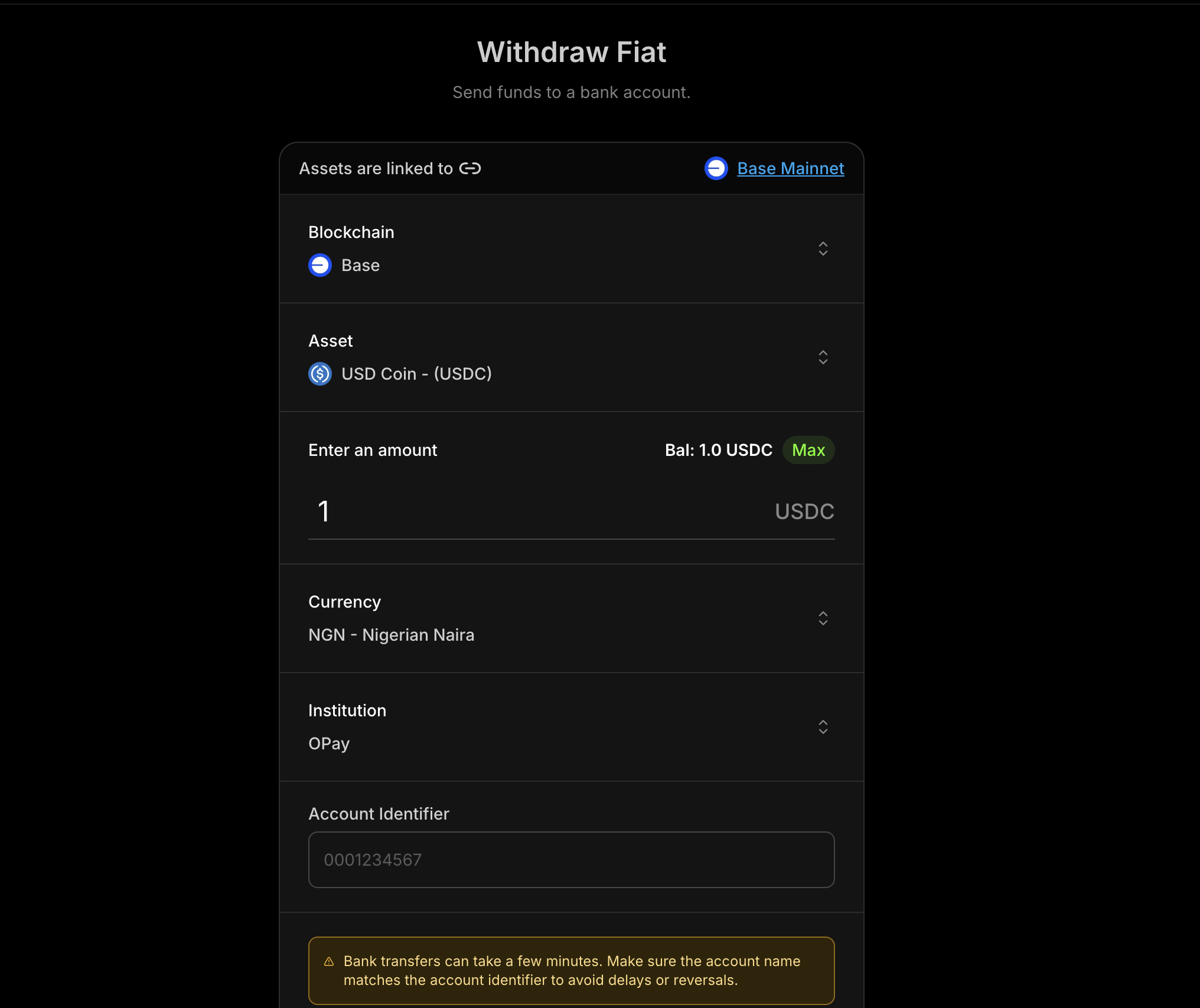
La API de Retiro a Fiat de Blockradar le permite convertir stablecoins compatibles a moneda fiat y transferir los fondos a cuentas bancarias. Puede consultar los activos compatibles, validar cuentas bancarias, obtener cotizaciones y ejecutar retiros tanto desde master wallets como desde child addresses.
 ## Requisitos previos
Antes de utilizar Retiro a Fiat, asegúrese de contar con lo siguiente:
Complete el proceso de incorporación de socio antes de solicitar el acceso a Retiro a Fiat (consulte
[Requisitos de cumplimiento](#requisitos-de-cumplimiento) más abajo).
Obtenga su clave de API desde el [Dashboard de
Blockradar](https://dashboard.blockradar.co). Diríjase a **Developers** para
generarla.
Cree una wallet desde el dashboard. Necesitará el `walletId` para las
operaciones de retiro.
Consulte los activos fiat compatibles utilizando [Get Supported
Assets](/en/api-reference/withdraw-fiat/get-supported-assets).
Recopile un identificador de cuenta válido y un identificador de institución (código bancario).
## Cómo funciona
Retiro a Fiat sigue una secuencia sencilla:
Consulte los activos compatibles para retiros.
Recupere todas las monedas compatibles.
Consulte la tasa de cambio actual para el activo seleccionado.
Valide los datos de la cuenta de la institución antes de iniciar un retiro.
Estime las comisiones y la tasa de cambio para el monto solicitado.
Envíe el retiro para su procesamiento.
## Monedas fiat compatibles
| Moneda | Código |
| --------------- | ------ |
| Chelín keniano | KES |
| Naira nigeriana | NGN |
| Chelín tanzano | TZS |
| Chelín ugandés | UGX |
| Real brasileño | BRL |
| Kwacha malauí | MWK |
## Requisitos de cumplimiento
Antes de acceder a Retiro a Fiat, complete el proceso de incorporación de cumplimiento aplicable
según la cobertura de monedas de pago.
### **Elija su ruta de incorporación**
* **Solo NGN (Naira)**: Complete el [formulario de incorporación solo para Naira](https://airtable.com/appsn5KFgmZhzQ9lh/pag8ytSkiF9k5w590/form).
* **Otras monedas africanas**: Complete la [incorporación de socio para monedas africanas](https://app.paycrest.io/partner-onboarding?referralId=blockradar).
Si necesita acceso tanto a NGN como a otras monedas africanas compatibles, complete ambos flujos de incorporación.
### **Requisito de aprobación**
El acceso a Retiro a Fiat se habilita después de la revisión y aprobación de cumplimiento para la ruta de incorporación seleccionada.
## Master Wallet vs Child Address
Retiro a Fiat está disponible en dos niveles:
Realice retiros desde la master wallet. Ideal para operaciones de tesorería.
Realice retiros desde una child address específica. Útil para flujos por usuario.
### Endpoints
| Operación | Master Wallet | Child Address |
| -------------------------- | ---------------------------------------------------------------------------- | ------------------------------------------------------------------------- |
| Get Supported Assets | `GET /v1/wallets/{walletId}/withdraw/fiat/assets` | — |
| Get Institutions | `GET /v1/wallets/{walletId}/withdraw/fiat/institutions` | — |
| Get Exchange Rates | `GET /v1/wallets/{walletId}/withdraw/fiat/rates` | — |
| Get Currencies | `GET /v1/wallets/{walletId}/withdraw/fiat/currencies` | — |
| Verify Institution Account | `POST /v1/wallets/{walletId}/withdraw/fiat/institution-account-verification` | — |
| Get Quote | `POST /v1/wallets/{walletId}/withdraw/fiat/quote` | `POST /v1/wallets/{walletId}/addresses/{addressId}/withdraw/fiat/quote` |
| Execute | `POST /v1/wallets/{walletId}/withdraw/fiat/execute` | `POST /v1/wallets/{walletId}/addresses/{addressId}/withdraw/fiat/execute` |
## Flujo típico
1. **Consulte los activos compatibles** para elegir la stablecoin a retirar.
2. **Liste las instituciones** y seleccione un identificador de banco/institución.
3. **Verifique la cuenta** para confirmar el nombre y los datos de la cuenta.
4. **Obtenga una cotización** para mostrar las comisiones y la tasa antes de la ejecución.
5. **Ejecute el retiro** y haga seguimiento del estado en su sistema.
## Paso 1: Obtener una cotización
Siempre obtenga una cotización antes de ejecutar un retiro para poder mostrar la tasa y las comisiones al usuario.
### Parámetros de la solicitud
| Parámetro | Tipo | Requerido | Descripción |
| ----------------------- | ------ | --------- | -------------------------------------------- |
| `assetId` | string | Sí | ID del activo stablecoin a retirar |
| `amount` | string | Sí | Monto a retirar en las unidades del activo |
| `currency` | string | Sí | Moneda fiat de destino (p. ej., `NGN`) |
| `accountIdentifier` | string | Sí | Número o identificador de la cuenta bancaria |
| `institutionIdentifier` | string | Sí | Código del banco/institución |
### Ejemplo de cotización
```bash Curl theme={null}
curl --request POST \
--url https://api.blockradar.co/v1/wallets/{walletId}/withdraw/fiat/quote \
--header 'Content-Type: application/json' \
--header 'x-api-key: ' \
--data '{
"assetId": "asset-uuid-here",
"amount": "1000",
"currency": "NGN",
"accountIdentifier": "0023103996",
"institutionIdentifier": "SBICNGLA"
}'
```
## Paso 2: Ejecutar el retiro
Una vez aceptada la cotización, ejecute el retiro con los mismos datos.
### Parámetros de la solicitud
| Parámetro | Tipo | Requerido | Descripción |
| ----------------------- | ------ | --------- | ---------------------------------------------------- |
| `assetId` | string | Sí | ID del activo stablecoin a retirar |
| `amount` | string | Sí | Monto a retirar en las unidades del activo |
| `currency` | string | Sí | Moneda fiat de destino (p. ej., `NGN`) |
| `accountIdentifier` | string | Sí | Número o identificador de la cuenta bancaria |
| `institutionIdentifier` | string | Sí | Código del banco/institución |
| `reference` | string | No | Referencia del cliente para idempotencia/seguimiento |
| `metadata` | object | No | Metadatos clave-valor adjuntos a la transacción |
| `note` | string | No | Nota legible para humanos sobre este retiro |
### Ejemplo de ejecución
```bash Curl theme={null}
curl --request POST \
--url https://api.blockradar.co/v1/wallets/{walletId}/withdraw/fiat/execute \
--header 'Content-Type: application/json' \
--header 'x-api-key: ' \
--data '{
"assetId": "asset-uuid-here",
"amount": "1000",
"currency": "NGN",
"accountIdentifier": "8034007516",
"institutionIdentifier": "OPAYNGPC",
"reference": "WD-20260303-001",
"metadata": {
"source": "payroll",
"initiatedBy": "treasury-bot"
},
"note": "March payroll payout"
}'
```
### Respuesta de ejecución
```json theme={null}
{
"status": true,
"message": "Successful",
"data": {
"id": "db53c3ef-5643-4f98-92cf-d02aef300f45",
"reference": "WD-20260303-001",
"senderAddress": "0x969838345E5cd5F755DfcADB57e72F5d23271e48",
"recipientAddress": "0x30F6A8457F8E42371E204a9c103f2Bd42341dD0F",
"tokenAddress": "0x46C85152bFe9f96829aA94755D9f915F9B10EF5F",
"amount": "1000",
"amountPaid": "1000",
"amountUSD": "0.68",
"rateUSD": "0.00068",
"fee": "2",
"currency": "NGN",
"toAmount": "1000.00",
"toCurrency": "NGN",
"status": "PENDING",
"processingStatus": "PENDING",
"processingProviderReference": null,
"processingReason": null,
"type": "OFFRAMP",
"createdChannel": "api",
"network": "mainnet",
"chainId": null,
"note": "March payroll payout",
"metadata": {
"source": "payroll",
"initiatedBy": "treasury-bot"
},
"beneficiary": {
"id": "4dd8d16e-8550-4f51-84a1-60df9c608c5d",
"name": "JOHN DOE",
"type": "FIAT",
"isActive": true,
"institutionIdentifier": "OPAYNGPC",
"institutionAccountIdentifier": "8034007516",
"currency": "NGN"
}
}
}
```
## Webhooks
Realice el seguimiento del estado del retiro con los siguientes eventos de webhook:
| Evento | Descripción |
| -------------------- | ------------------------------- |
| `offramp.processing` | El retiro está siendo procesado |
| `offramp.success` | Retiro completado con éxito |
| `offramp.failed` | El retiro falló |
### Ejemplo de payload del webhook
```json theme={null}
{
"event": "offramp.processing",
"data": {
"id": "d2b985da-7f7e-4494-a6bc-0e675d50eed3",
"reference": "EVF2g9X70Sj4hoX3ma8l",
"senderAddress": "0x969838345E5cd5F755DfcADB57e72F5d23271e48",
"tokenAddress": "0x833589fCD6eDb6E08f4c7C32D4f71b54bdA02913",
"amount": "0.5",
"amountPaid": "0.5",
"amountUSD": "0.4998",
"rateUSD": "0.9996",
"fee": "0",
"feeUSD": null,
"currency": "USD",
"toCurrency": "NGN",
"status": "PROCESSING",
"processingStatus": "SUCCESS",
"processingProviderReference": "0x25003cb8356c92e3c296e7dd384ead681c5f57fb6182760fa4178750464ffd35",
"processingReason": null,
"type": "OFFRAMP",
"createdChannel": "api",
"network": "mainnet",
"chainId": 8453,
"metadata": null,
"toAmount": "711.21",
"rate": "1422.42",
"beneficiary": {
"id": "4dd8d16e-8550-4f51-84a1-60df9c608c5d",
"name": "JOHN DOE",
"type": "FIAT",
"isActive": true,
"reference": "d7dd5c7cf57acb5e2ff62eb23bceaca84d5dad6e62fec3d3836f20cfa1ea735c",
"institutionIdentifier": "OPAYNGPC",
"institutionAccountIdentifier": "8030303030",
"currency": "NGN"
}
}
}
```
## Ejemplo de flujo completo
A continuación, una implementación completa que muestra el flujo verificar → cotizar → ejecutar:
```javascript theme={null}
async function executeFiatWithdrawal({
walletId,
currency,
accountIdentifier,
}) {
const apiKey = process.env.BLOCKRADAR_API_KEY;
const baseUrl = "https://api.blockradar.co/v1";
const headers = { "x-api-key": apiKey };
// Step 1: Get supported assets
const assetsRes = await fetch(
`${baseUrl}/wallets/${walletId}/withdraw/fiat/assets`,
{ headers },
).then((r) => r.json());
// Pick the first asset (example)
const assetId = assetsRes.data?.[0]?.asset?.id;
// Step 2: Get supported currencies
const currenciesRes = await fetch(
`${baseUrl}/wallets/${walletId}/withdraw/fiat/currencies`,
{ headers },
).then((r) => r.json());
console.log("Supported currencies:", currenciesRes.data);
// Step 3: Get institutions for the currency
const institutionsRes = await fetch(
`${baseUrl}/wallets/${walletId}/withdraw/fiat/institutions?currency=${currency}`,
{ headers },
).then((r) => r.json());
// Pick the first institution (example)
const institutionIdentifier = institutionsRes.data?.[0]?.code;
// Step 4: Verify account
const verification = await fetch(
`${baseUrl}/wallets/${walletId}/withdraw/fiat/institution-account-verification`,
{
method: "POST",
headers: {
...headers,
"Content-Type": "application/json",
},
body: JSON.stringify({
accountIdentifier,
currency,
institutionIdentifier,
}),
},
).then((r) => r.json());
console.log("Account name:", verification.data?.accountName);
// Step 5: Get exchange rate (optional)
const amount = "1000";
const ratesRes = await fetch(
`${baseUrl}/wallets/${walletId}/withdraw/fiat/rates?currency=${currency}&assetId=${assetId}&amount=${amount}`,
{ headers },
).then((r) => r.json());
console.log("Rate:", ratesRes.data);
// Step 6: Get quote
const quote = await fetch(
`${baseUrl}/wallets/${walletId}/withdraw/fiat/quote`,
{
method: "POST",
headers: {
...headers,
"Content-Type": "application/json",
},
body: JSON.stringify({
assetId,
amount,
currency,
accountIdentifier,
institutionIdentifier,
}),
},
).then((r) => r.json());
console.log("Estimated arrival:", quote.data?.estimatedArrivalTime);
console.log("Network fee:", quote.data?.networkFee);
// Step 7: Execute (after user confirmation)
const execution = await fetch(
`${baseUrl}/wallets/${walletId}/withdraw/fiat/execute`,
{
method: "POST",
headers: {
...headers,
"Content-Type": "application/json",
},
body: JSON.stringify({
assetId,
amount,
currency,
accountIdentifier,
institutionIdentifier,
reference: "WD-20260303-001",
metadata: { source: "payroll", initiatedBy: "treasury-bot" },
note: "March payroll payout",
}),
},
).then((r) => r.json());
console.log("Withdrawal initiated:", execution.data?.id);
console.log("Status:", execution.data?.status);
// Step 8: Listen for webhook to confirm completion
return execution.data;
}
// Usage
executeFiatWithdrawal({
walletId: "wallet-uuid",
currency: "NGN",
accountIdentifier: "0023103996",
});
```
## Respuestas de error
```json theme={null}
{
"message": "Institution not supported",
"statusCode": 400
}
```
```json theme={null}
{
"message": "Currency not supported",
"statusCode": 400
}
```
```json theme={null}
{
"message": "Asset not supported",
"statusCode": 404
}
```
```json theme={null}
{
"message": "Fiat withdrawal feature is not enabled for this business, please contact support via the live chat or email support for more information",
}
```
```json theme={null}
{
"message": "Insufficient token balance for withdrawal",
"statusCode": 400,
}
```
```json theme={null}
{
"message": "Insufficient native balance for gas fees",
"statusCode": 400
}
```
```json theme={null}
{
"message": "Insufficient master balance for gas top-up",
"statusCode": 400
}
```
## Buenas prácticas
### Experiencia de usuario
* **Verifique las cuentas primero**: Confirme siempre el nombre de la cuenta antes de mostrar una cotización
* **Muestre el costo total**: Presente la tasa de cambio, la comisión de red y el monto total
* **Visibilice el estado de procesamiento**: Use webhooks para actualizar a los usuarios en tiempo real
### Seguridad
* **Valide las entradas**: Asegúrese de que la moneda, la institución y los identificadores de cuenta estén bien formados
* **Use referencias**: Realice el seguimiento de los retiros con un `reference` único
* **Confirme mediante webhooks**: Trate `offramp.success` como la fuente final de verdad
### Rendimiento
* **Cachee las listas de instituciones**: Refresque periódicamente en lugar de hacerlo en cada solicitud
* **Reutilice los metadatos de los activos**: Cachee los activos y monedas compatibles
* **Reintente ante errores transitorios**: Use retroceso exponencial para respuestas 5xx
## Referencia de la API
| Endpoint | Descripción |
| ---------------------------------------------------------------------------------------- | --------------------------------------------- |
| [Get Supported Assets](/en/api-reference/withdraw-fiat/get-supported-assets) | Listar los activos stablecoin compatibles |
| [Get Institutions](/en/api-reference/withdraw-fiat/get-institutions) | Listar instituciones por moneda |
| [Get Exchange Rates](/en/api-reference/withdraw-fiat/get-exchange-rates) | Obtener la tasa de cambio para una cotización |
| [Get Currencies](/en/api-reference/withdraw-fiat/get-currencies) | Listar monedas fiat compatibles |
| [Verify Institution Account](/en/api-reference/withdraw-fiat/verify-institution-account) | Verificar los datos de la cuenta bancaria |
| [Master Wallet Quote](/en/api-reference/withdraw-fiat/master-wallet-get-quote) | Obtener cotización desde la master wallet |
| [Master Wallet Execute](/en/api-reference/withdraw-fiat/master-wallet-execute) | Ejecutar retiro desde la master wallet |
| [Child Address Quote](/en/api-reference/withdraw-fiat/child-address-get-quote) | Obtener cotización desde una child address |
| [Child Address Execute](/en/api-reference/withdraw-fiat/child-address-execute) | Ejecutar retiro desde una child address |
## Soporte
* **Correo**: [support@blockradar.co](mailto:support@blockradar.co)
* **Documentación**: [Referencia de la API](/en/api-reference/withdraw-fiat/get-supported-assets)
## Requisitos previos
Antes de utilizar Retiro a Fiat, asegúrese de contar con lo siguiente:
Complete el proceso de incorporación de socio antes de solicitar el acceso a Retiro a Fiat (consulte
[Requisitos de cumplimiento](#requisitos-de-cumplimiento) más abajo).
Obtenga su clave de API desde el [Dashboard de
Blockradar](https://dashboard.blockradar.co). Diríjase a **Developers** para
generarla.
Cree una wallet desde el dashboard. Necesitará el `walletId` para las
operaciones de retiro.
Consulte los activos fiat compatibles utilizando [Get Supported
Assets](/en/api-reference/withdraw-fiat/get-supported-assets).
Recopile un identificador de cuenta válido y un identificador de institución (código bancario).
## Cómo funciona
Retiro a Fiat sigue una secuencia sencilla:
Consulte los activos compatibles para retiros.
Recupere todas las monedas compatibles.
Consulte la tasa de cambio actual para el activo seleccionado.
Valide los datos de la cuenta de la institución antes de iniciar un retiro.
Estime las comisiones y la tasa de cambio para el monto solicitado.
Envíe el retiro para su procesamiento.
## Monedas fiat compatibles
| Moneda | Código |
| --------------- | ------ |
| Chelín keniano | KES |
| Naira nigeriana | NGN |
| Chelín tanzano | TZS |
| Chelín ugandés | UGX |
| Real brasileño | BRL |
| Kwacha malauí | MWK |
## Requisitos de cumplimiento
Antes de acceder a Retiro a Fiat, complete el proceso de incorporación de cumplimiento aplicable
según la cobertura de monedas de pago.
### **Elija su ruta de incorporación**
* **Solo NGN (Naira)**: Complete el [formulario de incorporación solo para Naira](https://airtable.com/appsn5KFgmZhzQ9lh/pag8ytSkiF9k5w590/form).
* **Otras monedas africanas**: Complete la [incorporación de socio para monedas africanas](https://app.paycrest.io/partner-onboarding?referralId=blockradar).
Si necesita acceso tanto a NGN como a otras monedas africanas compatibles, complete ambos flujos de incorporación.
### **Requisito de aprobación**
El acceso a Retiro a Fiat se habilita después de la revisión y aprobación de cumplimiento para la ruta de incorporación seleccionada.
## Master Wallet vs Child Address
Retiro a Fiat está disponible en dos niveles:
Realice retiros desde la master wallet. Ideal para operaciones de tesorería.
Realice retiros desde una child address específica. Útil para flujos por usuario.
### Endpoints
| Operación | Master Wallet | Child Address |
| -------------------------- | ---------------------------------------------------------------------------- | ------------------------------------------------------------------------- |
| Get Supported Assets | `GET /v1/wallets/{walletId}/withdraw/fiat/assets` | — |
| Get Institutions | `GET /v1/wallets/{walletId}/withdraw/fiat/institutions` | — |
| Get Exchange Rates | `GET /v1/wallets/{walletId}/withdraw/fiat/rates` | — |
| Get Currencies | `GET /v1/wallets/{walletId}/withdraw/fiat/currencies` | — |
| Verify Institution Account | `POST /v1/wallets/{walletId}/withdraw/fiat/institution-account-verification` | — |
| Get Quote | `POST /v1/wallets/{walletId}/withdraw/fiat/quote` | `POST /v1/wallets/{walletId}/addresses/{addressId}/withdraw/fiat/quote` |
| Execute | `POST /v1/wallets/{walletId}/withdraw/fiat/execute` | `POST /v1/wallets/{walletId}/addresses/{addressId}/withdraw/fiat/execute` |
## Flujo típico
1. **Consulte los activos compatibles** para elegir la stablecoin a retirar.
2. **Liste las instituciones** y seleccione un identificador de banco/institución.
3. **Verifique la cuenta** para confirmar el nombre y los datos de la cuenta.
4. **Obtenga una cotización** para mostrar las comisiones y la tasa antes de la ejecución.
5. **Ejecute el retiro** y haga seguimiento del estado en su sistema.
## Paso 1: Obtener una cotización
Siempre obtenga una cotización antes de ejecutar un retiro para poder mostrar la tasa y las comisiones al usuario.
### Parámetros de la solicitud
| Parámetro | Tipo | Requerido | Descripción |
| ----------------------- | ------ | --------- | -------------------------------------------- |
| `assetId` | string | Sí | ID del activo stablecoin a retirar |
| `amount` | string | Sí | Monto a retirar en las unidades del activo |
| `currency` | string | Sí | Moneda fiat de destino (p. ej., `NGN`) |
| `accountIdentifier` | string | Sí | Número o identificador de la cuenta bancaria |
| `institutionIdentifier` | string | Sí | Código del banco/institución |
### Ejemplo de cotización
```bash Curl theme={null}
curl --request POST \
--url https://api.blockradar.co/v1/wallets/{walletId}/withdraw/fiat/quote \
--header 'Content-Type: application/json' \
--header 'x-api-key: ' \
--data '{
"assetId": "asset-uuid-here",
"amount": "1000",
"currency": "NGN",
"accountIdentifier": "0023103996",
"institutionIdentifier": "SBICNGLA"
}'
```
## Paso 2: Ejecutar el retiro
Una vez aceptada la cotización, ejecute el retiro con los mismos datos.
### Parámetros de la solicitud
| Parámetro | Tipo | Requerido | Descripción |
| ----------------------- | ------ | --------- | ---------------------------------------------------- |
| `assetId` | string | Sí | ID del activo stablecoin a retirar |
| `amount` | string | Sí | Monto a retirar en las unidades del activo |
| `currency` | string | Sí | Moneda fiat de destino (p. ej., `NGN`) |
| `accountIdentifier` | string | Sí | Número o identificador de la cuenta bancaria |
| `institutionIdentifier` | string | Sí | Código del banco/institución |
| `reference` | string | No | Referencia del cliente para idempotencia/seguimiento |
| `metadata` | object | No | Metadatos clave-valor adjuntos a la transacción |
| `note` | string | No | Nota legible para humanos sobre este retiro |
### Ejemplo de ejecución
```bash Curl theme={null}
curl --request POST \
--url https://api.blockradar.co/v1/wallets/{walletId}/withdraw/fiat/execute \
--header 'Content-Type: application/json' \
--header 'x-api-key: ' \
--data '{
"assetId": "asset-uuid-here",
"amount": "1000",
"currency": "NGN",
"accountIdentifier": "8034007516",
"institutionIdentifier": "OPAYNGPC",
"reference": "WD-20260303-001",
"metadata": {
"source": "payroll",
"initiatedBy": "treasury-bot"
},
"note": "March payroll payout"
}'
```
### Respuesta de ejecución
```json theme={null}
{
"status": true,
"message": "Successful",
"data": {
"id": "db53c3ef-5643-4f98-92cf-d02aef300f45",
"reference": "WD-20260303-001",
"senderAddress": "0x969838345E5cd5F755DfcADB57e72F5d23271e48",
"recipientAddress": "0x30F6A8457F8E42371E204a9c103f2Bd42341dD0F",
"tokenAddress": "0x46C85152bFe9f96829aA94755D9f915F9B10EF5F",
"amount": "1000",
"amountPaid": "1000",
"amountUSD": "0.68",
"rateUSD": "0.00068",
"fee": "2",
"currency": "NGN",
"toAmount": "1000.00",
"toCurrency": "NGN",
"status": "PENDING",
"processingStatus": "PENDING",
"processingProviderReference": null,
"processingReason": null,
"type": "OFFRAMP",
"createdChannel": "api",
"network": "mainnet",
"chainId": null,
"note": "March payroll payout",
"metadata": {
"source": "payroll",
"initiatedBy": "treasury-bot"
},
"beneficiary": {
"id": "4dd8d16e-8550-4f51-84a1-60df9c608c5d",
"name": "JOHN DOE",
"type": "FIAT",
"isActive": true,
"institutionIdentifier": "OPAYNGPC",
"institutionAccountIdentifier": "8034007516",
"currency": "NGN"
}
}
}
```
## Webhooks
Realice el seguimiento del estado del retiro con los siguientes eventos de webhook:
| Evento | Descripción |
| -------------------- | ------------------------------- |
| `offramp.processing` | El retiro está siendo procesado |
| `offramp.success` | Retiro completado con éxito |
| `offramp.failed` | El retiro falló |
### Ejemplo de payload del webhook
```json theme={null}
{
"event": "offramp.processing",
"data": {
"id": "d2b985da-7f7e-4494-a6bc-0e675d50eed3",
"reference": "EVF2g9X70Sj4hoX3ma8l",
"senderAddress": "0x969838345E5cd5F755DfcADB57e72F5d23271e48",
"tokenAddress": "0x833589fCD6eDb6E08f4c7C32D4f71b54bdA02913",
"amount": "0.5",
"amountPaid": "0.5",
"amountUSD": "0.4998",
"rateUSD": "0.9996",
"fee": "0",
"feeUSD": null,
"currency": "USD",
"toCurrency": "NGN",
"status": "PROCESSING",
"processingStatus": "SUCCESS",
"processingProviderReference": "0x25003cb8356c92e3c296e7dd384ead681c5f57fb6182760fa4178750464ffd35",
"processingReason": null,
"type": "OFFRAMP",
"createdChannel": "api",
"network": "mainnet",
"chainId": 8453,
"metadata": null,
"toAmount": "711.21",
"rate": "1422.42",
"beneficiary": {
"id": "4dd8d16e-8550-4f51-84a1-60df9c608c5d",
"name": "JOHN DOE",
"type": "FIAT",
"isActive": true,
"reference": "d7dd5c7cf57acb5e2ff62eb23bceaca84d5dad6e62fec3d3836f20cfa1ea735c",
"institutionIdentifier": "OPAYNGPC",
"institutionAccountIdentifier": "8030303030",
"currency": "NGN"
}
}
}
```
## Ejemplo de flujo completo
A continuación, una implementación completa que muestra el flujo verificar → cotizar → ejecutar:
```javascript theme={null}
async function executeFiatWithdrawal({
walletId,
currency,
accountIdentifier,
}) {
const apiKey = process.env.BLOCKRADAR_API_KEY;
const baseUrl = "https://api.blockradar.co/v1";
const headers = { "x-api-key": apiKey };
// Step 1: Get supported assets
const assetsRes = await fetch(
`${baseUrl}/wallets/${walletId}/withdraw/fiat/assets`,
{ headers },
).then((r) => r.json());
// Pick the first asset (example)
const assetId = assetsRes.data?.[0]?.asset?.id;
// Step 2: Get supported currencies
const currenciesRes = await fetch(
`${baseUrl}/wallets/${walletId}/withdraw/fiat/currencies`,
{ headers },
).then((r) => r.json());
console.log("Supported currencies:", currenciesRes.data);
// Step 3: Get institutions for the currency
const institutionsRes = await fetch(
`${baseUrl}/wallets/${walletId}/withdraw/fiat/institutions?currency=${currency}`,
{ headers },
).then((r) => r.json());
// Pick the first institution (example)
const institutionIdentifier = institutionsRes.data?.[0]?.code;
// Step 4: Verify account
const verification = await fetch(
`${baseUrl}/wallets/${walletId}/withdraw/fiat/institution-account-verification`,
{
method: "POST",
headers: {
...headers,
"Content-Type": "application/json",
},
body: JSON.stringify({
accountIdentifier,
currency,
institutionIdentifier,
}),
},
).then((r) => r.json());
console.log("Account name:", verification.data?.accountName);
// Step 5: Get exchange rate (optional)
const amount = "1000";
const ratesRes = await fetch(
`${baseUrl}/wallets/${walletId}/withdraw/fiat/rates?currency=${currency}&assetId=${assetId}&amount=${amount}`,
{ headers },
).then((r) => r.json());
console.log("Rate:", ratesRes.data);
// Step 6: Get quote
const quote = await fetch(
`${baseUrl}/wallets/${walletId}/withdraw/fiat/quote`,
{
method: "POST",
headers: {
...headers,
"Content-Type": "application/json",
},
body: JSON.stringify({
assetId,
amount,
currency,
accountIdentifier,
institutionIdentifier,
}),
},
).then((r) => r.json());
console.log("Estimated arrival:", quote.data?.estimatedArrivalTime);
console.log("Network fee:", quote.data?.networkFee);
// Step 7: Execute (after user confirmation)
const execution = await fetch(
`${baseUrl}/wallets/${walletId}/withdraw/fiat/execute`,
{
method: "POST",
headers: {
...headers,
"Content-Type": "application/json",
},
body: JSON.stringify({
assetId,
amount,
currency,
accountIdentifier,
institutionIdentifier,
reference: "WD-20260303-001",
metadata: { source: "payroll", initiatedBy: "treasury-bot" },
note: "March payroll payout",
}),
},
).then((r) => r.json());
console.log("Withdrawal initiated:", execution.data?.id);
console.log("Status:", execution.data?.status);
// Step 8: Listen for webhook to confirm completion
return execution.data;
}
// Usage
executeFiatWithdrawal({
walletId: "wallet-uuid",
currency: "NGN",
accountIdentifier: "0023103996",
});
```
## Respuestas de error
```json theme={null}
{
"message": "Institution not supported",
"statusCode": 400
}
```
```json theme={null}
{
"message": "Currency not supported",
"statusCode": 400
}
```
```json theme={null}
{
"message": "Asset not supported",
"statusCode": 404
}
```
```json theme={null}
{
"message": "Fiat withdrawal feature is not enabled for this business, please contact support via the live chat or email support for more information",
}
```
```json theme={null}
{
"message": "Insufficient token balance for withdrawal",
"statusCode": 400,
}
```
```json theme={null}
{
"message": "Insufficient native balance for gas fees",
"statusCode": 400
}
```
```json theme={null}
{
"message": "Insufficient master balance for gas top-up",
"statusCode": 400
}
```
## Buenas prácticas
### Experiencia de usuario
* **Verifique las cuentas primero**: Confirme siempre el nombre de la cuenta antes de mostrar una cotización
* **Muestre el costo total**: Presente la tasa de cambio, la comisión de red y el monto total
* **Visibilice el estado de procesamiento**: Use webhooks para actualizar a los usuarios en tiempo real
### Seguridad
* **Valide las entradas**: Asegúrese de que la moneda, la institución y los identificadores de cuenta estén bien formados
* **Use referencias**: Realice el seguimiento de los retiros con un `reference` único
* **Confirme mediante webhooks**: Trate `offramp.success` como la fuente final de verdad
### Rendimiento
* **Cachee las listas de instituciones**: Refresque periódicamente en lugar de hacerlo en cada solicitud
* **Reutilice los metadatos de los activos**: Cachee los activos y monedas compatibles
* **Reintente ante errores transitorios**: Use retroceso exponencial para respuestas 5xx
## Referencia de la API
| Endpoint | Descripción |
| ---------------------------------------------------------------------------------------- | --------------------------------------------- |
| [Get Supported Assets](/en/api-reference/withdraw-fiat/get-supported-assets) | Listar los activos stablecoin compatibles |
| [Get Institutions](/en/api-reference/withdraw-fiat/get-institutions) | Listar instituciones por moneda |
| [Get Exchange Rates](/en/api-reference/withdraw-fiat/get-exchange-rates) | Obtener la tasa de cambio para una cotización |
| [Get Currencies](/en/api-reference/withdraw-fiat/get-currencies) | Listar monedas fiat compatibles |
| [Verify Institution Account](/en/api-reference/withdraw-fiat/verify-institution-account) | Verificar los datos de la cuenta bancaria |
| [Master Wallet Quote](/en/api-reference/withdraw-fiat/master-wallet-get-quote) | Obtener cotización desde la master wallet |
| [Master Wallet Execute](/en/api-reference/withdraw-fiat/master-wallet-execute) | Ejecutar retiro desde la master wallet |
| [Child Address Quote](/en/api-reference/withdraw-fiat/child-address-get-quote) | Obtener cotización desde una child address |
| [Child Address Execute](/en/api-reference/withdraw-fiat/child-address-execute) | Ejecutar retiro desde una child address |
## Soporte
* **Correo**: [support@blockradar.co](mailto:support@blockradar.co)
* **Documentación**: [Referencia de la API](/en/api-reference/withdraw-fiat/get-supported-assets)