> ## Documentation Index
> Fetch the complete documentation index at: https://docs.blockradar.co/llms.txt
> Use this file to discover all available pages before exploring further.
# Addresses
> Learn how to create dedicated addresses for your customers to deposit stablecoins
In a nutshell
Dedicated addresses allow you to create unique blockchain addresses for each customer. These addresses can receive stablecoins across multiple EVM-compatible chains, with deposits automatically swept to your master wallet.
 ## Prerequisites
Before generating addresses, ensure you have:
Get your API key from the [Blockradar Dashboard](https://dashboard.blockradar.co). Navigate to **Developers** to generate one.
Create at least one master wallet via the [Create Wallet API](/en/api-reference/wallets/create-wallet) or dashboard. You'll need the `walletId` to generate addresses.
Fund your master wallet with native tokens (ETH, BNB, MATIC, etc.) to cover gas fees for auto-sweeping operations.
Set up your webhook URL on the master wallet to receive deposit notifications. See [Webhooks](/en/essentials/webhooks) for setup details.
## How It Works
Dedicated Addresses is a crucial feature on Blockradar that enables you to create unique addresses for your customers. These addresses allow your customers to deposit stablecoins into your fintech app seamlessly.
When you create a dedicated address for a customer, they can use that single address to deposit stablecoins across multiple EVM-compatible blockchains.
For example, if you have Ethereum, Binance Smart Chain, Polygon, and Base master wallets created, each address you generate through any of these master wallets can be used to receive stablecoins on any of the [supported blockchains and assets](/en/essentials/integrations). This ensures that you don't have to worry about your customer sending stablecoins to the wrong blockchain.
Additionally, when stablecoins are deposited into a particular address, the assets are automatically moved to the chain's master wallet address.
Aside from Tron and Solana, addresses generated from one wallet can be used to deposit stablecoins across other blockchains that have the blockchain parameter `isEvmCompatible: true`.
## Address Parameters Explained
When creating or updating an address, you can use the following optional parameters to customize its behavior:
| Parameter | Type | Default | Description |
| ----------------------- | ------------------ | ------- | -------------------------------------------------------------------------------------------------------------- |
| `disableAutoSweep` | Boolean (Optional) | `false` | If set to `true`, automatic sweeping of funds from this address is disabled. |
| `enableGaslessWithdraw` | Boolean (Optional) | `false` | If set to `true`, allows withdrawals without requiring the user to pay gas fees directly. |
| `metadata` | Object (Optional) | `null` | Custom metadata you can attach to the address for your own reference or tracking purposes. |
| `name` | String (Optional) | `null` | A human-readable name for the address, useful for identification in your dashboard or logs. |
| `showPrivateKey` | Boolean (Optional) | `false` | If set to `true`, the private key for this address will be returned in the API response. **Use with caution.** |
The parameters `disableAutoSweep`, `enableGaslessWithdraw`, and `showPrivateKey` will override the corresponding settings in the master wallet configuration for this specific address. This allows for granular control at the address level, regardless of the wallet's default settings.
**Notes:**
* All these parameters are optional; you only need to include those relevant to your use case.
* Enabling `showPrivateKey` can expose sensitive information. Only use this in secure, trusted environments.
* Be cautious with `showPrivateKey` exposing private keys can compromise security.
## Create a Dedicated Address
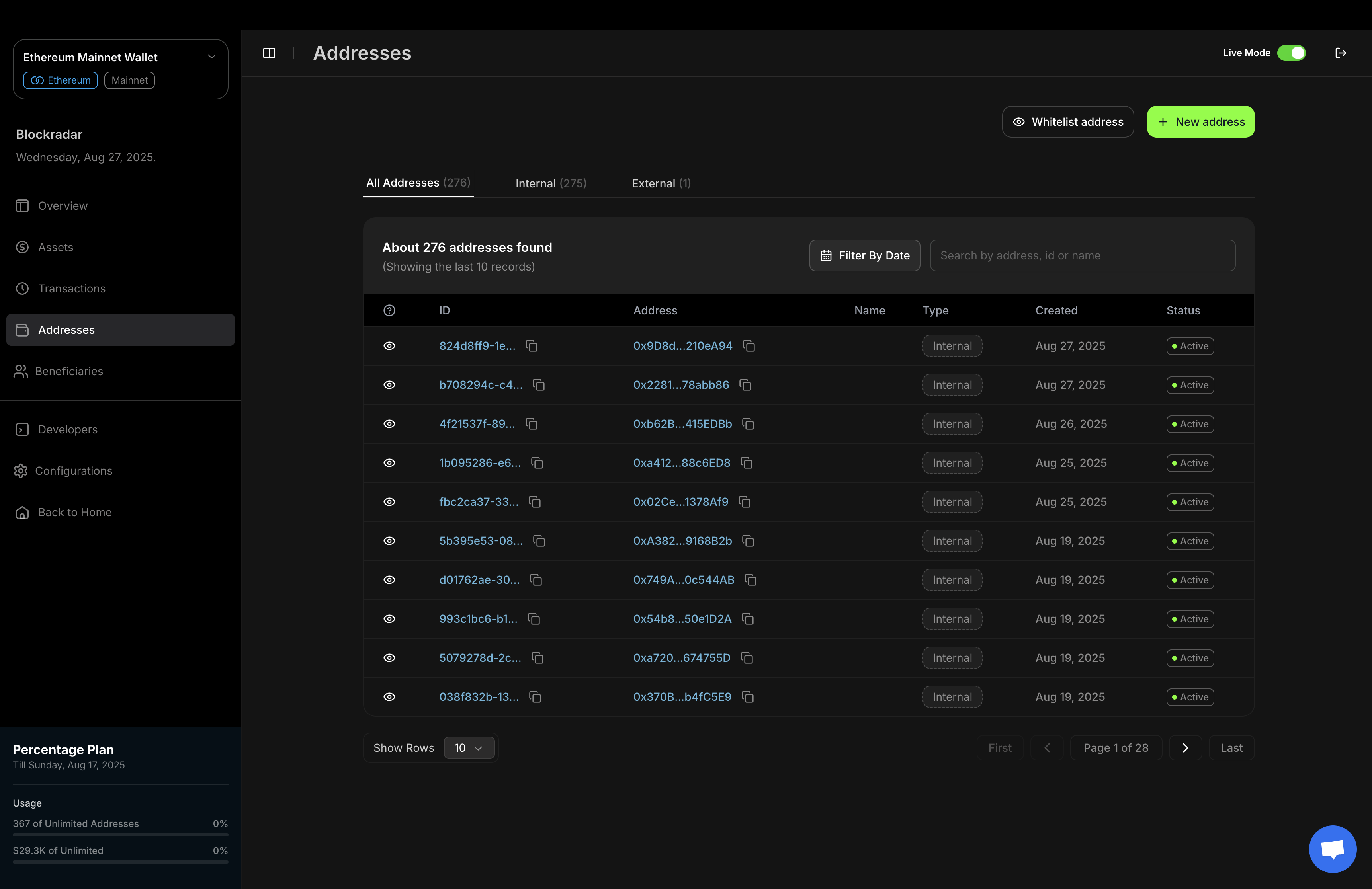
You can generate a dedicated address for your customer using either the [Blockradar dashboard ](https://dashboard.blockradar.co) or the API, depending on your workflow and integration needs.
### 1. Using the Dashboard
The Blockradar dashboard provides a simple, user-friendly interface for generating new addresses.
## Prerequisites
Before generating addresses, ensure you have:
Get your API key from the [Blockradar Dashboard](https://dashboard.blockradar.co). Navigate to **Developers** to generate one.
Create at least one master wallet via the [Create Wallet API](/en/api-reference/wallets/create-wallet) or dashboard. You'll need the `walletId` to generate addresses.
Fund your master wallet with native tokens (ETH, BNB, MATIC, etc.) to cover gas fees for auto-sweeping operations.
Set up your webhook URL on the master wallet to receive deposit notifications. See [Webhooks](/en/essentials/webhooks) for setup details.
## How It Works
Dedicated Addresses is a crucial feature on Blockradar that enables you to create unique addresses for your customers. These addresses allow your customers to deposit stablecoins into your fintech app seamlessly.
When you create a dedicated address for a customer, they can use that single address to deposit stablecoins across multiple EVM-compatible blockchains.
For example, if you have Ethereum, Binance Smart Chain, Polygon, and Base master wallets created, each address you generate through any of these master wallets can be used to receive stablecoins on any of the [supported blockchains and assets](/en/essentials/integrations). This ensures that you don't have to worry about your customer sending stablecoins to the wrong blockchain.
Additionally, when stablecoins are deposited into a particular address, the assets are automatically moved to the chain's master wallet address.
Aside from Tron and Solana, addresses generated from one wallet can be used to deposit stablecoins across other blockchains that have the blockchain parameter `isEvmCompatible: true`.
## Address Parameters Explained
When creating or updating an address, you can use the following optional parameters to customize its behavior:
| Parameter | Type | Default | Description |
| ----------------------- | ------------------ | ------- | -------------------------------------------------------------------------------------------------------------- |
| `disableAutoSweep` | Boolean (Optional) | `false` | If set to `true`, automatic sweeping of funds from this address is disabled. |
| `enableGaslessWithdraw` | Boolean (Optional) | `false` | If set to `true`, allows withdrawals without requiring the user to pay gas fees directly. |
| `metadata` | Object (Optional) | `null` | Custom metadata you can attach to the address for your own reference or tracking purposes. |
| `name` | String (Optional) | `null` | A human-readable name for the address, useful for identification in your dashboard or logs. |
| `showPrivateKey` | Boolean (Optional) | `false` | If set to `true`, the private key for this address will be returned in the API response. **Use with caution.** |
The parameters `disableAutoSweep`, `enableGaslessWithdraw`, and `showPrivateKey` will override the corresponding settings in the master wallet configuration for this specific address. This allows for granular control at the address level, regardless of the wallet's default settings.
**Notes:**
* All these parameters are optional; you only need to include those relevant to your use case.
* Enabling `showPrivateKey` can expose sensitive information. Only use this in secure, trusted environments.
* Be cautious with `showPrivateKey` exposing private keys can compromise security.
## Create a Dedicated Address
You can generate a dedicated address for your customer using either the [Blockradar dashboard ](https://dashboard.blockradar.co) or the API, depending on your workflow and integration needs.
### 1. Using the Dashboard
The Blockradar dashboard provides a simple, user-friendly interface for generating new addresses.
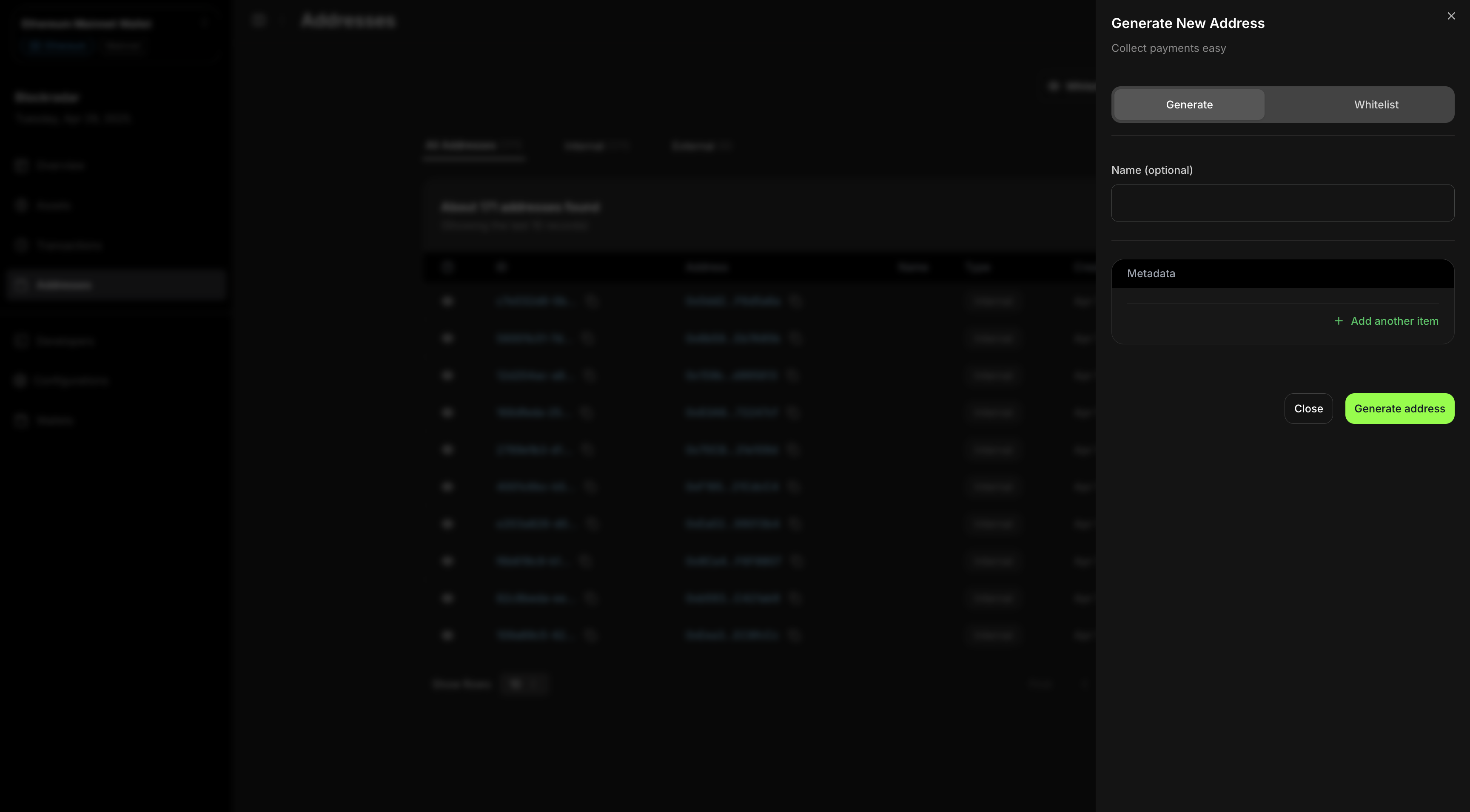 This screenshot demonstrates the process of generating a new address via the Blockradar dashboard. This method is ideal for manual address creation or for teams who prefer a graphical interface.
### 2. Using the API
For programmatic or automated address generation, you can use the **Create Dedicated Address API**.\
This is useful for integrating address creation into your own applications or backend systems.
To create a dedicated address for a customer, send a **`POST`** request to our [Create Dedicated Address API](/en/api-reference/addresses/generate-address).
```bash address.cmd theme={null}
curl --request POST \
--url https://api.blockradar.co/v1/wallets/{walletId}/addresses \
--header 'Content-Type: application/json' \
--header 'x-api-key: ' \
--data '{
"disableAutoSweep": "OPTIONAL_BOOLEAN",
"enableGaslessWithdraw": "OPTIONAL_BOOLEAN",
"metadata": "OPTIONAL_METADATA",
"name": "OPTIONAL_ADDRESS_NAME",
"showPrivateKey": "OPTIONAL_BOOLEAN"
}'
```
```js address.js theme={null}
const options = {
method: 'POST',
headers: {'x-api-key': '', 'Content-Type': 'application/json'},
body: '{"metadata":"OPTIONAL_METADATA","name":"OPTIONAL_ADDRESS_NAME"}'
};
fetch('https://api.blockradar.co/v1/wallets/{walletId}/addresses', options)
.then(response => response.json())
.then(response => console.log(response))
.catch(err => console.error(err));
```
```php address.php theme={null}
"https://api.blockradar.co/v1/wallets/{walletId}/addresses",
CURLOPT_RETURNTRANSFER => true,
CURLOPT_ENCODING => "",
CURLOPT_MAXREDIRS => 10,
CURLOPT_TIMEOUT => 30,
CURLOPT_HTTP_VERSION => CURL_HTTP_VERSION_1_1,
CURLOPT_CUSTOMREQUEST => "POST",
CURLOPT_POSTFIELDS => "{\n \"metadata\": \"OPTIONAL_METADATA\",\n \"name\": \"OPTIONAL_ADDRESS_NAME\"\n}",
CURLOPT_HTTPHEADER => [
"Content-Type: application/json",
"x-api-key: "
],
]);
$response = curl_exec($curl);
$err = curl_error($curl);
curl_close($curl);
if ($err) {
echo "cURL Error #:" . $err;
} else {
echo $response;
}
```
### Response
```json theme={null}
{
"data": {
"address": "0xe1037B45b48390285e5067424053fa35c478296b",
"blockchain": {
"createdAt": "2024-05-14T11:53:33.095Z",
"derivationPath": "m/44'/60'/0'/0",
"id": "85ffc132-3972-4c9e-99a5-5cf0ccb688bf",
"isActive": true,
"isEvmCompatible": true,
"logoUrl": "https://res.cloudinary.com/blockradar/image/upload/v1716800081/crypto-assets/ethereum-eth-logo_idraq2.png",
"name": "ethereum",
"slug": "ethereum",
"symbol": "eth",
"tokenStandard": "ERC20",
"updatedAt": "2024-06-14T22:32:11.983Z"
},
"configurations": {
"aml": {
"message": "Address is not sanctioned",
"provider": "ofac",
"status": "success"
},
"disableAutoSweep": false,
"enableGaslessWithdraw": false,
"showPrivateKey": false
},
"createdAt": "2024-10-23T11:13:40.446Z",
"derivationPath": "m/44'/60'/0'/0/87",
"id": "0a69c48a-6c6f-422c-bd6a-70de3306a3ac",
"isActive": true,
"metadata": {
"user_id": 1
},
"name": "Customer 1",
"network": "testnet",
"type": "INTERNAL",
"updatedAt": "2024-10-23T11:13:40.446Z"
},
"message": "Address generated successfully",
"statusCode": 200
}
```
## Address Issuing and Indexing
Blockradar separates two things that used to happen together when you create an address:
* **Issuing** an address is cheap. It derives a new address from your master wallet and stores it, so you can hand it to a customer right away.
* **Indexing** an address is the costly part. It places the address under on-chain monitoring so deposits are detected in real time, and indexing is what billing is based on.
This lets you issue an address per customer up front and turn on indexing only when a customer shows intent to deposit, so you only pay for the addresses you actually monitor.
### Two independent switches
Every address has two settings that control its state:
| Setting | Values | Controls |
| ---------------- | --------------------- | ------------------------------------------------------------------------------------- |
| `isActive` | `true` / `false` | The hard on/off switch. `false` disables the address entirely. |
| `indexingStatus` | `ACTIVE` / `INACTIVE` | The monitoring and billing switch. `INACTIVE` means dormant: not watched, not billed. |
An address is watched on-chain and counted for billing **only when both are on**: `isActive: true` and `indexingStatus: ACTIVE`.
Existing addresses are unaffected. `indexingStatus` defaults to `ACTIVE`, so every address you already created, and every address you create without opting in, behaves exactly as before.
### Issue a dormant address
When generating an address, pass `enableIndexing: false` to create a dormant address that is not watched and not billed. Omit the field or pass `true` for the default behavior (indexed immediately). A dormant address returns `"indexingStatus": "INACTIVE"` in the response.
```bash address.cmd theme={null}
curl --request POST \
--url https://api.blockradar.co/v1/wallets/{walletId}/addresses \
--header 'Content-Type: application/json' \
--header 'x-api-key: ' \
--data '{
"name": "Customer 123",
"metadata": { "customerId": "123" },
"enableIndexing": false
}'
```
```js address.js theme={null}
const options = {
method: 'POST',
headers: {'x-api-key': '', 'Content-Type': 'application/json'},
body: '{"name":"Customer 123","metadata":{"customerId":"123"},"enableIndexing":false}'
};
fetch('https://api.blockradar.co/v1/wallets/{walletId}/addresses', options)
.then(response => response.json())
.then(response => console.log(response))
.catch(err => console.error(err));
```
```php address.php theme={null}
"https://api.blockradar.co/v1/wallets/{walletId}/addresses",
CURLOPT_RETURNTRANSFER => true,
CURLOPT_CUSTOMREQUEST => "POST",
CURLOPT_POSTFIELDS => "{\n \"name\": \"Customer 123\",\n \"metadata\": { \"customerId\": \"123\" },\n \"enableIndexing\": false\n}",
CURLOPT_HTTPHEADER => [
"Content-Type: application/json",
"x-api-key: "
],
]);
$response = curl_exec($curl);
curl_close($curl);
echo $response;
```
### Enable indexing
Enable indexing when the customer shows intent to deposit. This subscribes the address, starts real-time monitoring, and includes it in billing. The call takes no body and is idempotent (a no-op if indexing is already on). The `addressId` path parameter accepts either the address UUID or the on-chain address string.
The response shows `"indexingStatus": "ACTIVE"`. It returns `400` if the address has been deactivated (`isActive: false`).
```bash indexing.cmd theme={null}
curl --request POST \
--url https://api.blockradar.co/v1/wallets/{walletId}/addresses/{addressId}/indexing/enable \
--header 'x-api-key: '
```
```js indexing.js theme={null}
const options = {
method: 'POST',
headers: {'x-api-key': ''}
};
fetch('https://api.blockradar.co/v1/wallets/{walletId}/addresses/{addressId}/indexing/enable', options)
.then(response => response.json())
.then(response => console.log(response))
.catch(err => console.error(err));
```
```php indexing.php theme={null}
"https://api.blockradar.co/v1/wallets/{walletId}/addresses/{addressId}/indexing/enable",
CURLOPT_RETURNTRANSFER => true,
CURLOPT_CUSTOMREQUEST => "POST",
CURLOPT_HTTPHEADER => ["x-api-key: "],
]);
$response = curl_exec($curl);
curl_close($curl);
echo $response;
```
### Disable indexing
Disable indexing for churned or inactive customers to stop billing for addresses you no longer watch. This stops monitoring and removes the address from billing on the next cycle. The call takes no body and is idempotent. Funds already received remain safe on-chain, and you can re-enable indexing later at no extra cost beyond normal billing. The response shows `"indexingStatus": "INACTIVE"`.
```bash indexing.cmd theme={null}
curl --request POST \
--url https://api.blockradar.co/v1/wallets/{walletId}/addresses/{addressId}/indexing/disable \
--header 'x-api-key: '
```
```js indexing.js theme={null}
const options = {
method: 'POST',
headers: {'x-api-key': ''}
};
fetch('https://api.blockradar.co/v1/wallets/{walletId}/addresses/{addressId}/indexing/disable', options)
.then(response => response.json())
.then(response => console.log(response))
.catch(err => console.error(err));
```
```php indexing.php theme={null}
"https://api.blockradar.co/v1/wallets/{walletId}/addresses/{addressId}/indexing/disable",
CURLOPT_RETURNTRANSFER => true,
CURLOPT_CUSTOMREQUEST => "POST",
CURLOPT_HTTPHEADER => ["x-api-key: "],
]);
$response = curl_exec($curl);
curl_close($curl);
echo $response;
```
### Billing
Address billing is a live count taken at each renewal, not a per-address charge. Each cycle, Blockradar counts the addresses that are active and indexed on mainnet and charges for usage above your plan limit.
| Address state | Counted for billing | Watched on-chain |
| ------------------------------------ | --------------------------- | ---------------- |
| Dormant (`indexingStatus: INACTIVE`) | No — free | No |
| Indexed (`indexingStatus: ACTIVE`) | Yes | Yes |
| Disabled mid-cycle | Drops out on the next count | No |
Generating dormant addresses bills nothing, and disabling indexing reclaims that slot on the next cycle.
### Best practices
* Issue a dormant address when you assign it to a customer. It costs nothing.
* Enable indexing when the customer shows intent to deposit (KYC passed, checkout opened, deposit screen viewed).
* Always enable indexing before sharing an address for a real deposit, so the deposit is detected in real time.
* Disable indexing for churned or inactive customers, then re-enable later when needed.
Deposits made to a dormant address are not detected in real time. If a customer deposits to an address before indexing is enabled, the funds are safe on-chain but are not picked up automatically. Enable indexing and trigger the [Deposit Finder](/en/essentials/wallets#deposit-finder) to recover them. Always enable indexing before sharing an address to avoid this.
## Address Whitelisting
This feature allows you to whitelist an external address to be monitored based on the wallet's requirements.
Already have wallets issued by another provider? You can still plug them into Blockradar and monitor deposits without changing your existing setup.
### **Body Parameters**
| Key | Required | Type | Description |
| ----------------------- | -------- | ------- | --------------------------------------------------------------------------------------- |
| `name` | false | string | The name of the address. |
| `address` | true | string | The wallet address. |
| `metadata` | false | object | Additional metadata for the address. This will be part of any transaction tied to this. |
| `showPrivateKey` | false | boolean | If you want the address private key to be part of the response. |
| `disableAutoSweep` | false | boolean | Disable automatic sweeping of assets sent to the address into your master wallet. |
| `enableGaslessWithdraw` | false | boolean | Enable gasless transactions from this address. |
| `privateKey` | false | string | The private key associated with the address. Required for executing actions securely. |
```bash address.cmd theme={null}
curl --request POST \
--url https://api.blockradar.co/v1/wallets/{walletId}/addresses/whitelist \
--header 'Content-Type: application/json' \
--header 'x-api-key: ' \
--data '{
"address": "0x742d35Cc6634C0532925a3b8D4C9db96C4b4d8b6",
"name": "Whitelisted Address",
"metadata": {"purpose": "external_monitoring", "source": "manual"},
"showPrivateKey": false,
"disableAutoSweep": false,
"enableGaslessWithdraw": true,
"privateKey": "0x1234567890abcdef..."
}'
```
```js address.js theme={null}
const options = {
method: 'POST',
headers: {'x-api-key': '', 'Content-Type': 'application/json'},
body: '{"address":"ADDRESS_TO_WHITELIST","metadata":"OPTIONAL_METADATA","name":"OPTIONAL_ADDRESS_NAME"}'
};
fetch('https://api.blockradar.co/v1/wallets/{walletId}/addresses/whitelist', options)
.then(response => response.json())
.then(response => console.log(response))
.catch(err => console.error(err));
```
```php address.php theme={null}
"https://api.blockradar.co/v1/wallets/{walletId}/addresses/whitelist",
CURLOPT_RETURNTRANSFER => true,
CURLOPT_ENCODING => "",
CURLOPT_MAXREDIRS => 10,
CURLOPT_TIMEOUT => 30,
CURLOPT_HTTP_VERSION => CURL_HTTP_VERSION_1_1,
CURLOPT_CUSTOMREQUEST => "POST",
CURLOPT_POSTFIELDS => "{\n \"address\": \"ADDRESS_TO_WHITELIST\",\n \"metadata\": \"OPTIONAL_METADATA\",\n \"name\": \"OPTIONAL_ADDRESS_NAME\"\n}",
CURLOPT_HTTPHEADER => [
"Content-Type: application/json",
"x-api-key":
],
]);
$response = curl_exec($curl);
$err = curl_error($curl);
curl_close($curl);
if ($err) {
echo "cURL Error #:" . $err;
} else {
echo $response;
}
```
### Response
```json theme={null}
{
"data": {
"address": "0x3375154fa32Cb434B044E73a2582C4D2E6518AE4",
"blockchain": {
"createdAt": "2024-05-27T08:31:14.966Z",
"derivationPath": "m/44'/60'/0'/0",
"id": "74733889-4ecd-403e-9840-94e87c043f24",
"isActive": true,
"isEvmCompatible": true,
"logoUrl": "https://res.cloudinary.com/blockradar/image/upload/v1716800080/crypto-assets/Base_Network_Logo_vqyh7r.png",
"name": "base",
"slug": "base",
"symbol": "eth",
"tokenStandard": null,
"updatedAt": "2024-10-27T07:52:16.115Z"
},
"configurations": {
"aml": {
"message": "Address is not sanctioned",
"provider": "ofac",
"status": "success"
}
},
"createdAt": "2024-11-11T16:57:19.160Z",
"derivationPath": null,
"id": "b87901a2-45c1-4d2d-8ee7-205ef0c4ddf1",
"isActive": true,
"metadata": null,
"name": "External address",
"network": "testnet",
"type": "EXTERNAL",
"updatedAt": "2024-11-11T16:57:19.160Z"
},
"message": "Address whitelisted successfully",
"statusCode": 200
}
```
## Testing
Addresses generated via a testnet master wallet can only receive assets on the testnet.
Here is a list of places where you can get testnet assets to test with:
* **Ethereum** - Get test USDC here: [Circle](https://faucet.circle.com/)
* **Binance Smart Chain** - Get test USDT here: [Binance](https://www.bnbchain.org/en/testnet-faucet)
* **Polygon** - Get test USDC here: [Circle](https://faucet.circle.com/)
* **Base** - Get test USDC here: [Circle](https://faucet.circle.com/)
* **Tron** - Get test USDT here: [Nileex](https://nileex.io/join/getJoinPage)
* **Solana** - Get test USDC here: [Circle](https://faucet.circle.com)
* **Optimism** - Get test USDC here: [Circle](https://faucet.circle.com)
* **Arbitrum** - Get test USDC here: [Circle](https://faucet.circle.com)
* **Celo** - Get test USDC here: [Circle](https://faucet.circle.com)
This screenshot demonstrates the process of generating a new address via the Blockradar dashboard. This method is ideal for manual address creation or for teams who prefer a graphical interface.
### 2. Using the API
For programmatic or automated address generation, you can use the **Create Dedicated Address API**.\
This is useful for integrating address creation into your own applications or backend systems.
To create a dedicated address for a customer, send a **`POST`** request to our [Create Dedicated Address API](/en/api-reference/addresses/generate-address).
```bash address.cmd theme={null}
curl --request POST \
--url https://api.blockradar.co/v1/wallets/{walletId}/addresses \
--header 'Content-Type: application/json' \
--header 'x-api-key: ' \
--data '{
"disableAutoSweep": "OPTIONAL_BOOLEAN",
"enableGaslessWithdraw": "OPTIONAL_BOOLEAN",
"metadata": "OPTIONAL_METADATA",
"name": "OPTIONAL_ADDRESS_NAME",
"showPrivateKey": "OPTIONAL_BOOLEAN"
}'
```
```js address.js theme={null}
const options = {
method: 'POST',
headers: {'x-api-key': '', 'Content-Type': 'application/json'},
body: '{"metadata":"OPTIONAL_METADATA","name":"OPTIONAL_ADDRESS_NAME"}'
};
fetch('https://api.blockradar.co/v1/wallets/{walletId}/addresses', options)
.then(response => response.json())
.then(response => console.log(response))
.catch(err => console.error(err));
```
```php address.php theme={null}
"https://api.blockradar.co/v1/wallets/{walletId}/addresses",
CURLOPT_RETURNTRANSFER => true,
CURLOPT_ENCODING => "",
CURLOPT_MAXREDIRS => 10,
CURLOPT_TIMEOUT => 30,
CURLOPT_HTTP_VERSION => CURL_HTTP_VERSION_1_1,
CURLOPT_CUSTOMREQUEST => "POST",
CURLOPT_POSTFIELDS => "{\n \"metadata\": \"OPTIONAL_METADATA\",\n \"name\": \"OPTIONAL_ADDRESS_NAME\"\n}",
CURLOPT_HTTPHEADER => [
"Content-Type: application/json",
"x-api-key: "
],
]);
$response = curl_exec($curl);
$err = curl_error($curl);
curl_close($curl);
if ($err) {
echo "cURL Error #:" . $err;
} else {
echo $response;
}
```
### Response
```json theme={null}
{
"data": {
"address": "0xe1037B45b48390285e5067424053fa35c478296b",
"blockchain": {
"createdAt": "2024-05-14T11:53:33.095Z",
"derivationPath": "m/44'/60'/0'/0",
"id": "85ffc132-3972-4c9e-99a5-5cf0ccb688bf",
"isActive": true,
"isEvmCompatible": true,
"logoUrl": "https://res.cloudinary.com/blockradar/image/upload/v1716800081/crypto-assets/ethereum-eth-logo_idraq2.png",
"name": "ethereum",
"slug": "ethereum",
"symbol": "eth",
"tokenStandard": "ERC20",
"updatedAt": "2024-06-14T22:32:11.983Z"
},
"configurations": {
"aml": {
"message": "Address is not sanctioned",
"provider": "ofac",
"status": "success"
},
"disableAutoSweep": false,
"enableGaslessWithdraw": false,
"showPrivateKey": false
},
"createdAt": "2024-10-23T11:13:40.446Z",
"derivationPath": "m/44'/60'/0'/0/87",
"id": "0a69c48a-6c6f-422c-bd6a-70de3306a3ac",
"isActive": true,
"metadata": {
"user_id": 1
},
"name": "Customer 1",
"network": "testnet",
"type": "INTERNAL",
"updatedAt": "2024-10-23T11:13:40.446Z"
},
"message": "Address generated successfully",
"statusCode": 200
}
```
## Address Issuing and Indexing
Blockradar separates two things that used to happen together when you create an address:
* **Issuing** an address is cheap. It derives a new address from your master wallet and stores it, so you can hand it to a customer right away.
* **Indexing** an address is the costly part. It places the address under on-chain monitoring so deposits are detected in real time, and indexing is what billing is based on.
This lets you issue an address per customer up front and turn on indexing only when a customer shows intent to deposit, so you only pay for the addresses you actually monitor.
### Two independent switches
Every address has two settings that control its state:
| Setting | Values | Controls |
| ---------------- | --------------------- | ------------------------------------------------------------------------------------- |
| `isActive` | `true` / `false` | The hard on/off switch. `false` disables the address entirely. |
| `indexingStatus` | `ACTIVE` / `INACTIVE` | The monitoring and billing switch. `INACTIVE` means dormant: not watched, not billed. |
An address is watched on-chain and counted for billing **only when both are on**: `isActive: true` and `indexingStatus: ACTIVE`.
Existing addresses are unaffected. `indexingStatus` defaults to `ACTIVE`, so every address you already created, and every address you create without opting in, behaves exactly as before.
### Issue a dormant address
When generating an address, pass `enableIndexing: false` to create a dormant address that is not watched and not billed. Omit the field or pass `true` for the default behavior (indexed immediately). A dormant address returns `"indexingStatus": "INACTIVE"` in the response.
```bash address.cmd theme={null}
curl --request POST \
--url https://api.blockradar.co/v1/wallets/{walletId}/addresses \
--header 'Content-Type: application/json' \
--header 'x-api-key: ' \
--data '{
"name": "Customer 123",
"metadata": { "customerId": "123" },
"enableIndexing": false
}'
```
```js address.js theme={null}
const options = {
method: 'POST',
headers: {'x-api-key': '', 'Content-Type': 'application/json'},
body: '{"name":"Customer 123","metadata":{"customerId":"123"},"enableIndexing":false}'
};
fetch('https://api.blockradar.co/v1/wallets/{walletId}/addresses', options)
.then(response => response.json())
.then(response => console.log(response))
.catch(err => console.error(err));
```
```php address.php theme={null}
"https://api.blockradar.co/v1/wallets/{walletId}/addresses",
CURLOPT_RETURNTRANSFER => true,
CURLOPT_CUSTOMREQUEST => "POST",
CURLOPT_POSTFIELDS => "{\n \"name\": \"Customer 123\",\n \"metadata\": { \"customerId\": \"123\" },\n \"enableIndexing\": false\n}",
CURLOPT_HTTPHEADER => [
"Content-Type: application/json",
"x-api-key: "
],
]);
$response = curl_exec($curl);
curl_close($curl);
echo $response;
```
### Enable indexing
Enable indexing when the customer shows intent to deposit. This subscribes the address, starts real-time monitoring, and includes it in billing. The call takes no body and is idempotent (a no-op if indexing is already on). The `addressId` path parameter accepts either the address UUID or the on-chain address string.
The response shows `"indexingStatus": "ACTIVE"`. It returns `400` if the address has been deactivated (`isActive: false`).
```bash indexing.cmd theme={null}
curl --request POST \
--url https://api.blockradar.co/v1/wallets/{walletId}/addresses/{addressId}/indexing/enable \
--header 'x-api-key: '
```
```js indexing.js theme={null}
const options = {
method: 'POST',
headers: {'x-api-key': ''}
};
fetch('https://api.blockradar.co/v1/wallets/{walletId}/addresses/{addressId}/indexing/enable', options)
.then(response => response.json())
.then(response => console.log(response))
.catch(err => console.error(err));
```
```php indexing.php theme={null}
"https://api.blockradar.co/v1/wallets/{walletId}/addresses/{addressId}/indexing/enable",
CURLOPT_RETURNTRANSFER => true,
CURLOPT_CUSTOMREQUEST => "POST",
CURLOPT_HTTPHEADER => ["x-api-key: "],
]);
$response = curl_exec($curl);
curl_close($curl);
echo $response;
```
### Disable indexing
Disable indexing for churned or inactive customers to stop billing for addresses you no longer watch. This stops monitoring and removes the address from billing on the next cycle. The call takes no body and is idempotent. Funds already received remain safe on-chain, and you can re-enable indexing later at no extra cost beyond normal billing. The response shows `"indexingStatus": "INACTIVE"`.
```bash indexing.cmd theme={null}
curl --request POST \
--url https://api.blockradar.co/v1/wallets/{walletId}/addresses/{addressId}/indexing/disable \
--header 'x-api-key: '
```
```js indexing.js theme={null}
const options = {
method: 'POST',
headers: {'x-api-key': ''}
};
fetch('https://api.blockradar.co/v1/wallets/{walletId}/addresses/{addressId}/indexing/disable', options)
.then(response => response.json())
.then(response => console.log(response))
.catch(err => console.error(err));
```
```php indexing.php theme={null}
"https://api.blockradar.co/v1/wallets/{walletId}/addresses/{addressId}/indexing/disable",
CURLOPT_RETURNTRANSFER => true,
CURLOPT_CUSTOMREQUEST => "POST",
CURLOPT_HTTPHEADER => ["x-api-key: "],
]);
$response = curl_exec($curl);
curl_close($curl);
echo $response;
```
### Billing
Address billing is a live count taken at each renewal, not a per-address charge. Each cycle, Blockradar counts the addresses that are active and indexed on mainnet and charges for usage above your plan limit.
| Address state | Counted for billing | Watched on-chain |
| ------------------------------------ | --------------------------- | ---------------- |
| Dormant (`indexingStatus: INACTIVE`) | No — free | No |
| Indexed (`indexingStatus: ACTIVE`) | Yes | Yes |
| Disabled mid-cycle | Drops out on the next count | No |
Generating dormant addresses bills nothing, and disabling indexing reclaims that slot on the next cycle.
### Best practices
* Issue a dormant address when you assign it to a customer. It costs nothing.
* Enable indexing when the customer shows intent to deposit (KYC passed, checkout opened, deposit screen viewed).
* Always enable indexing before sharing an address for a real deposit, so the deposit is detected in real time.
* Disable indexing for churned or inactive customers, then re-enable later when needed.
Deposits made to a dormant address are not detected in real time. If a customer deposits to an address before indexing is enabled, the funds are safe on-chain but are not picked up automatically. Enable indexing and trigger the [Deposit Finder](/en/essentials/wallets#deposit-finder) to recover them. Always enable indexing before sharing an address to avoid this.
## Address Whitelisting
This feature allows you to whitelist an external address to be monitored based on the wallet's requirements.
Already have wallets issued by another provider? You can still plug them into Blockradar and monitor deposits without changing your existing setup.
### **Body Parameters**
| Key | Required | Type | Description |
| ----------------------- | -------- | ------- | --------------------------------------------------------------------------------------- |
| `name` | false | string | The name of the address. |
| `address` | true | string | The wallet address. |
| `metadata` | false | object | Additional metadata for the address. This will be part of any transaction tied to this. |
| `showPrivateKey` | false | boolean | If you want the address private key to be part of the response. |
| `disableAutoSweep` | false | boolean | Disable automatic sweeping of assets sent to the address into your master wallet. |
| `enableGaslessWithdraw` | false | boolean | Enable gasless transactions from this address. |
| `privateKey` | false | string | The private key associated with the address. Required for executing actions securely. |
```bash address.cmd theme={null}
curl --request POST \
--url https://api.blockradar.co/v1/wallets/{walletId}/addresses/whitelist \
--header 'Content-Type: application/json' \
--header 'x-api-key: ' \
--data '{
"address": "0x742d35Cc6634C0532925a3b8D4C9db96C4b4d8b6",
"name": "Whitelisted Address",
"metadata": {"purpose": "external_monitoring", "source": "manual"},
"showPrivateKey": false,
"disableAutoSweep": false,
"enableGaslessWithdraw": true,
"privateKey": "0x1234567890abcdef..."
}'
```
```js address.js theme={null}
const options = {
method: 'POST',
headers: {'x-api-key': '', 'Content-Type': 'application/json'},
body: '{"address":"ADDRESS_TO_WHITELIST","metadata":"OPTIONAL_METADATA","name":"OPTIONAL_ADDRESS_NAME"}'
};
fetch('https://api.blockradar.co/v1/wallets/{walletId}/addresses/whitelist', options)
.then(response => response.json())
.then(response => console.log(response))
.catch(err => console.error(err));
```
```php address.php theme={null}
"https://api.blockradar.co/v1/wallets/{walletId}/addresses/whitelist",
CURLOPT_RETURNTRANSFER => true,
CURLOPT_ENCODING => "",
CURLOPT_MAXREDIRS => 10,
CURLOPT_TIMEOUT => 30,
CURLOPT_HTTP_VERSION => CURL_HTTP_VERSION_1_1,
CURLOPT_CUSTOMREQUEST => "POST",
CURLOPT_POSTFIELDS => "{\n \"address\": \"ADDRESS_TO_WHITELIST\",\n \"metadata\": \"OPTIONAL_METADATA\",\n \"name\": \"OPTIONAL_ADDRESS_NAME\"\n}",
CURLOPT_HTTPHEADER => [
"Content-Type: application/json",
"x-api-key":
],
]);
$response = curl_exec($curl);
$err = curl_error($curl);
curl_close($curl);
if ($err) {
echo "cURL Error #:" . $err;
} else {
echo $response;
}
```
### Response
```json theme={null}
{
"data": {
"address": "0x3375154fa32Cb434B044E73a2582C4D2E6518AE4",
"blockchain": {
"createdAt": "2024-05-27T08:31:14.966Z",
"derivationPath": "m/44'/60'/0'/0",
"id": "74733889-4ecd-403e-9840-94e87c043f24",
"isActive": true,
"isEvmCompatible": true,
"logoUrl": "https://res.cloudinary.com/blockradar/image/upload/v1716800080/crypto-assets/Base_Network_Logo_vqyh7r.png",
"name": "base",
"slug": "base",
"symbol": "eth",
"tokenStandard": null,
"updatedAt": "2024-10-27T07:52:16.115Z"
},
"configurations": {
"aml": {
"message": "Address is not sanctioned",
"provider": "ofac",
"status": "success"
}
},
"createdAt": "2024-11-11T16:57:19.160Z",
"derivationPath": null,
"id": "b87901a2-45c1-4d2d-8ee7-205ef0c4ddf1",
"isActive": true,
"metadata": null,
"name": "External address",
"network": "testnet",
"type": "EXTERNAL",
"updatedAt": "2024-11-11T16:57:19.160Z"
},
"message": "Address whitelisted successfully",
"statusCode": 200
}
```
## Testing
Addresses generated via a testnet master wallet can only receive assets on the testnet.
Here is a list of places where you can get testnet assets to test with:
* **Ethereum** - Get test USDC here: [Circle](https://faucet.circle.com/)
* **Binance Smart Chain** - Get test USDT here: [Binance](https://www.bnbchain.org/en/testnet-faucet)
* **Polygon** - Get test USDC here: [Circle](https://faucet.circle.com/)
* **Base** - Get test USDC here: [Circle](https://faucet.circle.com/)
* **Tron** - Get test USDT here: [Nileex](https://nileex.io/join/getJoinPage)
* **Solana** - Get test USDC here: [Circle](https://faucet.circle.com)
* **Optimism** - Get test USDC here: [Circle](https://faucet.circle.com)
* **Arbitrum** - Get test USDC here: [Circle](https://faucet.circle.com)
* **Celo** - Get test USDC here: [Circle](https://faucet.circle.com)
Happy hacking! 💚